
CTA Performance Metrics That Actually Matter
Cut through the noise around CTA performance metrics. Learn which numbers predict revenue, how to track them across channels, and what to optimize first.
Grow your LinkedIn to the next level.
Use ViralBrain to analyze top creators and create posts that perform.
Try ViralBrain freeMost advice about CTA performance starts with the button. Change the color. Shorten the copy. Add urgency. Then someone celebrates a higher click through rate while qualified pipeline stays flat.
That's backwards. CTA performance metrics should track intent through the funnel, from exposure to click, from click to meaningful action, then from action to revenue. A click matters, but it's only evidence that someone moved one step. It doesn't prove they wanted the offer, understood it, or had any chance of buying.
The practical standard is simple. Keep CTR for creative diagnosis, but connect it to conversion quality, cost, and pipeline. A dashboard that reports clicks without downstream outcomes is just a nicely formatted way to avoid bad news.
Why CTR Alone Is a Trap
A high CTR can mean your CTA earned attention. It can also mean your wording attracted the wrong people.
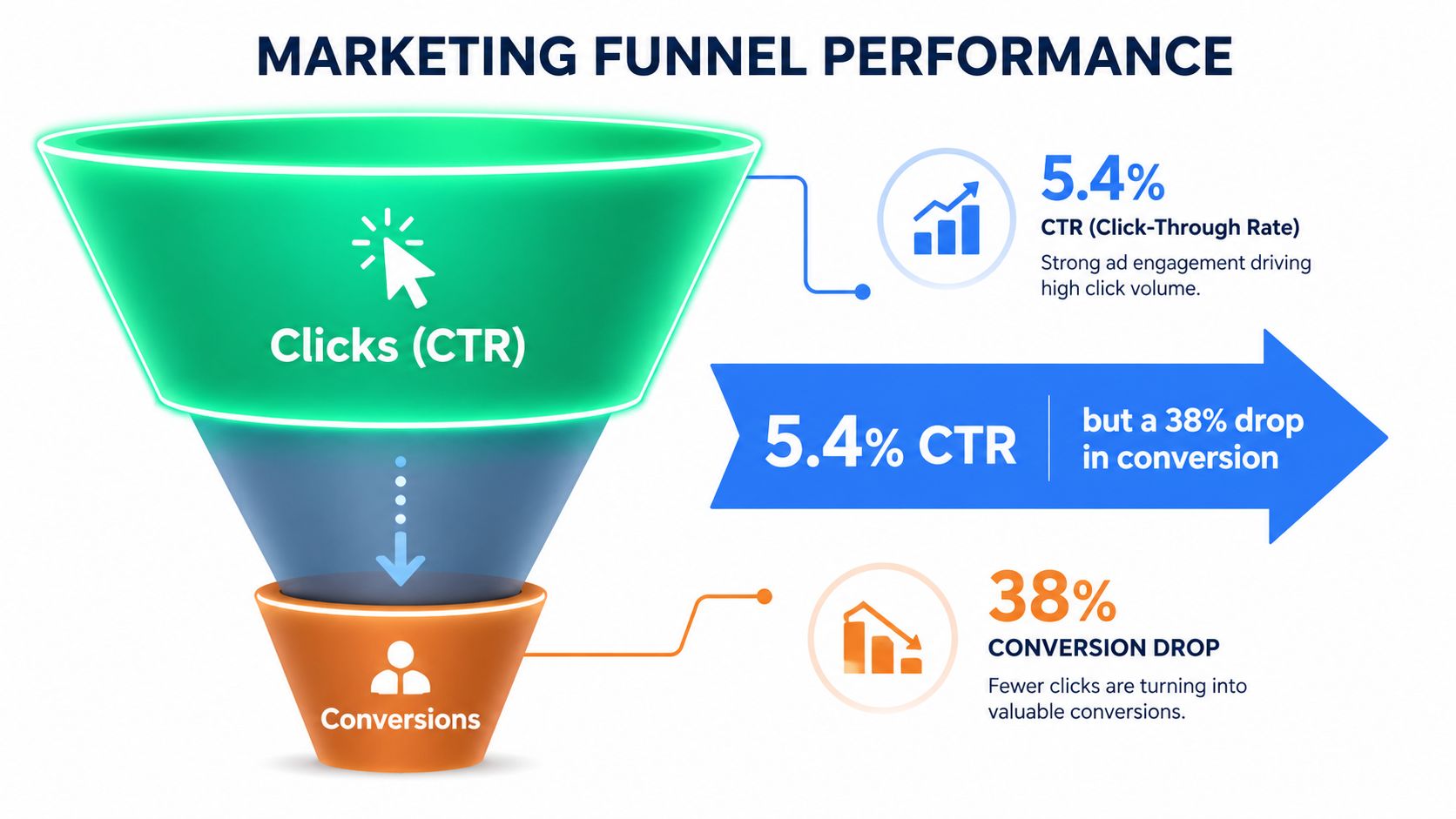
Consider a blog CTA that lifted CTR from 2.1% to 5.4%, while lead to customer conversion dropped 38%. The new copy created curiosity, but it pulled in job seekers and students instead of buyers. The upstream metric improved because the traffic mix changed. Revenue did not get the same memo.
Click through rate measures attention, not buying intent. It's calculated as clicks divided by impressions, multiplied by 100. That makes it useful for comparing hooks, buttons, and ad copy, but weak as a standalone business outcome. MetricHQ's explanation of CTR also shows why channel context matters. B2B email CTR is often benchmarked around 2% to 5%, display advertising around 0.1% to 0.5%, and paid search around 2% to 10% or higher, depending on the campaign.
The measurement trap
When a team optimizes for clicks alone, it often makes the promise broader, louder, or more mysterious. That can increase traffic while lowering the proportion of visitors who fit the offer. The marketing report looks healthier. Sales receives more noise.
The same problem appears on LinkedIn. Independent benchmarks place sponsored content CTR around 0.44% to 0.65%, with some B2B campaign averages at 0.89% and engagement campaigns as low as 0.18%, according to LinkedIn benchmark data from Cleverly. A small rate can still produce useful B2B leads, while a higher rate can produce people who never intended to speak with sales.
Practical rule: Treat CTR as a diagnostic signal. Treat qualified conversion as the score.
CTR still earns a place in the stack. If downstream tracking is broken, it can help compare ad creative and identify weak messaging. But once tracking works, the question changes from “Did people click?” to “What did the click produce?”
The Core CTA Performance Metrics
A useful CTA dashboard follows the visitor in order. Start with exposure, then measure the click, the post click experience, the conversion, and the commercial result. This prevents teams from comparing disconnected numbers that answer different questions.
From exposure to action
Click through rate, or CTR, equals clicks divided by impressions, multiplied by 100. It tells you whether the CTA earns a response from the people who saw it. It's a leading metric, so it's useful for creative diagnosis.
Click rate uses sessions or views as the denominator rather than ad impressions. A simple version is CTA clicks divided by CTA views, multiplied by 100. This helps on a page where you know the CTA was rendered, while CTR is more common for ads and email sends.
Conversion rate equals conversions divided by total CTA clickers, multiplied by 100. It answers a different question from CTR. A CTA can attract clicks while the page, form, or offer fails to close the action, a distinction described in Zowie's CTA conversion rate glossary.
Micro conversions are smaller actions that show movement without proving purchase intent. Examples include reaching a chosen scroll depth, playing a video, viewing a pricing page, or starting a form. Track them as signals, not as substitutes for revenue.
Cost and quality
Cost per click, or CPC, equals spend divided by clicks. It tells you what you paid to generate traffic. Cost per acquisition, or CPA, equals spend divided by completed acquisitions. CPA is a lagging metric and is usually more defensible with leadership because it connects cost to an outcome.
Bounce rate after click measures the share of visitors who leave without a meaningful second interaction, based on your analytics definition. Engagement time on the destination shows how long visitors remain active after the click. Neither proves intent alone, but both can expose a mismatch between CTA promise and landing page.
Assisted conversions count conversions where the CTA influenced the journey without receiving the final click. They matter because last click tends to favor the final bottom funnel action and hide earlier content that created demand.
| Metric | Formula | What It Actually Tells You |
|---|---|---|
| CTR | Clicks ÷ impressions × 100 | Whether the CTA earns attention |
| Click rate | CTA clicks ÷ CTA views × 100 | Whether exposed page visitors interact |
| Conversion rate | Conversions ÷ CTA clickers × 100 | Whether clicks become the intended action |
| Micro conversion rate | Micro actions ÷ exposed visitors × 100 | Whether visitors show intermediate intent |
| CPC | Spend ÷ clicks | Cost of generating a click |
| CPA | Spend ÷ acquisitions | Cost of generating the target outcome |
| Bounce rate after click | Single interaction visits ÷ destination visits × 100 | Whether the click led to meaningful activity |
| Engagement time | Active time on destination | Whether visitors consume the promised experience |
| Assisted conversions | Conversions with an earlier CTA touch | Whether the CTA helped without closing last |
For a small marketing team, defend conversion rate, cost per qualified meeting, and qualified click ratio. They're harder to inflate than impressions or raw clicks. Leadership doesn't need a twelve touch attribution model to spot a CTA that attracts traffic but produces no useful sales conversations.
Benchmarks by Channel and Format
A channel benchmark is useful only when the denominator matches the job. LinkedIn sponsored content creates a demand signal, while a landing page button asks an already interested visitor to act. Their click rates belong in separate comparisons, or a dashboard can reward cheap attention over pipeline quality.
B2B email CTR commonly falls around 2% to 5%, display advertising around 0.1% to 0.5%, and paid search around 2% to 10% or higher, according to the MetricHQ CTR benchmarks. Use these ranges as sanity checks rather than targets. Paid search usually captures more active intent than a display impression, so an equal CTR does not imply equal sales value.
| Channel | Typical CTR | Typical Conversion Rate | Watch Out For |
|---|---|---|---|
| LinkedIn sponsored content | About 0.44% to 0.65% | Varies by offer and audience | Low volume can hide lead quality |
| LinkedIn organic posts | Highly variable | Track the next action | Follower mix skews every ratio |
| B2B email CTAs | Often 2% to 5% | Depends on form or booking friction | Opens and clicks may not equal intent |
| Blog in text CTAs | Varies by topic and placement | Compare qualified leads, not clicks | Informational readers may not buy |
| Landing page primary buttons | No universal benchmark | Use completed form or booking | A low rate signals serious page friction |
| Paid search | Often 2% to 10% or higher | Depends on query and landing page | Broad terms can bring weak traffic |
A 1.2% CTR on LinkedIn sponsored content may be healthy when the audience and offer fit. The same 1.2% click rate on a landing page primary button deserves investigation because visitors have already reached a page built around that action. The denominator changes the diagnosis, and the post-click conversion rate decides whether the traffic was worth buying.
Email needs the same quality check. ActiveCampaign's email benchmark discussion explains that a healthy rate depends on the intended action, such as a reply, link click, booking, or purchase. A click that never reaches a qualified conversation should not receive the same weight as a booking.
Display results can look stronger after accidental clicks or loose click definitions inflate the top of the funnel. Organic LinkedIn results also vary sharply by audience composition. A founder speaking to a narrow, relevant network does not share a denominator with a broad company page.
Report each channel against its recent baseline, then compare qualified click ratio, conversion rate, and pipeline contribution. A higher CTR is a warning to inspect intent when qualified outcomes fall.
Tracking CTAs Across LinkedIn, Email, and Landing Pages
Tracking fails when teams force every channel into one event definition. LinkedIn, email, and landing pages produce different actions, so each needs a clear taxonomy before the dashboard gets built.
LinkedIn event design
For LinkedIn Sponsored Content and Single Image Ads, give every CTA variant its own UTM content value. A practical structure is utm_source=linkedin, utm_medium=paid, a campaign value, and utm_content=cta_button_v1. Pass the click identifier into a hidden form field, then stitch the lead to the CRM record in HubSpot or Salesforce.
LinkedIn defines post CTR as clicks divided by impressions, while engagement rate uses interactions divided by impressions. Its page analytics includes reactions, comments, shares, clicks, and follows, so a busy post may still send little traffic. LinkedIn's measurement guidance makes that distinction useful when reporting to people who confuse likes with pipeline.
Email and landing page events
In email, track the HTML click event in the email platform. Send server side Message Opened and Clicked events through the ESP webhook when available, so delivery or client behavior doesn't look like a CTA failure.
On the landing page, send page_view to GA4 before the click. Fire a click event keyed to button_text, then send generate_lead only after the form submits. Keep the events separate. A button click is not a lead.
Teams trying to connect email and web journeys should document how identifiers move between the ESP, analytics platform, and CRM. That documentation prevents a campaign from looking profitable because the systems disagree about who converted. You can find a related implementation example in LinkedIn conversion tracking.
| Channel | Event Name | Trigger Point | Where It Lands |
|---|---|---|---|
| CTA variant click | Ad link click | LinkedIn, analytics, CRM | |
| HTML click | Tracked email link click | ESP and analytics | |
| Message Opened | Server side webhook event | ESP and customer record | |
| Landing page | page_view | Page load | GA4 |
| Landing page | CTA click | Button interaction | GA4 |
| Landing page | generate_lead | Successful form submit | GA4 and CRM |
Three errors show up repeatedly. Teams count soft mobile taps as conversions, let pixels fire twice, or forget to suppress internal traffic. Standardize page_view, cta_click, generate_lead, Message Opened, and Clicked across the team. Then define the trigger for each event in writing.
Attribution and Click Quality
Attribution is where honest CTA reporting often dies. Teams celebrate click volume first, then discover that the visitors had short sessions, shallow page activity, and no return visit.
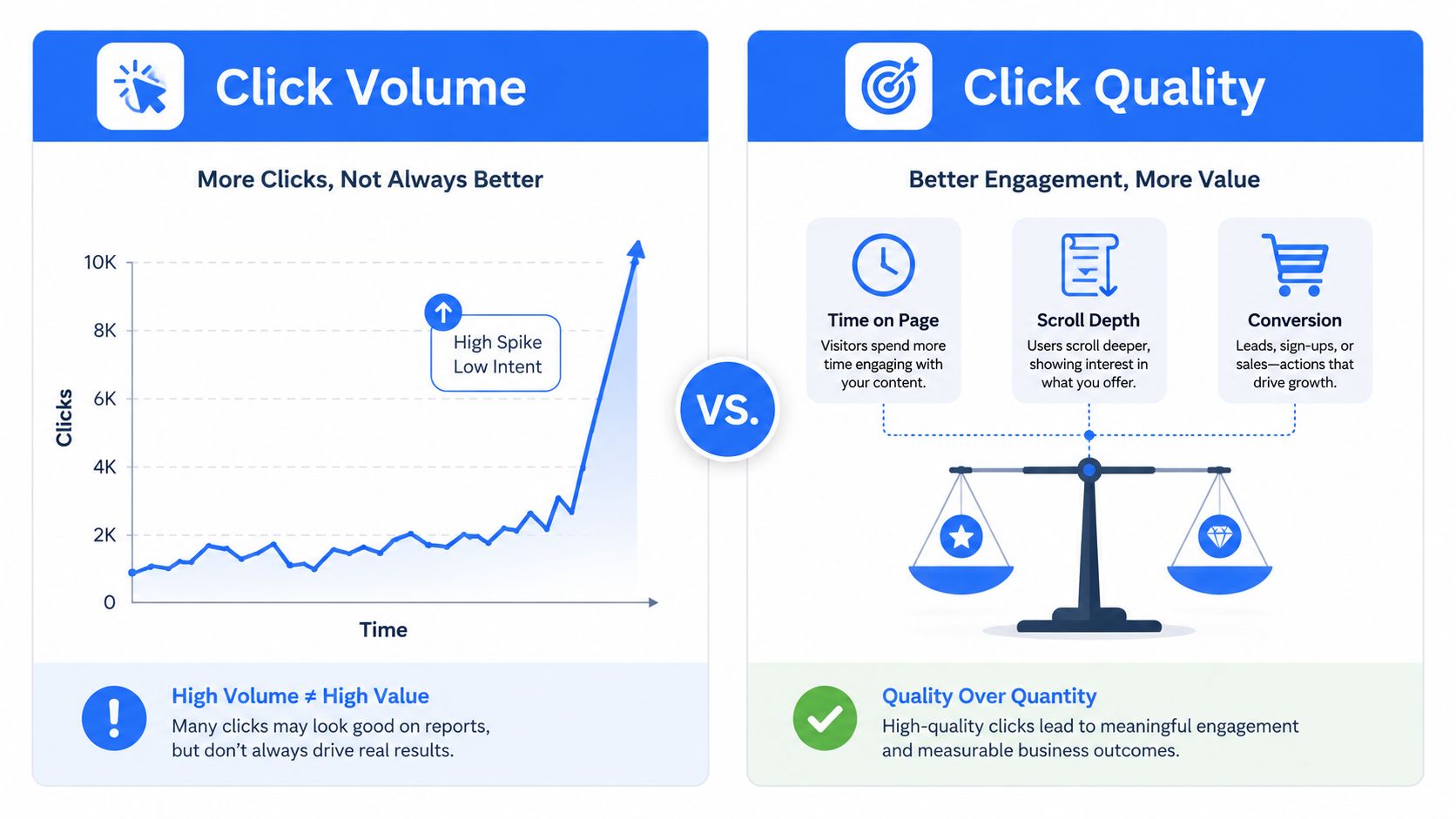
A practical click quality score uses three inputs. Measure time on page after the click, scroll depth past the CTA fold, and whether the user returns within 7 days. You can weight those inputs to fit the funnel, but keep the score stable long enough to compare variants. The goal isn't to create a magical number. It's to separate useful traffic from cheap curiosity.
Choose attribution for the decision
First touch helps answer which CTA introduced an account. It suits awareness reporting, especially when the first interaction matters more than the final conversion.
Linear attribution spreads credit across the journey. It works better for content heavy buying cycles where several CTAs contribute and no single touch deserves all the praise.
Data driven attribution can be useful when you have enough conversion volume to model patterns. One benchmark framework in the provided research uses 300 or more conversions per month as a threshold for this approach, though teams should treat that as a practical guide rather than a law.
Last click will overcredit bottom funnel CTAs. A pricing page button often receives the final click because the buyer is already close, while an earlier guide or LinkedIn post created the initial demand. Teams that optimize only against last click may cut those earlier CTAs, then watch pipeline weaken later.
Read what attribution modeling means before changing the model. Keep at least one view based CTA in each campaign for assisted credit. A low last click conversion rate doesn't automatically make that CTA useless. It may be opening the door for the touch that gets the credit later.
A click is a behavior. Click quality is a business signal.
What Actually Moves the Numbers
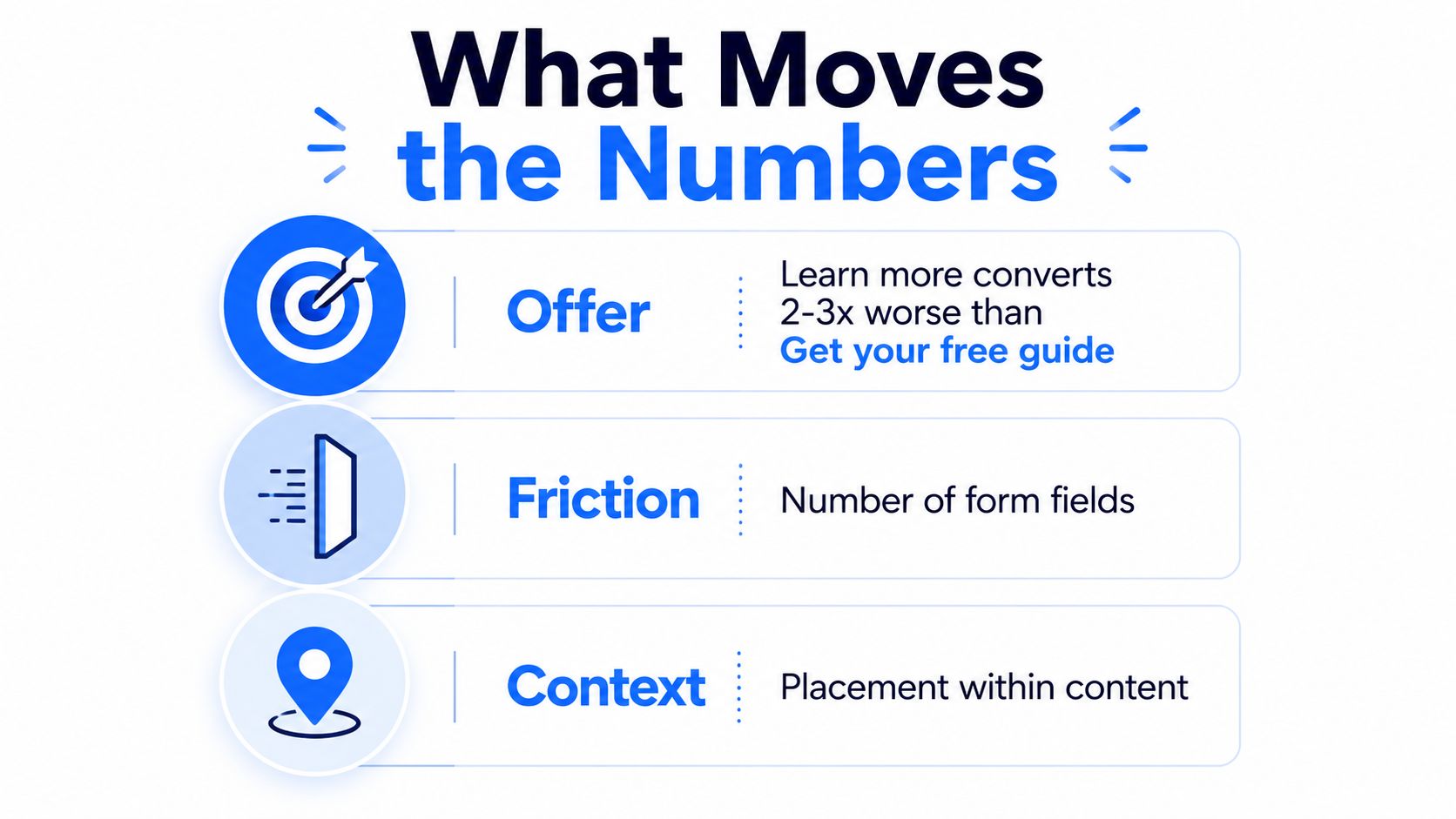
Button color gets too much attention because it's easy to change and easy to screenshot. The variables that usually deserve the work are offer, friction, and context, in that order.
Offer specificity
“Learn more” asks the visitor to guess what happens next. “Get the Q3 retention benchmarks report” names the outcome and filters the audience. Specific copy can reduce casual clicks while improving the quality of the people who continue.
That trade off matters. The CTA should make the next step clear, not maximize curiosity at any cost. Track the offer test with CTR, conversion rate, and qualified meeting rate so you can see whether a lower click rate produces better pipeline.
Friction and context
Friction includes form length, unclear fields, slow pages, weak mobile placement, and a mismatch between the promise and the next screen. Remove unnecessary work, then measure completed actions rather than button activity.
Context joins the CTA to the sentence, ad, or post that introduced it. If the ad promises a retention report, the landing page and button should repeat that promise in plain language. A mismatched CTA creates doubt, and doubt creates exits.
CXL's analysis of CTA button color found no universal winning color. Contrast helps the button stand out, but the surrounding context matters more than a fixed color rule. The same source cites a study where red CTAs on light backgrounds lifted conversions by an average of 31.4% across 22 DTC brands, and red buttons outperformed green by 14.2% across 3,800 live stores. Those findings support testing contrast in context, not painting every button red.
Use conversion optimization principles to connect each change to the right metric. Offer specificity should affect qualified conversion. Friction should affect completion rate. Context should affect both click quality and downstream conversion.
Change one variable per test. Run it through at least two business cycles. Treat results with fewer than 200 visitors per variant as directional, not final.
A/B Test Ideas Worth Running
Start with tests that change the promise. Button color belongs near the bottom of the queue because a prettier button can't repair a weak offer.
Use this hypothesis format: If we change X for audience Y, metric Z should improve because reason A. Rank the tests by likely pipeline value, not by how fast a designer can ship them.
| Priority | Test Idea | Expected Lift | Min Sample per Variant |
|---|---|---|---|
| High | Case study versus generic resource offer | Potentially meaningful pipeline change | Calculate from baseline |
| High | Demo CTA versus pricing CTA | May change lead quality and sales readiness | Calculate from baseline |
| High | ROI calculator placement | May improve qualified action rate | Calculate from baseline |
| Medium | First person versus second person copy | May affect click quality | Calculate from baseline |
| Medium | Benefit versus feature framing | May improve conversion intent | Calculate from baseline |
| Medium | Urgency line | May increase action, may lower trust | Calculate from baseline |
| Low | Button color | Tests salience after copy is stable | Calculate from baseline |
| Low | Whitespace or sticky placement | Tests visibility and access | Calculate from baseline |
For sample planning, use your actual baseline conversion rate, expected 10% relative lift, and 90% statistical power. There isn't one honest minimum sample without those inputs. A low baseline needs more traffic than a high baseline, so anyone giving one universal number is selling certainty they don't have.
Run each test through one full business cycle. Check whether lead quality, sales acceptance, and pipeline movement follow the click result. Stop testing button color while the landing page converts under 1%. Test to 95% significance before declaring a winner, and don't peek at the dashboard every hour until the result talks itself into changing.
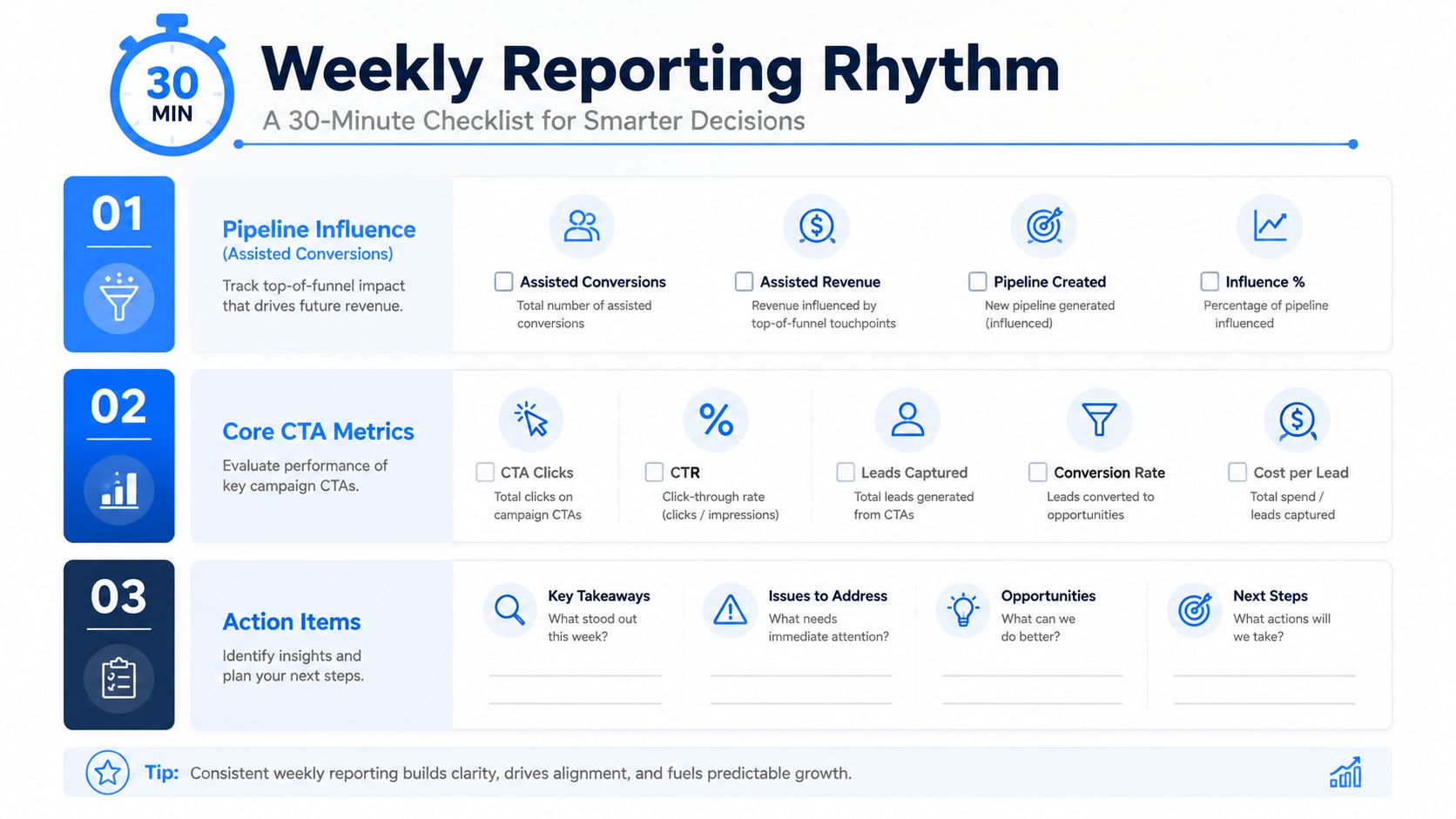
Your Weekly Reporting Rhythm
A useful reporting rhythm fits inside a Monday review. The dashboard should follow the same order as the buyer journey, with commercial outcomes at the top and creative diagnostics at the bottom.
Start with one page. Put pipeline influence, assisted conversions, and multi touch revenue first. Place core CTA metrics in the middle, including CTR, click to meeting rate, CPA, and micro conversion rate by source. Put channel diagnostics at the bottom, including LinkedIn impressions versus clicks, email click rate by send, and landing page conversion rate by variant.
Use three review cadences
Daily glance: Spend five minutes checking spend pacing and unusual CTR changes. Don't make strategic decisions from a single noisy day.
Weekly review: Spend thirty minutes comparing the current week with the trailing four week baseline. Investigate changes in click quality, qualified meetings, and conversion rate before touching creative.
Monthly review: Re benchmark each channel against its relevant standard. Archive winning variants with their audience, offer, placement, and tracking details. A winner without documentation becomes a random old asset that someone accidentally edits.
For LinkedIn teams, official page analytics can break down performance by text posts, images, videos, events, polls, articles, and newsletters. LinkedIn's post analytics guide explains where to open those reports and review social engagement, link engagement, and audience reach.
Report four numbers to leadership: pipeline influenced, cost per qualified meeting, click to meeting rate by channel, and qualified clicks divided by total clicks. Those numbers won't make every campaign look good. That's their job.
ViralBrain helps teams create LinkedIn posts from proven hooks, structures, and CTA patterns, then review post quality and engagement signals before publishing. If you want a more disciplined way to test LinkedIn CTAs instead of guessing from likes, visit ViralBrain and compare your content against the metrics that matter.
Grow your LinkedIn to the next level.
Use ViralBrain to analyze top creators and create posts that perform.
Try ViralBrain free