

How to Find Content Ideas That Actually Work in 2026
Learn how to find content ideas using real research, trend mining, and proven workflows that turn audience signals into posts worth publishing.
Grow your LinkedIn to the next level.
Use ViralBrain to analyze top creators and create posts that perform.
Try ViralBrain freeYou're halfway through the week, your publishing slot is approaching, and the idea bank contains three vague notes, two recycled opinions, and one headline that sounded clever before lunch. Most content workflows fail at this stage. They treat ideas as a creativity problem, then blame the creator when inspiration stops answering emails.
The better approach is less romantic and more useful. Content ideation is a research and validation pipeline. You collect real signals, turn them into candidate angles, score them, then measure what survives. The point isn't to generate more ideas. It's to stop spending hours on ideas that had no audience, proof, or useful angle from the start.
Why Idea Generation Breaks And What To Build Instead
Three habits empty an idea bank fast. The first is waiting for inspiration. Inspiration is welcome, but it has terrible attendance. The second is brainstorming without research. A room full of people can produce plenty of topics, yet still miss the questions buyers ask in sales calls, comments, and support threads. The third is collecting raw ideas without a filter. A giant list feels productive until every item needs the same amount of thought.
Research supports a different model. A 2023 survey summarized by Databox found that keyword analysis was the most popular way marketers found new content ideas, with competitor analysis, customer feedback, social media monitoring, and sales input also common. That points to a practical truth. Strong ideation usually combines several evidence sources instead of relying on one heroic brainstorm.
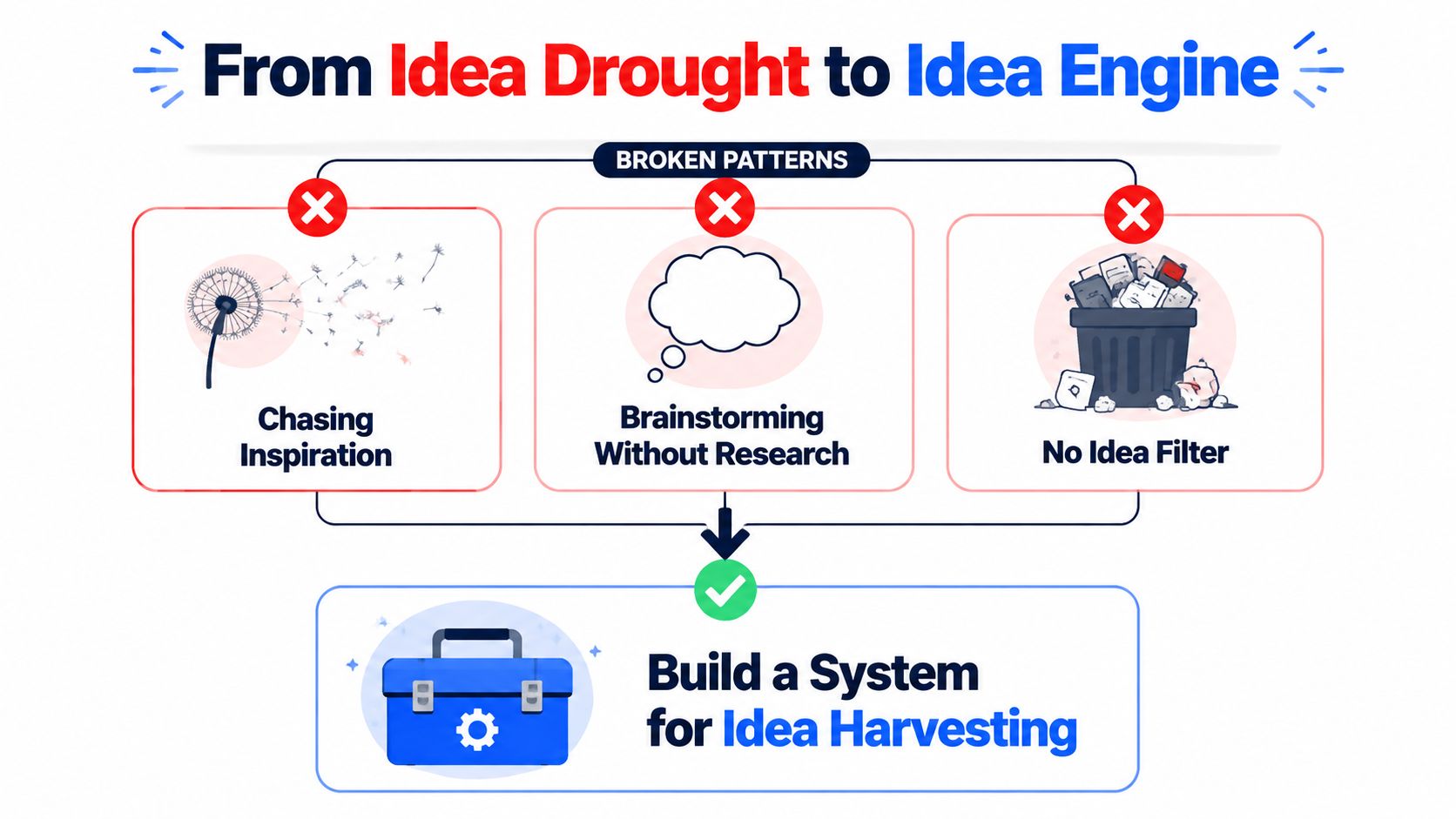
Build the pipeline
Use four stages.
- Harvest signals. Collect questions, objections, search terms, competitor patterns, community language, and your own performance data.
- Generate angles. Turn each signal into different formats, such as a teardown, contrarian view, tutorial, story, or checklist.
- Validate and score. Check audience fit, originality, proof, effort, and likely business value.
- Schedule and measure. Publish the strongest ideas, track results, then record which inputs produced usable work.
Most creators stop after stage two. They generate plenty but never record which source created the idea, which angle made it publishable, or which posts earned useful attention. Their backlog grows. Their judgment doesn't.
Practical rule: An idea without a source is a hunch. A hunch can become a post, but it shouldn't skip validation.
Structured frameworks help because they separate generation from selection. A large study found a positive correlation between framework structure and novel viable ideas, with r(422)=0.517, p<.0001, plus a smaller significant correlation with idea quality, r(422)=0.347, p<.0001 (ScienceDirect). The useful lesson is simple. Set constraints first, generate broadly, then score without falling in love with the first decent headline.
For a solo B2B creator, a weekly system can be small. Keep one tracker with the source, raw signal, proposed angle, format, evidence, score, production effort, and result. If you need extra examples for video formats, RemotionAI's guide to good YouTube video topics is a useful reference for shaping ideas around clear viewer needs.
Researching Audience and Competitors for Real Signal
Start with language buyers already use. Your job isn't to guess what sounds relevant. It's to capture the words that reveal confusion, risk, resistance, or a desired result.
Check LinkedIn comments and direct messages from your target buyer profile. Save questions almost word for word. Sales call transcripts expose objections that public content often hides. Support tickets show where users get stuck after purchase. Reddit threads, niche Slack groups, and Discord channels reveal informal language, including complaints people may never put in a formal survey. Quarterly industry reports add context, while competitor posts sorted by engagement show which subjects attract visible response.
A useful research log looks like this.
| Source | Signal to Capture | Log Location |
|---|---|---|
| LinkedIn comments | Questions, objections, repeated phrases | Audience tab |
| Sales calls | Buying friction, stalled decisions, requested proof | Sales tab |
| Support tickets | Setup problems, feature confusion, recurring failures | Customer tab |
| Reddit and private communities | Unfiltered complaints, comparisons, workarounds | Community tab |
| Industry reports | Market shifts, definitions, research prompts | Evidence tab |
| Competitor posts | Topic, format, hook, comments, visible engagement | Competitor tab |
Run a short competitor audit
Choose competitors who sell to the same buyer, not every account that posts about your category. Add a few creators who own attention in the niche even if they don't sell a competing product. Review their recent posts, then compare topic, format, hook, comment quality, visible reactions, and reuse across channels.
Don't copy the post. Copy the question it answers, then find the gap. A competitor may publish a generic checklist. Your opening could focus on the failure that makes the checklist necessary, supported by a customer objection or internal example.
Log each finding in a shared tracker, even if you're working alone. A single row should show the source, date, exact language, proposed angle, evidence available, channel, and status. After several research cycles, repeated phrases become visible. That's when an idea bank starts behaving like an operating system instead of a junk drawer.
The competitor content analysis guide can help structure this review. Use it to study patterns, not to produce imitation. Your buyer has already seen enough posts that say “five lessons I learned.” Give them a reason to keep reading.
Mining Trends Communities and Your Own Backlog
Trends are useful raw material, but they're also an efficient way to waste an afternoon. Google Trends, Exploding Topics, LinkedIn Pulse, and industry newsletters can show what's gaining attention. None of them can tell you whether a topic matters to your buyer without extra work.
Tag every trend with a buyer reason. “New AI feature” is not a content idea. “What this new AI feature changes for a B2B marketer handling customer research” is closer. If you can't state the audience problem, skip the trend. Volume without relevance is just noise wearing a graph.
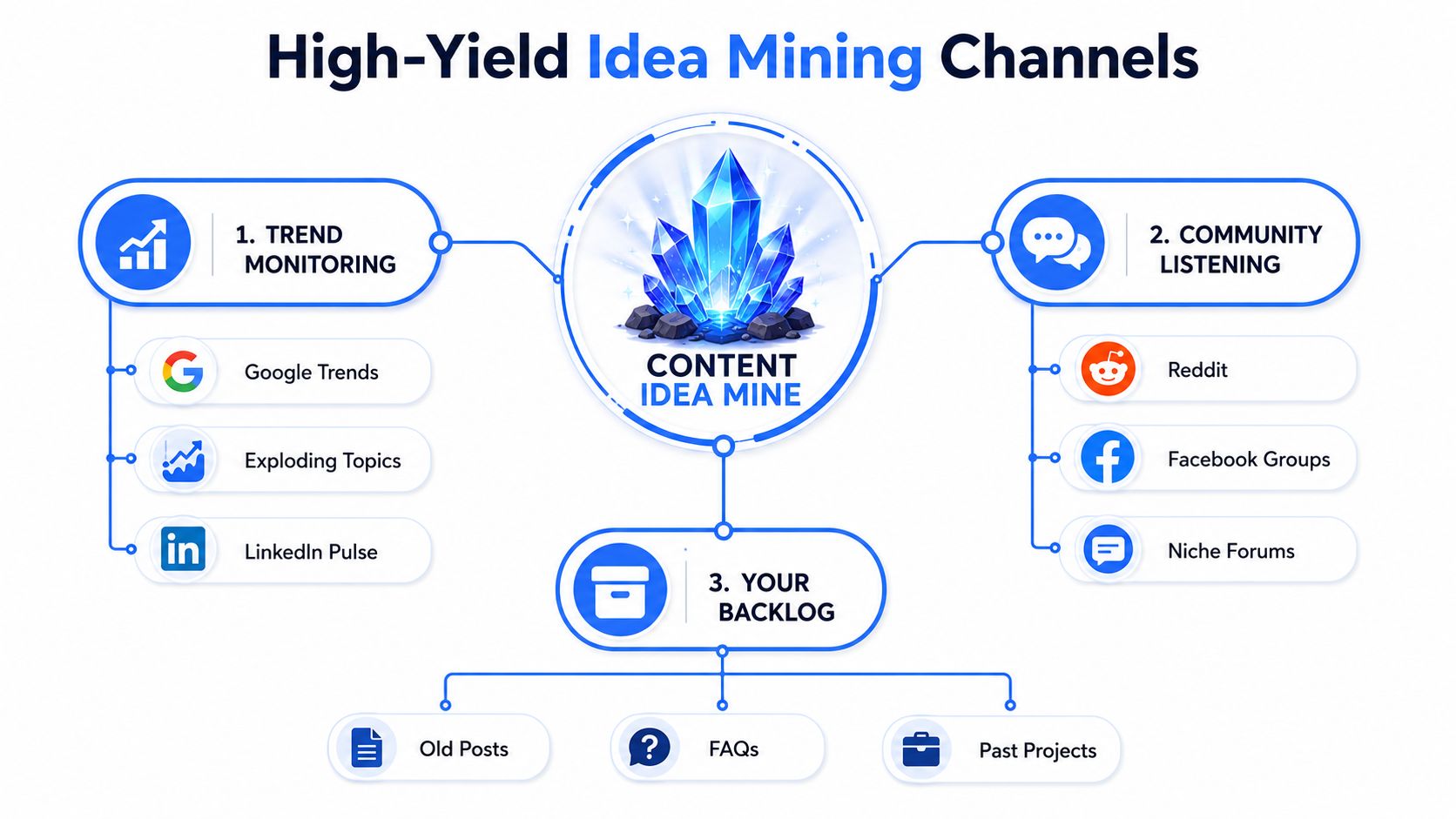
Listen where people complain
Communities produce better angles than polished feeds because people explain what went wrong. Scan Reddit, LinkedIn hashtags, niche Slack groups, and podcast comments for:
- Unstated problems: What do people describe without naming the issue?
- Contrarian takes: Which common recommendation keeps getting challenged?
- Workarounds: What are people doing because the official process is too slow or vague?
- Decision language: Which comparisons, fears, and trade-offs appear repeatedly?
A comment about “having plenty of content but no usable distribution plan” can become a diagnostic post. A thread arguing about whether founders should write their own LinkedIn posts can become a comparison of authenticity, speed, and editorial control. The source gives you tension. Your experience gives you the point.
You can use trend forecasting as a planning aid, but don't confuse a forecast with proof of audience need. Validate the topic against buyer language and your own expertise before it reaches production.
Trends suggest timing. Communities supply tension. Your backlog supplies proof.
Mine assets you already paid for
Your old posts, customer emails, podcast appearances, internal documents, webinar notes, and sales enablement files contain unfinished ideas. Search for explanations that took effort. Those are often better starting points than a blank document.
Use this rewrite prompt:
Take this old idea, identify the core buyer problem, then turn it into a contrarian post, a practical checklist, a short story, and a simple framework. Keep the evidence. Remove claims the source material cannot support.
An old post may become a carousel. A podcast answer may become a short script. An internal document may become a public teardown after confidential details are removed. Reuse saves research time, but lazy duplication makes your feed feel like it was assembled by a tired photocopier.
Prompt Stacks and Templates That Generate Ideas Fast
Prompts work best after research. Paste in raw questions, competitor observations, customer language, and evidence. Don't ask an AI tool for “content ideas about marketing” unless generic wallpaper is your target.
Run this stack during your weekly ideation block.
- Contrarian angle: “From the research below, find a common recommendation that deserves qualification. Create five LinkedIn angles that explain when it fails, who it harms, and what to do instead. Use only claims supported by the input.”
- Teardown: “Review these customer questions and competitor posts. Identify one weak assumption in each. Turn the strongest assumption into a teardown with a clear opening, evidence, and practical fix.”
- Framework: “Group these recurring objections into a simple process a B2B buyer can follow. Give me three names for the process, then remove any name that sounds like marketing.”
- Story: “Find the most specific tension in this research. Shape it into a short story with a situation, mistake, consequence, and lesson. Do not invent results or dialogue.”
- Listicle: “Turn these verified signals into a practical list. Each item must solve a different problem, use plain language, and include the evidence needed before publication.”
Paste the output into your tracker. Discard vague hooks, unsupported claims, duplicate angles, and ideas that require evidence you can't access. Prompts increase volume. They don't improve judgment.
Use templates without sounding assembled
Templates help when the blank page is the problem. Keep them as scaffolding, not a permanent personality transplant.
- HOOK, CONTEXT, TENSION, TAKEAWAY: State the sharp point, explain the situation, show the friction, give the useful conclusion.
- Before, After, Bridge: Describe the old process, define the desired state, explain the change that connects them.
- Claim, Proof, Limit: Make a claim, show evidence, state where the claim stops applying.
- Mistake, Cost, Correction: Name the mistake, explain its consequence, give the replacement action.
- Question, Pattern, Answer: Use a real buyer question, show the recurring pattern, answer it with a specific example.
- Myth, Evidence, Practice: State the popular belief, challenge it with available evidence, give a better operating rule.
- Teardown, Rebuild: Show why a familiar approach fails, then rebuild it with clearer inputs and decisions.
Cap template-only posts at one of every three. More than that and your voice starts to sound like a content calendar wearing a fake moustache. The strongest posts combine a known structure with a detail only your audience, work, or data can provide.
Validating and Prioritizing Ideas Before You Write
You don't need a complex scoring model. You need a filter you'll use. Pick the lightest framework that matches your publishing volume, then apply it consistently.
| Framework | Criteria Count | Time per Idea | Best For | Main Trade-off |
|---|---|---|---|---|
| Gut check | 3 | Under 90 seconds | Small batches | Fast, but subjective |
| Weighted score | 5 | Under 90 seconds | Higher output | More consistent, needs setup |
| Buy a feature test | One decision | Under 90 seconds | Product and offer content | Strong commercial signal, narrower use |
The gut check asks whether the idea has audience fit, originality, and proof points. Give each a simple pass, weak, or strong mark. If the idea fits the buyer, says something distinct, and has evidence behind it, keep it moving.
The weighted score is better when several people review ideas or when your backlog is large. Score audience relevance, business connection, evidence strength, distinctiveness, and production effort. Choose your own weights, but write them down before reviewing the batch. Otherwise the most exciting headline wins, which is how sensible teams end up producing a post about a topic nobody asked them to explain.
The buy-a-feature test asks whether a buyer would choose to receive this specific answer, tool, or explanation. If the idea were a product feature, would someone make room for it in their workflow? The test works well for product education, comparisons, templates, and content tied to a real decision.
Make the shortlist concrete
Take a batch of 10 ideas and score each one with the same method. An idea with strong audience fit but no evidence should be parked. An original idea that takes too much production time may wait. A plain tutorial with clear proof and low effort may win, even if it feels less glamorous.
Set a threshold before reviewing the batch. Ideas below it go into a “someday or maybe” document, not the bin. They can become useful filler when the calendar has a gap or when new evidence changes their relevance.
Then rank the survivors by production cost versus expected reach. Reach is not a promise. It's a planning estimate based on audience interest, distribution fit, and the strength of the hook. A low-cost post with solid evidence can earn priority over a polished production that depends on several unknowns.
A Weekly Editorial Workflow You Can Actually Stick To
A workable schedule protects research from being swallowed by writing. It also gives every idea a place to go. The blocks below suit a solo B2B creator, but the order matters more than the exact calendar.
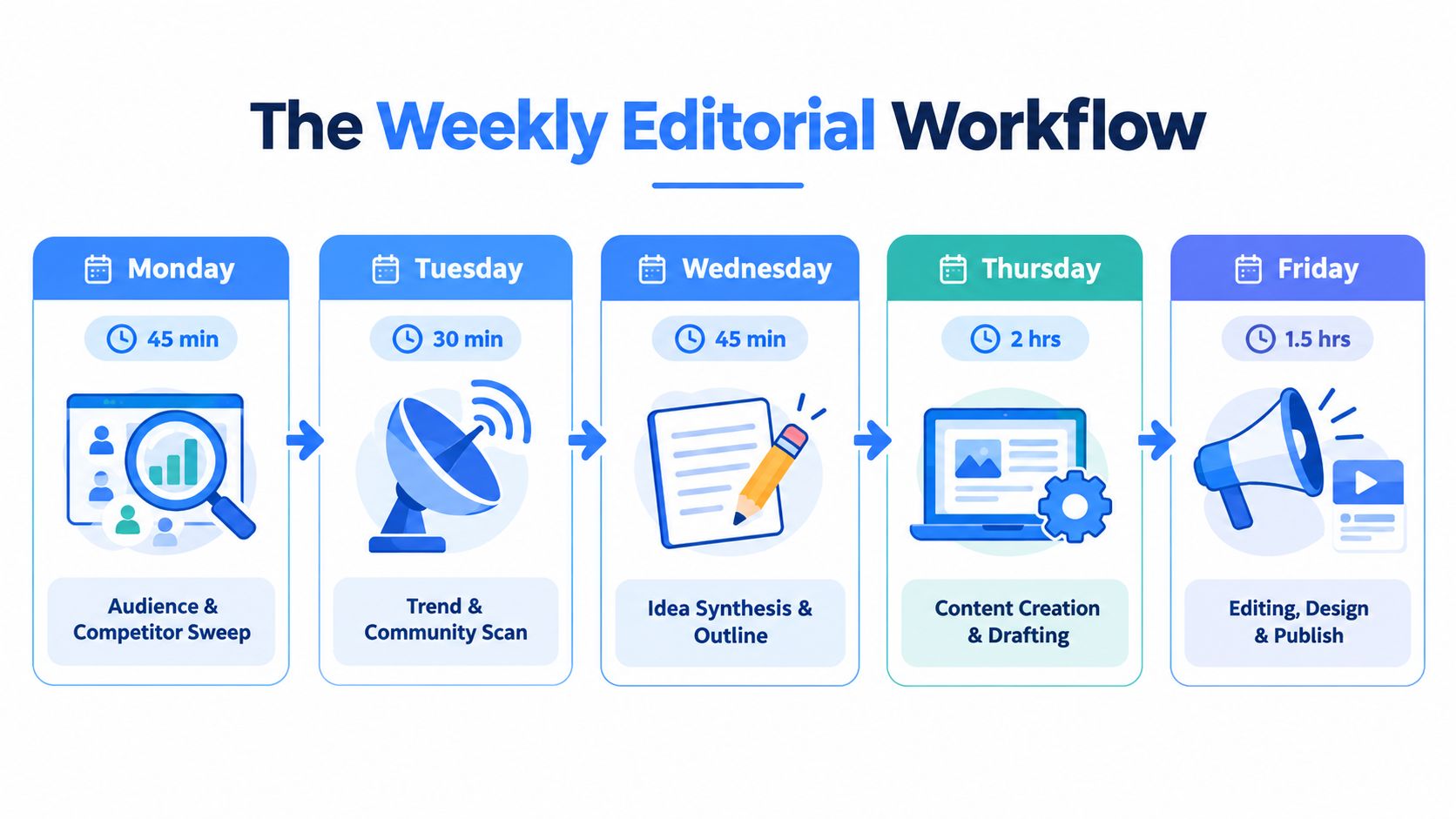
Monday and Tuesday collect signal
On Monday, spend 45 minutes reviewing audience questions, sales notes, support tickets, and competitor posts. Save the exact language, not your cleaned-up interpretation. On Tuesday, spend 30 minutes scanning trends, communities, newsletters, and relevant comments. Tag each signal with the buyer problem it connects to.
Wednesday gets 60 minutes for prompt-driven ideation and template filling. Generate broadly, then add every candidate to the tracker with its source. Don't start writing the first idea that feels acceptable. That move feels fast and usually creates avoidable editing.
Thursday takes 30 minutes for scoring and prioritization. Use the same framework across the batch. Friday is for batching hooks and outlines, with writing and publishing placed inside protected weekday windows rather than squeezed between meetings.
Repurpose with a record
Every published post becomes two derivatives, one carousel and one short-form script. Log both in the same tracker, link them to the original, and note whether the derivative changes the angle or merely changes the format. Repetition is useful when the audience needs the idea in another shape. It's lazy when the sentence order stays the same.
Your analytics loop should compare the previous week's strongest and weakest performers. Look at the topic, hook, format, evidence, and call to action. Adjust the scoring weights and prompt inputs based on what happened, not on what you hoped would happen.
A clean content creation workflow can help you keep research, drafting, review, and repurposing in one sequence. For creators turning podcast material into posts, ClearAudio for smoother podcasts is a practical production reference before you extract clips or written ideas.
A workflow improves when you remove the part that slipped, not when you add another ambitious task.
Make one change every Friday. If research ran long, reduce the source list. If scoring never happened, shrink the batch. If repurposing created clutter, define what counts as a useful derivative. Content systems improve through small corrections, not motivational speeches.
ViralBrain helps B2B creators find LinkedIn topics from niche signals and trending developments, then turn proven post patterns into drafts in their own voice. Visit ViralBrain, bring your research tracker with you, and use the platform to generate, compare, refine, and repurpose ideas before you spend time writing.
Grow your LinkedIn to the next level.
Use ViralBrain to analyze top creators and create posts that perform.
Try ViralBrain free