
10 Image Generation Tool Picks for LinkedIn
Compare 10 image generation tool options for LinkedIn visuals, with use cases, limits, pricing pointers, and workflow tips.
Grow your LinkedIn to the next level.
Use ViralBrain to analyze top creators and create posts that perform.
Try ViralBrain freeNo single image generation tool wins every LinkedIn task. A clean infographic, a text heavy graphic, a branded campaign asset, and a fast visual concept demand different trade offs.
The useful comparison is less glamorous than a feature race. Does the output fit LinkedIn? Can it render words accurately? Can your team control the brand? How much editing comes after generation? Is access simple? Can you understand the pricing before the invoice arrives?
Text inside generated images still needs human checking. In one design benchmark, DALL E 3 scored 83.3 percent on a text rendering measure, while SDXL scored 37.9 percent. Even the stronger system struggled with complicated text, according to the design benchmark. Put legal copy, prices, product specifications, and long explanations in a design editor instead.
The list below ranks each tool by the LinkedIn job it does best. ViralBrain belongs in the infographic focused part of the workflow, not as a universal replacement for every visual tool. It works beside research, drafting, review, and manual publishing. For teams producing batches of visual assets, this batch image guide from MerchLoom offers useful context on repeatable image workflows.
1. Free AI Infographic Generator for LinkedIn, ViralBrain
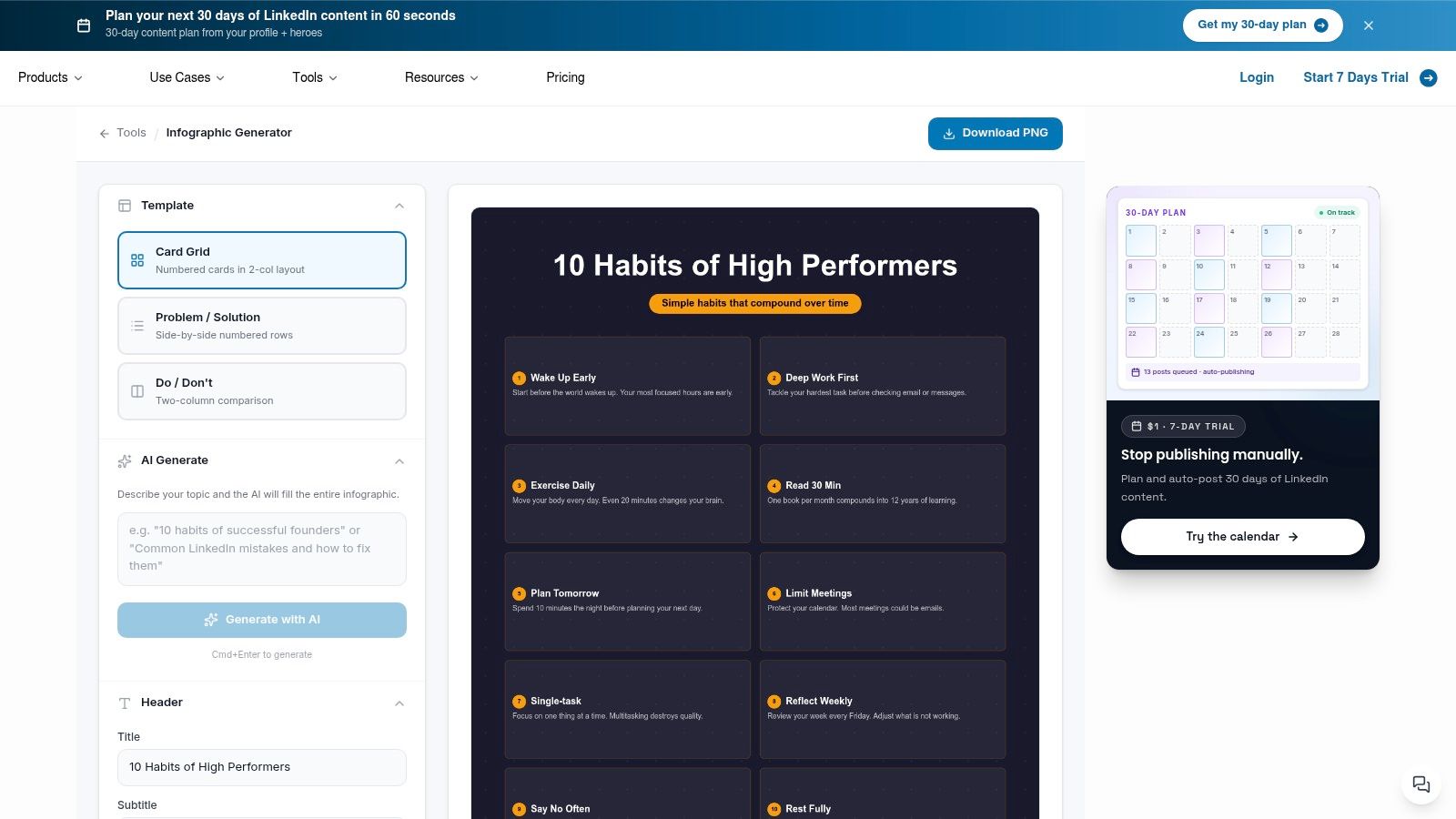
ViralBrain is the most direct pick when the job is a LinkedIn infographic, not a cinematic portrait of a robot drinking coffee. You describe the topic, use AI Generate, and the tool builds a complete layout. You can start from social focused formats such as Card Grid, Problem/Solution, or Do/Don't.
The main advantage is the handoff from idea to usable post asset. ViralBrain exports a LinkedIn optimized PNG at 1080×1350, so you aren't left guessing which canvas size will survive the feed. The tool is free, requires no sign up, and lets you create and download an infographic immediately through its LinkedIn infographic generator.
Best fit for fast visual posts
ViralBrain suits founders, marketers, and solo creators who need a visual explanation without opening a full design suite. Its social first templates reflect common LinkedIn storytelling patterns, which helps when the topic is a process, comparison, or short lesson.
The trade off is control. Export options appear limited to PNG and one main size. There's no native scheduling or publishing, so you'll still review the file, open LinkedIn, and post manually. That last step is not a flaw. It's a useful pause before an inaccurate claim escapes into public view.
Practical rule: Let ViralBrain build the first layout, then check every heading, number, label, and brand phrase before publishing.
Use ViralBrain during the drafting stage after researching a topic and choosing the post structure. Review the claims against your source material. Edit the copy if the generated wording sounds unlike your brand. Preview the final post, then publish it manually.
2. Midjourney
Midjourney is the strongest choice for visual direction. It produces stylized images that can give a LinkedIn campaign a clear mood, especially for headers, carousel covers, founder stories, and concept boards. It's less useful when the image must explain several facts in a tidy layout.
The web experience makes it easier to explore, organize, and reuse prompts, while Discord workflows remain available through its official Midjourney platform. Upscaling, variations, inpainting, outpainting, and personalization support active iteration rather than one prompt followed by prayer.
Midjourney's strength can become a problem. Strong style often overwhelms business clarity. A beautiful visual metaphor may attract attention while saying almost nothing about the post. The tool also has no free web or Discord trial at present. Trial access is limited to the niji·journey mobile app, so casual testing has a narrower path.
Where it belongs in the workflow
Use Midjourney after research has produced the core idea, not before. Create a visual direction for the campaign, then draft the LinkedIn post around the message. Add important words in a normal design tool because generated typography remains a weak point across image systems.
Midjourney also has less enterprise governance than a full creative suite. That matters when several people need asset ownership, review trails, or strict brand controls. For a founder or small creative team, the visual quality may justify the extra manual work. For a regulated marketing department, the handoff may feel like carrying paperwork in a beautiful backpack.
3. OpenAI Image Generation
OpenAI Image Generation fits teams that want to move from conversation to production. Non technical users can work in ChatGPT. Developers can use image generation and editing through the OpenAI platform, including API based workflows built with developer tools and SDKs.
The practical advantage is continuity. A marketer can discuss a visual concept, request variations, and pass the selected direction to a programmatic workflow. That suits teams creating repeatable social assets from structured content, especially when image generation sits inside a larger content system.
The downside is cost planning. Token based pricing can be difficult to estimate without the official calculator. Model names and versions may change, so a workflow that works today can need maintenance later. The tool gives builders useful governance options, but governance still requires someone to define review rules, logging needs, and approval steps.
Best fit for API led content
Use this option when a developer needs to connect research, drafting, image creation, and asset storage. A LinkedIn team might generate a visual from a reviewed post brief, save the result, send it to a human reviewer, then route the approved asset into a publishing queue.
Don't treat the API as a substitute for editorial judgment. It can produce a technically valid image that misstates the brief. Check object presence, wording, layout, and brand details before the asset reaches a scheduled campaign.
4. Adobe Firefly
Adobe Firefly is the practical choice for teams already working in Photoshop, Illustrator, Express, or other Adobe products. Generation happens beside familiar editing tools, which reduces the awkward handoff between a generated image and the finished LinkedIn asset.
Firefly supports text to image generation, style and lighting controls, vector output, and generative fill workflows through its Adobe Firefly product. Content credentials and a clearer licensing position help commercial teams document how an asset was made.
That does not make the workflow automatic. Generative credits apply across Firefly and Creative Cloud apps, with standard and premium usage behaving differently. Premium features and non image model use can consume credits faster. Teams should decide who gets access, which tasks deserve premium usage, and where manual editing remains cheaper in time.
Best fit for Adobe based production
Firefly works well when the LinkedIn post already has a design system. A designer can generate a background, extend a scene, adjust an object, then place the final copy in Illustrator or Photoshop. The content team can research the topic and draft the post separately, while the designer handles visual refinement in the same environment.
It's less attractive for someone who only needs a quick one off concept. The credit model adds planning overhead, and the full benefit appears only when Adobe tools already sit inside the team's workflow.
5. Stability AI Brand Studio
Stability AI Brand Studio, formerly DreamStudio, targets repeatable brand production. It offers brand level customization through Brand ID models, production workflows through Producer Mode, precision inpainting, and curated routing across Stable Diffusion and partner models. The Stability AI platform is built for teams that need more control than a basic prompt box.
Its value appears when a campaign needs a consistent product, scene, or visual style across many assets. Precision editing gives teams a way to fix parts of an image without throwing away the whole composition. Access to Stability AI and partner models in one environment can reduce tool switching.
The naming transition creates avoidable confusion. Older references still use DreamStudio, while current product language uses Brand Studio. Pricing adds another wrinkle because Brand Studio subscriptions and API credits sit in separate paths.
Best fit for controlled brand variations
Use it after the content team has approved a message and visual brief. Create a controlled base asset, produce variations for different posts, and send each version through a brand review. For teams exploring a dedicated image branding workflow, the key question is whether the controls save enough editing time to justify the extra product complexity.
Brand Studio is not the obvious choice for a quick LinkedIn graphic. It makes more sense when brand consistency, product placement, and repeatable production matter more than instant access.
6. Ideogram
Ideogram is the clearest pick when readable words belong inside the image. Posters, banners, memes, event graphics, and slide visuals all benefit from stronger in image typography. That gives it a practical edge on LinkedIn, where a short headline often needs to survive before the reader opens the post.
The platform offers consumer plans, a web studio, multiple model options, P Image endpoints, and a developer API through Ideogram. Monthly plans are easier to understand than some token heavy systems, but API users still need to understand per token and per image costs.
Keep the copy short
Ideogram is better suited to a short banner line than a complete infographic paragraph. A 2025 visual text benchmark found a minus 0.20 correlation between edit distance and text accuracy, meaning larger differences from requested wording were linked with lower accuracy and clarity, according to the visual text benchmark.
Use it for the title or short message. Put detailed explanation in the LinkedIn caption or add it later in a design editor. Compare the rendered wording against the approved source copy every time.
Ideogram is less flexible than open frameworks for niche technical workflows. That trade off is reasonable for social teams. You get a focused tool for typography rather than a sprawling lab that asks you to become its part time systems administrator.
7. Leonardo.ai
Leonardo.ai is a balanced production suite for teams that want generation, editing, upscaling, collaboration, and API access in one place. Its visual canvas supports real time generation and editing, while batch tools help teams create variations without rebuilding every prompt.
The platform supports fine tuning custom models and a move from prototype work to production through its Leonardo.ai workspace. Token based metering gives users flexibility, and selected eligible models offer relaxed unlimited generations. The qualifier matters. Relaxed unlimited access applies only to eligible in house or selected models, not every generation path.
Best fit for a small production team
Leonardo suits a team that has moved beyond random experiments but doesn't need a heavy enterprise stack. A social manager can build a concept, edit it on the canvas, upscale the preferred version, and hand the result to a reviewer. A developer can later connect the approved pattern to the API.
Plan names, aliases, and token pools can confuse new users. Treat the pricing page as part of the product experience, not a footnote. Confirm which models use tokens, which qualify for relaxed generation, and what the API workflow needs before committing to a team process.
The tool works best when the team values a single working surface. It's less compelling if your designers already live in Adobe or your content team only needs a basic infographic maker.
8. Canva Magic Media
Canva Magic Media wins the speed contest for branded social production. Text to image sits inside Canva's design suite, beside templates, stock assets, brand kits, Magic Design, and resize tools. A marketer can create a visual, apply brand rules, place copy, and prepare a LinkedIn asset without learning a specialist art interface.
The Canva platform bundles AI allowance by plan, with an AI Pass or top ups available for heavier use. That makes casual work simple, but frequent generation needs monitoring. A team can start with a smooth workflow, then discover that repeated variations consume the allowance faster than expected.
Best fit for social teams
Canva is a strong choice when multiple people need to edit the same asset. Brand kits reduce inconsistency, collaboration supports review, and the template library helps teams produce a carousel or post header quickly.
The trade off is granular control. Dedicated art tools offer more control over photorealistic output, unusual compositions, and model behavior. Canva's advantage is not artistic depth. It's the short route from prompt to approved social graphic.
Before publishing, check the canvas against LinkedIn's intended display. Teams that need a quick image size check should still review the final export, since a correct design file can become a poor post after the wrong crop or resize.
9. Playground
Playground is useful as a testing lab. Its browser based studio offers Playground's own models, third party models, reference images, editing passes, and upscaling. A model picker lets creators compare approaches without setting up several separate tools.
Access is flexible through Pro and Pro+ subscriptions, day passes, and credit packs on Playground. That makes it easier to test a workflow before taking on a recurring plan. The cost is a more complicated usage system, with edit quotas, time windows, and model specific limits that need attention.
Best fit for model comparison
Use Playground when the content team has a visual brief but hasn't decided which model handles it best. Create a small set of concepts, compare composition and editability, then move the winner into the production tool that matches your brand and publishing process.
Playground isn't a full enterprise suite. Governance depends on your external workflow, so store approved prompts, source copy, final files, and review notes somewhere your team can access. The tool gives you room to experiment. It doesn't give you a complete content operation.
That makes it a good fit for freelancers, small teams, and curious marketers. It's less suitable as the only controlled environment for a large organization with strict approval requirements.
10. Google ImageFX
Google ImageFX is a fast concepting tool powered by Imagen models. It offers prompt modifiers, called expressive chips, that help users explore variations without rewriting every detail. Access runs through Google Labs with a Google account, which keeps the first test simple for Google centered teams.
The Google ImageFX experience has a leaner feature set than a full creative suite. Access and availability can change as Google Labs products develop, so it's better for experiments than for a critical production pipeline.
Best fit for quick ideas
ImageFX works well when a writer or marketer needs several visual directions before choosing one. Use the output to shape a campaign mood, then finish the asset in Canva, Adobe, or another editor. It can save time at the concept stage, but it doesn't replace a review process.
Google's Imagen lineage supports strong image quality, yet quality alone doesn't solve LinkedIn's practical problems. The team still needs to check text, claims, accessibility, brand fit, and final dimensions. A polished image can still communicate the wrong idea with impressive lighting.
The tool also raises a wider review issue for blind and low vision users. The American Foundation for the Blind report explains that current text to image tools can generate images for blind users but generally don't describe the results well enough for users to verify them nonvisually. Alt text alone doesn't confirm that an image matches the brief. Add structured descriptions, OCR, object checks, and human review when accessibility matters.
Top 10 Image Generation Tools, Quick Feature Comparison
| Tool | Target audience | Core features | Strengths / USP | Limitations | Price |
|---|---|---|---|---|---|
| Free AI Infographic Generator for LinkedIn, ViralBrain | Founders, marketers, busy LinkedIn creators | Full-layout AI generation, LinkedIn templates (Card Grid, Problem/Solution, Do/Don't), PNG export 1080×1350, no sign‑up | Recommended, instant WYSIWYG infographics, virality-informed templates, no design needed | PNG-only (one size), no native scheduling, may need text edits | Free, no account |
| Midjourney | Creative teams, designers, brand moodboards | Web app + Discord, upscalers, inpainting/outpainting, style controls | High aesthetic output, strong stylization and iteration | No free web/Discord trial; limited enterprise governance | Paid subscriptions (tiers) |
| OpenAI Image Generation (ChatGPT & API) | Dev teams and non-technical creators | Text-to-image + editing, multiple image models, Images & Responses API | Strong dev ecosystem, governance, easy ideation→API handoff | Token-based pricing complexity, models evolve over time | Pay-as-you-go (API credits / token pricing) |
| Adobe Firefly | Marketing/design teams, enterprises | Text-to-image, generative fill, vector output, Creative Cloud integration | Deep Adobe integration, clear licensing & content credentials | Generative credit system can be confusing; premium features cost more credits | Creative Cloud plans + generative credits |
| Stability AI Brand Studio | Brands, production teams | Brand ID models, Producer Mode, precision inpainting, curated model routing | Brand-aware workflows, repeatable on‑brand outputs, model variety | Name transition confusion; pricing split across subscriptions & API credits | Paid Brand Studio subscriptions + API credits |
| Ideogram | Social marketers, ad designers needing legible text | Best-in-class in-image typography, web studio, developer API | Excellent readable text/logo rendering for social graphics | Less flexible for niche workflows; API pricing per-endpoint | Monthly plans + per-endpoint API pricing |
| Leonardo.ai | Studios, teams needing production pipeline | Real-time canvas/editor, batch tools, fine-tuning, API | Strong editing/upscaling, prototyping→production, enterprise signals (SOC 2) | Token pools/plan names can be confusing; limits on 'relaxed' models | Token-based plans (paid) |
| Canva Magic Media | Non-designers, marketing teams, agencies | Text-to-image inside Canva, Magic Design, brand kits, resize tools | Very easy workflow, collaboration, brand governance | AI usage metered; less granular control for photorealism | Freemium + paid plans, AI Pass top-ups |
| Playground | Creators exploring models, quick ideation | Multiple models, web editor, reference images, upscaling, flexible access | Flexible access options (day passes, credits), transparent model picker | Model quotas and naming can be confusing; not a full enterprise suite | Pro/Pro+ subscriptions, day passes, credit packs |
| Google ImageFX (Imagen-powered) | Google-centric teams, experimenters | Imagen-based generation, prompt modifiers (“expressive chips”), Google Labs access | Strong Imagen lineage image quality, low friction for Google users | Lean feature set vs. full suites; availability in Labs may change | Free tier in Google Labs (availability varies) |
Choose the Tool That Fits the Workflow
Choose ViralBrain for fast LinkedIn infographics. It handles the layout problem directly, gives you social focused formats, and exports a LinkedIn ready PNG without requiring an account. Use it after researching the topic and deciding whether the post needs a card grid, a problem and solution structure, or a do and don't format.
Choose Ideogram when readable words belong inside the image. Keep those words short, check every character, and place longer explanations in the post caption. Choose Canva when the team needs branded social production, shared editing, templates, and brand kit controls. Its value comes from the complete design workflow, not from producing the most unusual image.
Choose Midjourney for visual direction. It's the better fit for mood, symbolism, campaign covers, and distinctive art direction. Add final copy outside the generator. Choose Adobe Firefly for Adobe based teams that need generation beside Photoshop, Illustrator, or Express, with a clearer commercial workflow and content credentials.
Choose Stability AI Brand Studio or Leonardo.ai for repeatable production. Brand Studio leans toward brand control, precision editing, and model routing. Leonardo.ai gives small teams a broad production surface with canvas editing, batch tools, upscaling, custom models, and an API path.
Choose OpenAI Image Generation for API led workflows. ChatGPT supports ideation for non technical users, while the API supports developers building image creation into a wider content system. Plan the cost carefully because token based pricing can be difficult to forecast.
Choose Playground when you need flexible testing across models, editing passes, and access options. Choose Google ImageFX for quick experiments, especially when your team already uses Google accounts. Neither should become a critical production dependency without checking current access and workflow limits.
The energy cost of image generation also belongs in the selection decision. Research comparing 17 image generation models found that energy use varied by as much as 46 times, while doubling resolution increased consumption by roughly 1.3 to 4.7 times, depending on the model, according to the study on image generation energy use. The same research found no statistically significant energy effect from prompt content or length. Draft at low resolution, create fewer retries, and reserve high resolution for finalists.
A useful workflow is short. Study strong LinkedIn patterns, choose the visual format, generate a draft, check every word and claim, resize or edit where needed, preview the post, then publish manually. Test prompt accuracy by splitting the brief into separate requirements for objects, attributes, counts, placement, scale, and interactions. Generate several versions, then check the requirements instead of choosing the prettiest failure.
Adoption already extends beyond specialist design teams. A 2025 AP NORC survey reported that 33 percent of U.S. adults had used artificial intelligence to create or edit images, according to the reported survey benchmark. That figure describes U.S. adults, not global adoption, and it doesn't show professional frequency. It does show why visual review matters. More people can make an image now, but that doesn't mean more people can verify one.
Before paying, compare current plans. Credits, models, quotas, licensing terms, and access rules change. If you need better product visuals, review these polished AI product photo tips before choosing a tool based only on a sample gallery.
ViralBrain helps founders, marketers, and content teams turn LinkedIn ideas into structured posts and ready to review visuals, including infographic formats built for the feed. Visit ViralBrain to create a LinkedIn graphic, check the draft, and decide whether it deserves a place in your next manual publishing queue.
Grow your LinkedIn to the next level.
Use ViralBrain to analyze top creators and create posts that perform.
Try ViralBrain free