
6 LinkedIn Photo Examples That Actually Work
Compare 6 linkedin photo examples for profiles and posts, with practical tips for personal branding, hiring, sales, and thought leadership.
Grow your LinkedIn to the next level.
Use ViralBrain to analyze top creators and create posts that perform.
Try ViralBrain freeA useful LinkedIn profile photo isn't the same as an attractive one. A polished image can still send the wrong signal if it doesn't fit your role, audience, or goal. A recruiter wants quick credibility. A founder may need approachability. A sales professional needs trust. A creator may need a stronger point of view.
The six LinkedIn photo examples below match each style to a job and a purpose. They cover the trade offs, from broad trust to sharper recognition. You'll also get a simple way to test a photo at thumbnail size, plus reusable templates for personal branding, hiring, sales outreach, and thought leadership. A ring light can fix a shadow. It can't fix a photo with no clear purpose. For more context on selecting an image, see this guide on how to choose a bio picture.
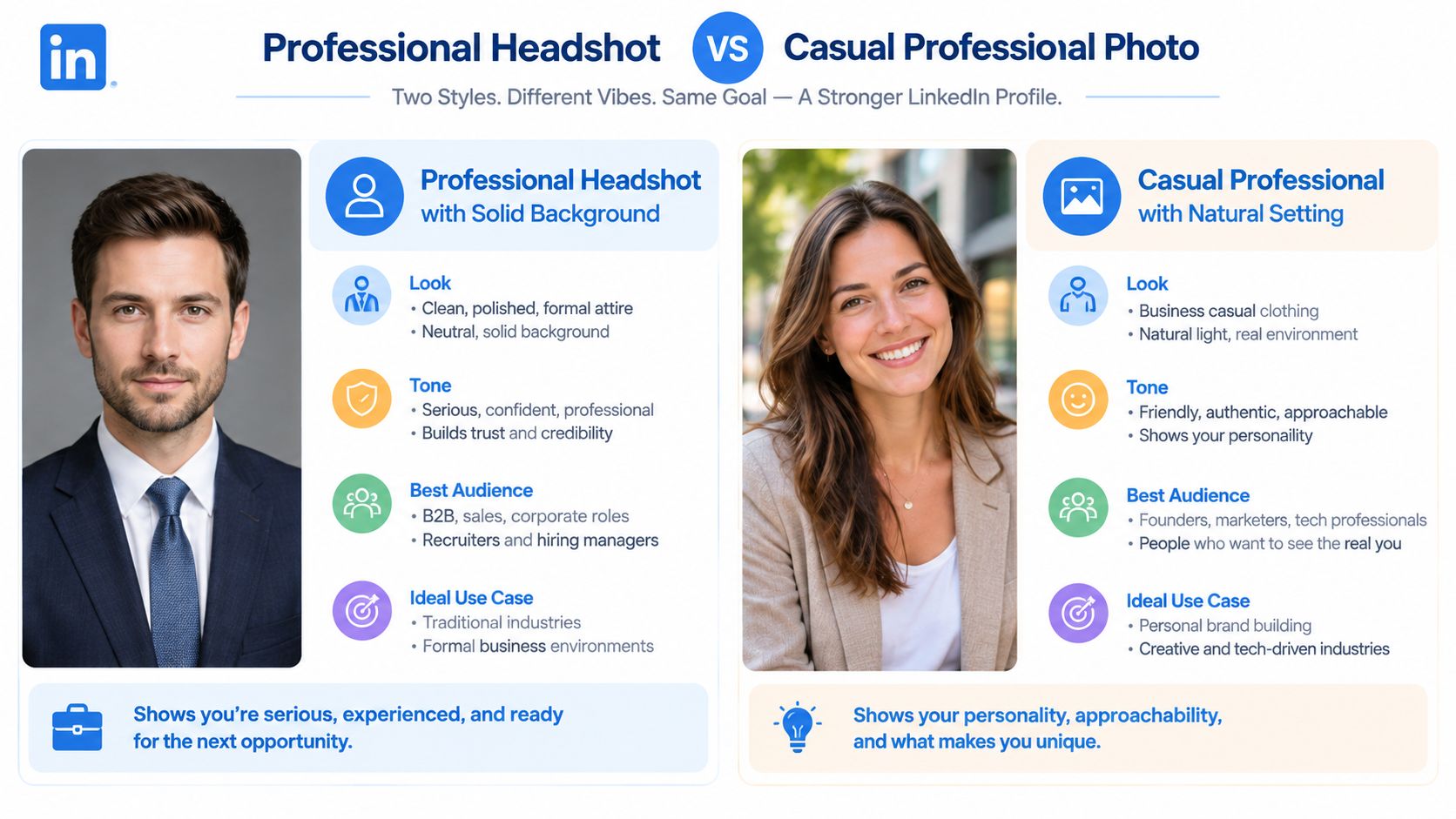
1. Professional Headshot with Solid Background
A plain background is a strategic choice, not a default. By keeping the head and shoulders prominent, it directs attention to your expression and makes the image readable at thumbnail size. That suits recruiters, consultants, executives, lawyers, finance professionals, and sales leaders who need quick recognition before a profile viewer reads further.
The image should resemble your current professional appearance. LinkedIn requires a profile photo to reflect your likeness, and its rules permit an illustration or caricature only when it still represents you. Logos, emojis, animals, stock images, celebrities, and fictional characters may be removed under LinkedIn's profile photo guidelines.

What this image signals
A natural smile, soft light, and current clothing communicate preparation and approachability. LinkedIn's 2026 business resource says profiles with a photo are 14 times more likely to be viewed than profiles without one. The same source associates professional headshots with up to 21 times more profile views and up to 36 times more messages. Read the underlying LinkedIn profile photo data.
The signal changes with the role. Client-facing professionals can use clothing suited to an important meeting, while a technical specialist may choose a less formal version that still looks deliberate. Face a window or use a ring light to reduce shadows. Leave enough space for a head and shoulders crop. A very close frame can feel intense; excessive distance weakens recognition.
Practical rule: Your profile photo should look like you on your best normal workday, not you at a costume party pretending to be a chief executive.
Test the image beside your recent posts. A formal portrait can support relaxed post visuals if the difference appears intentional, while a polished headshot paired with chaotic graphics creates a credibility gap. For branding, hiring, sales outreach, or thought leadership, reuse the same lighting, crop, and color logic in post images so the profile becomes a recognizable entry point. Review this LinkedIn profile optimization guide. Compare framing, clothing, and background options in the Liz by Design Photography headshots gallery before publishing.
2. Casual Professional with Natural Setting
A natural setting can make a profile feel approachable, but it can also weaken professional credibility. Use a bright office, quiet outdoor wall, or simple café corner only when it supports the role. The background is doing useful work when it clarifies your context. If it competes with your face, remove the distraction.
This format fits founders, marketers, community leaders, customer success professionals, and consultants whose work depends on relationships. It signals ease in conversation and practical access to the person behind the title. Business casual clothing and a relaxed posture support that message. A holiday-style snapshot does not.
What this image signals
Context changes the interpretation. A founder near the team workspace may suggest hands-on leadership. A marketing leader outdoors may appear open to new ideas. A consultant in a calm office can look accessible while retaining authority.
The same background can also expose poor judgment. Backlight can obscure your face, while a crowded café can make the image feel accidental. A blazer over a wrinkled T-shirt creates conflicting signals about preparation. Choose simple shapes, muted colors, and enough separation between your head and the background.
Wear clothing one step above your daily norm. Ask someone else to take the photo, since arm-length framing and front-camera distortion often produce a weaker result. Use natural light where possible, then check the image at the small circular size LinkedIn displays. If your expression disappears or the setting dominates, retake it.
Fit the photo to your feed
Your profile image should establish a visual rule that your posts can repeat. Client-work photos, team moments, and useful behind-the-scenes images can carry the same relaxed tone without turning the feed into a personal documentary. Test the combination beside recent posts. If the profile looks warm but the posts are overly formal, the audience receives two different promises.
A LinkedIn profile examples guide can help compare the image with your headline, About section, and featured content. A founder seeking investors may need a tidy environment and focused expression. A creator building community may gain more from a softer smile. Sales outreach may call for direct eye contact, while hiring content can support a more collaborative setting.
Reuse the winning crop, lighting, and color logic in post visuals. Retake the image when your appearance or role changes, so it still resembles the person who appears on a sales call.
3. Action or Lifestyle Photo
An action photo shows your role in context. Speaking at a conference, teaching a workshop, recording a podcast, collaborating with a team, or working beside a product screen can give viewers a useful clue before they read your headline. The strongest image keeps your face identifiable while making the work visible.
This format suits speakers, educators, event organizers, creators, founders, and community builders. It can support a profile built around teaching, hiring, sales outreach, or thought leadership. The setting becomes a liability when it takes attention away from the person or signals a role the rest of the profile does not support.
What this image signals
A speaker on stage signals public communication. A teacher at a whiteboard signals practical expertise. A founder with a team signals collaboration. These cues work only when they match the profile's promise. Someone whose headline says “B2B sales leader” weakens that promise with a photo where a microphone hides the face, unless public speaking is the intended signal.
Choose a genuine working moment rather than a staged pose. Keep the face visible after LinkedIn crops the square image into a circle. LinkedIn guidance commonly recommends keeping the face around 60 percent of the frame, while independent LinkedIn photo guidance explains why the composition must survive both square and circular crops. See the image sizing and cropping guidance.
A strong action photo explains what you do before the viewer reads every word.
Clarity remains the main test. Harsh stage lighting may look effective in a gallery but fail as a small profile icon. View the image as a phone thumbnail. If someone cannot identify you quickly, move the action image to your banner or featured content and use a clearer portrait for recognition.
Match the choice to the audience and repeat its visual logic in posts. A speaker can reuse event images for thought leadership, a founder can use team moments for hiring, and a sales professional can show customer-facing work without making the profile feel like a personal documentary. A conference clip can support the same content system, while the profile photo still needs to identify you.
4. Close Up Portrait with Expressive Emotion
A close-up portrait makes expression the primary signal. It suits coaches, therapists, podcast hosts, media personalities, creators, and professionals whose work depends on emotional trust. The background contributes little, so the face, gaze, and expression must carry the role clearly.
This format can feel direct and human, yet it offers little cover for an inaccurate expression. A relaxed, attentive look can invite conversation. A forced grin can suggest that the image was staged, which weakens the credibility the portrait is meant to build.
What this image signals
The portrait may communicate empathy, confidence, curiosity, or focus. Those signals support roles built around conversation. A coach can reduce perceived distance with a warm expression. A podcast host can appear ready to listen. A personal development creator can seem approachable without using a rigid studio pose.
Composition determines whether that signal survives the profile crop. Keep the eyes sharp and the face evenly lit. Leave balanced space around the head so the circular frame does not cut into important features. The image should show a current likeness and represent you accurately. Check LinkedIn's official photo conditions before applying an artistic treatment or heavy editing.
A good smartphone can produce a usable result when the light is soft and another person takes the photo. Avoid sunglasses, deep shadows, extreme filters, and expressions that conflict with your work. Test the image at thumbnail size. If the eyes disappear or the expression becomes unclear, the close-up is not doing its job.
Match expression to the audience
For hiring, a calm smile may feel safer than a dramatic expression. For sales outreach, direct eye contact can support a sense of trust. For creative thought leadership, a more distinctive expression may improve recognition when posts also use strong visual ideas.
Treat the portrait as the anchor for your written voice and post visuals. A warm face paired with cold, overly formal posts creates friction. A founder can reuse the same lighting and color treatment in hiring posts, a coach can carry the expression into educational graphics, and a sales professional can keep the visual tone consistent across outreach content. Compare profile views, relevant replies, and conversations after testing one expression against another. The strongest version is the one that fits the role and produces clearer audience response, not the one that looks most dramatic.
5. Photo with Your Product or Work
A product photo can provide evidence of what you do, but the object should support your identity rather than replace it. A software founder might stand beside a product screen, an author might hold a book, a designer might show a finished piece, and a consultant might present a framework to a client team. Each choice connects the profile to a role and gives viewers a faster answer to a practical question: what are you known for?
This format fits founders, makers, authors, designers, independent consultants, and product specialists. It can help during hiring, sales research, and founder discovery, provided the work remains identifiable after cropping.
What this image signals
The product supplies context. A dashboard suggests software expertise, a published book points to a body of work, and a workshop board supports a teaching role. The signal weakens when the item is too small, cluttered, outdated, or unclear at thumbnail size. A viewer should understand the connection between you and the work without inspecting the image closely.
Place your face and the work where both remain readable. Keep the background quiet, and light the face before the object. Clothing should support the product's visual identity rather than compete with it. If a bright blue interface fills the frame, a neon blue shirt can create visual noise instead of reinforcing recognition.
The image also has a limited shelf life. A discontinued product can make your profile confusing, while a major role change or new body of work may justify an update. Minor logo changes alone rarely require a new portrait.
Proof beats decoration: If the object does not clarify your expertise at thumbnail size, move it to the banner or Featured section.
Build a reusable visual system
Repeat selected product cues in post images, case study graphics, and sales materials. Keep the profile photo understandable on its own, then carry over a product color, shape, or interface detail in supporting visuals. An AI model outfit e-commerce use case can help teams assess how people, products, and styling appear together, but the profile image still needs to show a real likeness.
For sales outreach, connect the product to posts about a customer problem. For hiring, show the work while the About section explains the role you are building. For thought leadership, use the product as evidence or context, not as a permanent advertisement. Test the photo alongside those post visuals and compare relevant replies, profile views, or conversations. Keep the version that makes your expertise clearer to the intended audience.
6. Brand Consistent Photo with Logo or Color Scheme
A branded photo should strengthen recognition without turning a person into an advertisement. A SaaS founder might wear a brand color, a creator might use a familiar background tone, and a thought leader might repeat a visual style across the profile, banner, and posts. The strategic question is whether the image still identifies the individual at thumbnail size. If the logo or color dominates, viewers may read it as a company asset rather than a credible professional.
What this image signals
Color can help audiences recognize posts in a crowded feed. It can make a founder easier to remember and give a distributed sales team a shared visual language without requiring identical portraits. That signal works only when the person remains the primary subject.
Choose a small palette that contrasts with your face and suits the role you want to attract. Repeat one or two cues in post graphics, case studies, and presentation images. Keep logos restrained. A large logo explains who commissioned the image, but it gives little evidence of your judgment or expertise.
The profile photo must fit the content around it. A clean branded portrait can support posts built around bright diagrams and direct teaching. The same treatment may feel distant beside personal, reflective writing. Consistency means the profile, banner, and posts support the same audience and goal. It does not require identical colors on every surface.
Use LinkedIn banner guidance to align the cover image with the portrait. Review the complete profile on desktop and mobile, since the circular crop can hide a background element on a phone.
Test the photo with the visuals you plan to publish. For hiring, the image should feel credible beside work samples. For sales outreach, it should support a clear customer problem rather than resemble an advertisement. For thought leadership, use branding as context and evidence. Compare profile views, relevant replies, and conversations across versions, then keep the version that makes your role easiest for the intended audience to understand.
6-Style LinkedIn Photo Comparison
| Photo Style | Implementation Complexity | Resource Requirements | Expected Outcomes | Ideal Use Cases | Key Advantages |
|---|---|---|---|---|---|
| Professional Headshot with Solid Background | Medium, controlled studio or pro shoot | Professional lighting, plain backdrop, photographer/editing | Polished, recruiter‑trusted, clear recognition | B2B professionals, recruiters, sales, corporate roles | Universally professional; high credibility and clarity |
| Casual Professional with Natural Setting | Low–Medium, informal shoot, location dependent | Natural light, simple environment, basic photography skills | Approachable, personable, feed‑standout | Founders, marketers, creators, tech employees | Feels human and relatable; good for personal branding |
| Action or Lifestyle Photo | High, capture authentic activity, timing matters | Access to events/projects, skilled photographer, staging | Narrative‑driven, memorable, higher engagement | Speakers, consultants, trainers, entrepreneurs | Shows what you do; strong conversation starter |
| Close‑Up Portrait with Expressive Emotion | Medium, precise framing and lighting | Quality camera or pro photographer, soft lighting | Immediate emotional connection; great at thumbnail size | Coaches, consultants, personal brands, creators | Maximizes facial recognition and trust quickly |
| Photo with Your Product or Work | Medium–High, coordinate person + product display | Product or mockup, purposeful composition, good lighting | Communicates expertise and results; credibility boost | Founders, authors, designers, builders | Instantly shows offerings; differentiates from peers |
| Brand Consistent Photo with Logo or Color Scheme | Medium, requires brand alignment and styling | Brand colors, coordinated wardrobe/background, designer input | Cohesive identity and improved recognition | Personal brand builders, entrepreneurs, creators | Reinforces brand recall; polished, intentional aesthetic |
Pick the Signal You Can Repeat
Choose the solid background when you need broad trust and a style that fits most roles. It's the strongest default for recruiters, executives, consultants, finance professionals, and sales leaders. Choose the natural setting when approachability matters more than formality. It fits founders, marketers, community builders, and client facing professionals who want a human edge.
Choose the action photo when visible work matters. A speaker, teacher, or event organizer can show more context than a static pose, provided the face stays clear. Choose the close up when connection is central to the job. Coaches, therapists, podcast hosts, and creators can benefit from a direct expression that makes the profile feel less distant.
Choose the product photo when proof matters. It helps founders, authors, designers, and makers show what they do. Choose the branded photo when recognition matters, but keep the face and likeness central. A logo can support your identity. It can't perform your job interview.
Test the image before treating it as permanent. View the crop at thumbnail size on a phone. Ask a colleague which role or strength the photo suggests without giving context. If you have access to profile visits or qualified replies, compare changes over time. Change one variable at a time, such as background, expression, or setting. Otherwise, you won't know what caused the difference.
Use these simple templates:
- Personal brand: natural setting, relaxed expression, posts that teach through personal experience.
- Hiring: solid background, clear smile, posts that show team standards and role clarity.
- Sales outreach: close up or clean headshot, direct eye contact, posts that answer buyer problems.
- Thought leadership: action or branded portrait, visible point of view, posts built around repeatable ideas.
ViralBrain can help you study high performing LinkedIn patterns, draft related posts, and review content data. Use it to connect the photo with the content that follows, not to turn your profile into a uniform with a face attached.
ViralBrain helps you study proven LinkedIn content patterns, draft posts that match your voice, and review performance data while you refine your visual identity. Visit ViralBrain to connect your profile photo with a repeatable content system.
Grow your LinkedIn to the next level.
Use ViralBrain to analyze top creators and create posts that perform.
Try ViralBrain free