
LinkedIn Post Draft: Write Posts That Get Read
Write a linkedin post draft that earns real engagement. Hooks, structure, CTAs, tone, and templates you can copy and ship in minutes.
Grow your LinkedIn to the next level.
Use ViralBrain to analyze top creators and create posts that perform.
Try ViralBrain freeOnly around 3 million LinkedIn users post weekly, despite the platform reaching about 310+ million monthly active users. That puts weekly posters at roughly 1% of monthly active users, according to LinkedIn's 2026 statistics update. The feed has plenty of readers, but relatively few regular publishers.
That changes how you should think about a LinkedIn post draft. You aren't competing with every user at every moment. You're competing for attention in a crowded feed where a small group publishes repeatedly. A weak opening gets ignored. A sharp draft earns the chance to be read, discussed, remembered, and acted on.
Why Your LinkedIn Post Draft Matters More Than You Think
Most people treat drafting as admin work. They write something, tidy the grammar, add a call to action, then publish. That process misses the job. A draft is an attention bet. It decides whether someone stops, reads past the preview, engages, visits your profile, or moves on to a post about someone's heroic morning routine.
The small publisher pool makes quality more valuable. When many people read but relatively few post weekly, a credible, useful idea has room to stand out. That doesn't mean every good post will spread. It means the draft remains one of the few levers you control before distribution begins.
Three quiet draft killers
Most failed drafts don't fail because the writer lacks expertise. They fail in predictable ways.
- They write for everyone. A post aimed at founders, recruiters, sales teams, designers, and students usually gives none of them a reason to care.
- They lead with credentials. “After ten years in sales” is background. It isn't a stake. Readers want the problem, cost, conflict, or useful conclusion first.
- They skip the preview line. The strongest point gets buried after several soft sentences. By then, the reader has already left.
A useful draft makes the reader's next action easy. The opening creates interest. The body pays off the claim. The close gives that attention somewhere to go.
Practical rule: Draft for one reader with one problem, then make the first lines prove why the problem matters.
LinkedIn engagement benchmarks show why structure deserves serious attention. One 2026 benchmark places average engagement at 5.20%, with an 8% year over year increase, while native document posts reached 7.00% and text posts reached 3.95% in Q2 2026 in the same reporting from Socialinsider's LinkedIn benchmark. Those figures don't guarantee results, but they do show that format and structure affect what happens after publishing.
Your draft can support profile visits, inbound leads, follow conversions, and sales conversations. To connect those outcomes to actual performance, use a measurement framework such as this guide to measuring content performance. Treat the post as an asset with a job, not a chore to clear from your task list.
Hook First, Everything Else Second
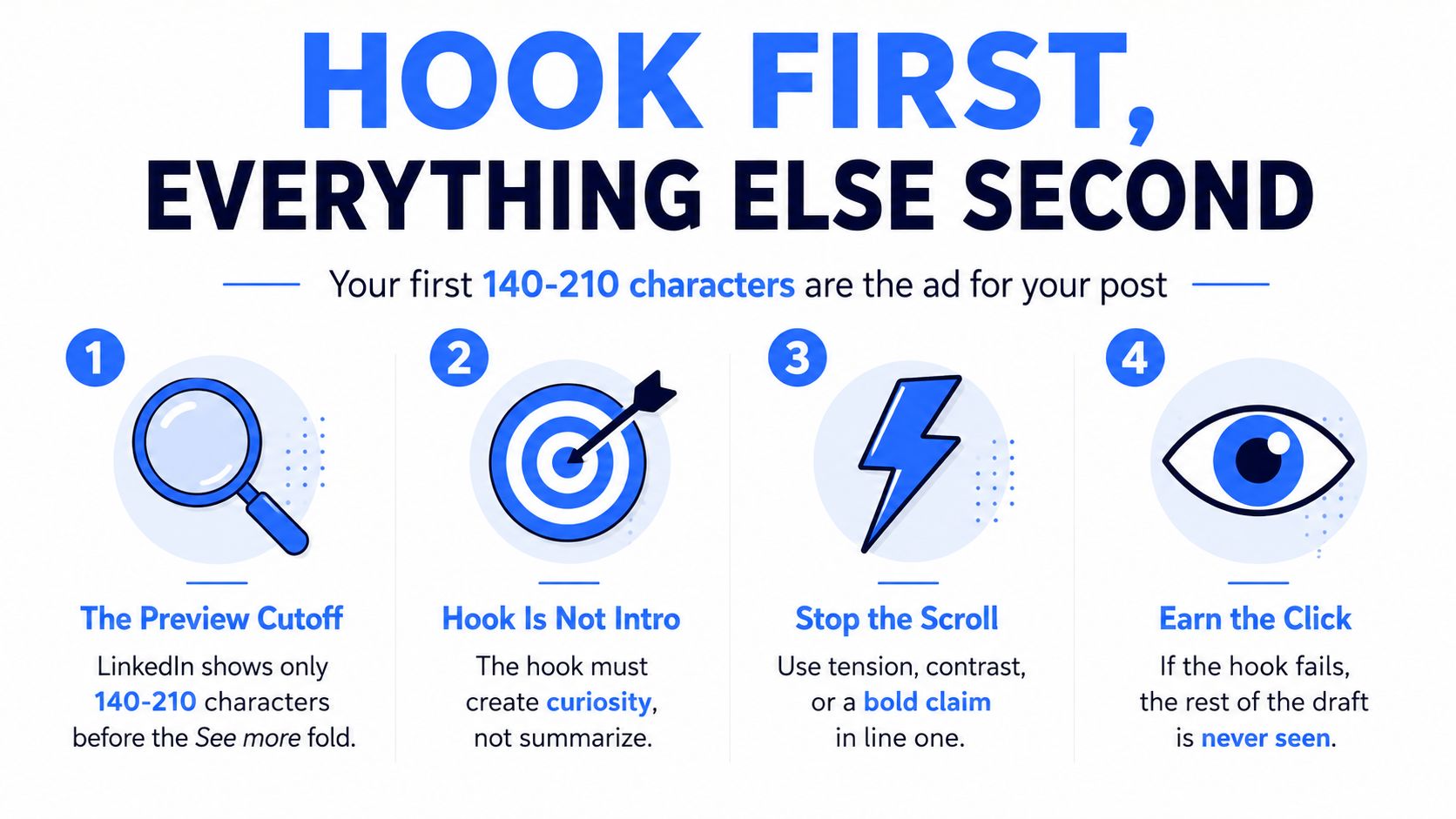
LinkedIn's visible preview often cuts off after roughly 140 to 210 characters, depending on the device, according to LinkedIn character limit guidance. That makes the opening line your most valuable space.
The hook isn't an introduction. It's the ad for the rest of the post. It needs to create tension, show stakes, offer something specific, and make the next line feel necessary.
Four hook patterns worth rotating
Contrarian claim
Weak: “Leadership is important for every company.”
Stronger: “Most leadership advice creates slower teams because it rewards activity instead of decisions.”
The first line states a familiar truth. The second creates disagreement and promises an explanation.
Lived failure
Weak: “Here are lessons from hiring.”
Stronger: “I hired the wrong VP because the interview felt impressive. The warning sign was visible before the first call ended.”
The rewrite gives readers a failure, a person, and a reason to continue.
Quantified result
Weak: “We improved our sales process.”
Stronger: “We removed one approval step from sales proposals, and the team stopped losing deals to internal delays.”
Use a number only when it's real and supportable. Otherwise, describe the result plainly. Fabricated precision is still fabrication, even when it looks professional.
Direct question
Weak: “Here are five tips for leadership.”
Stronger: “Why do smart managers keep promoting people who avoid hard decisions?”
The second version creates a clear problem. The body now has a job, explain the pattern and offer a better choice.
Run the preview trim test before publishing. Cut the draft after the first sentence, then after the first 140 characters. If the remaining opening sounds like a polite throat clear, rewrite it. More examples of this process appear in this guide to writing a good hook.
The body should deliver the promise set by the hook. A bold claim needs evidence or reasoning. A failure story needs the lesson. A question needs a useful answer, not a dramatic pause followed by generic advice.
LinkedIn allows up to 3,000 characters in a standard post, including spaces, punctuation, and emojis, according to LinkedIn's official post limit. That is room for substance, not permission to fill every inch. Use the space only when the idea earns it.
The opening comes first. Everything else exists to justify it.
Pick the Right Format Before You Write a Word
Format selection changes the draft itself. A text post needs rhythm and readable spacing. A document needs slide logic. A video needs a spoken script. An image needs a visual idea that survives without a paragraph doing all the work.
Benchmarks provide useful direction, but they don't remove trade-offs. A large 2026 compilation puts median LinkedIn engagement at 2.29% and the 90th percentile at 7.65%, meaning top-decile posts earn about 3.3 times the engagement of the median post, as reported by ContentIn's LinkedIn benchmark analysis. The gap suggests that structure matters, not that one format wins every situation.
LinkedIn post formats compared
| Format | Median Engagement | Top-Decile Engagement | Best Drafted For |
|---|---|---|---|
| Text | 2.29% | 7.65% | Hot takes, lessons, concise arguments |
| Document | 2.29% | 7.65% | Frameworks, numbered ideas, swipeable teaching |
| Image | 2.29% | 7.65% | Quotes, visual proof, simple comparisons |
| Video | 2.29% | 7.65% | Personal trust, demonstrations, lived explanation |
The table uses the overall median and top-decile benchmarks as a drafting reference, not separate format-specific figures. A benchmark from Socialbee's LinkedIn statistics review reports native document posts at 7.00% engagement, which supports treating documents as a serious option when the idea benefits from pages or slides.
Use text for a sharp opinion or a lesson that fits cleanly into a short narrative. Text is fast to produce, easy to edit, and strong when the writer's reasoning carries the post.
Use a document when the idea has steps, categories, a framework, or a sequence. Each page becomes a small promise. The cost is higher production effort, plus the risk of turning a simple idea into a badly designed presentation.
Use an image for a quote, visual comparison, or proof point. The design should clarify the idea, not compete with it. If you need extensive design work to make the point readable, the format is probably wrong.
Use video when trust depends on your face, voice, demonstration, or personal story. Video can feel more human, but scripting and recording take time. That cost is real. Treat it as a production choice, not an automatic upgrade.
If your profile needs consistent visual assets, a batch headshot workflow guide can help you prepare images before drafting. The decision rule is simple. One sentence means text. A list or framework means document. A face led explanation means video. A quote or proof point means image.
Two Drafts You Can Steal and Adapt Today
Templates work when they expose the mechanics. They fail when people copy the surface and ignore the idea underneath.
Draft A, a text post about remote work
Draft
Remote work didn't make weak managers worse.
It made their weaknesses visible.
Before remote work, a manager could hide behind meetings, office presence, and quick desk conversations.
Remote teams remove that cover.
People notice when priorities change every day.
They notice when feedback arrives late.
They notice when the manager measures activity instead of outcomes.
The fix isn't another status meeting.
Give the team three things:
A clear outcome.
A named owner.
A decision deadline.
Then judge the work against those conditions.
Remote work doesn't remove management. It removes the camouflage.
What management habit became impossible to hide on your team?
The hook is the first two lines. They challenge the usual claim that remote work causes management problems. The body stays with one idea, weak management becomes easier to see when presence is no longer mistaken for performance.
The CTA earns its place because the post discusses an observable workplace problem. It doesn't ask for random opinions about remote work. It asks readers to name a related management habit.
Adapt it three ways:
- Industry swap: Replace remote work with customer support, product launches, or sales forecasting.
- Seniority adjustment: For executives, focus on operating systems. For new managers, focus on daily decisions.
- Tone shift: Make it warmer by adding a brief personal observation. Make it blunter by removing the softest sentence.
Draft B, a document about pricing
Caption
Most pricing problems start before the price reaches the proposal.
Use this three step framework to find the leak.
Swipe through.
Document pages
Page 1: Your pricing problem may be a packaging problem
Page 2: Step one, define the costly outcome
Page 3: Step two, separate essentials from options
Page 4: Step three, price the decision, not the hours
Page 5: If buyers compare hours, your offer may be too vague
Page 6: Make the outcome visible before you discuss the number
The caption stays short because the document carries the teaching. Each page title acts as a sub hook. A reader who skips the caption still understands the sequence.
Adapt this draft for your market by changing the outcome, the buyer, and the evidence. A consultant can use saved executive time. A SaaS team can use reduced manual work. A freelancer can use a defined deliverable instead of an hourly bundle.
Keep the structure, but don't copy claims you can't defend. A clean framework with weak substance is just a tidy way to waste someone's swipe.
CTAs and Tone That Match Your Voice
A CTA should match the reader's level of commitment. Asking for a thoughtful comment after a complex document can feel like homework. Asking someone to save a practical framework makes more sense. The close should continue the post's logic, not suddenly turn into a sales department.
| CTA Type | Best For | Avg Lift | Watch Out For |
|---|---|---|---|
| Comment prompt | Text posts and personal lessons | Not established | Empty questions |
| Save prompt | Frameworks and checklists | Not established | Asking readers to save weak material |
| Share trigger | Useful team advice | Not established | Guilt or forced tagging |
| Soft pitch | Relevant tool or service | Not established | Hiding the commercial intent |
| Direct ask | Clear buying or contact intent | Not established | Asking too early |
No verified data supports a numerical average lift for these CTA types, so the table avoids invented figures. The practical ranking depends on the format and the effort required from the reader.
A question CTA often fits a text post because it invites a personal example. A document may work better with “Save this for your next pricing review,” because the asset has future use. Neither rule is universal. Test the match between the close and the content.
Keep the voice, change the posture
Tone isn't a costume. Adjust sentence length, vocabulary, and vulnerability without pretending to be a different person. A founder can sound credible without writing like a policy document. A marketer can sound direct without turning every line into a performance.
Corporate: “Our organization implemented a revised approach to customer onboarding.”
Creator: “We changed onboarding after customers kept getting stuck in the same place.”
Corporate: “This methodology may improve decision making across teams.”
Creator: “The team made faster decisions once one person owned the call.”
Corporate: “We experienced challenges during the launch phase.”
Creator: “The launch exposed a problem we'd ignored for months.”
The creator versions use concrete actors and shorter sentences. They keep credibility by naming the change and the consequence. For more guidance on keeping personality consistent, use this guide to voice and tone in writing.
The Post Publish Checklist That Protects the Draft
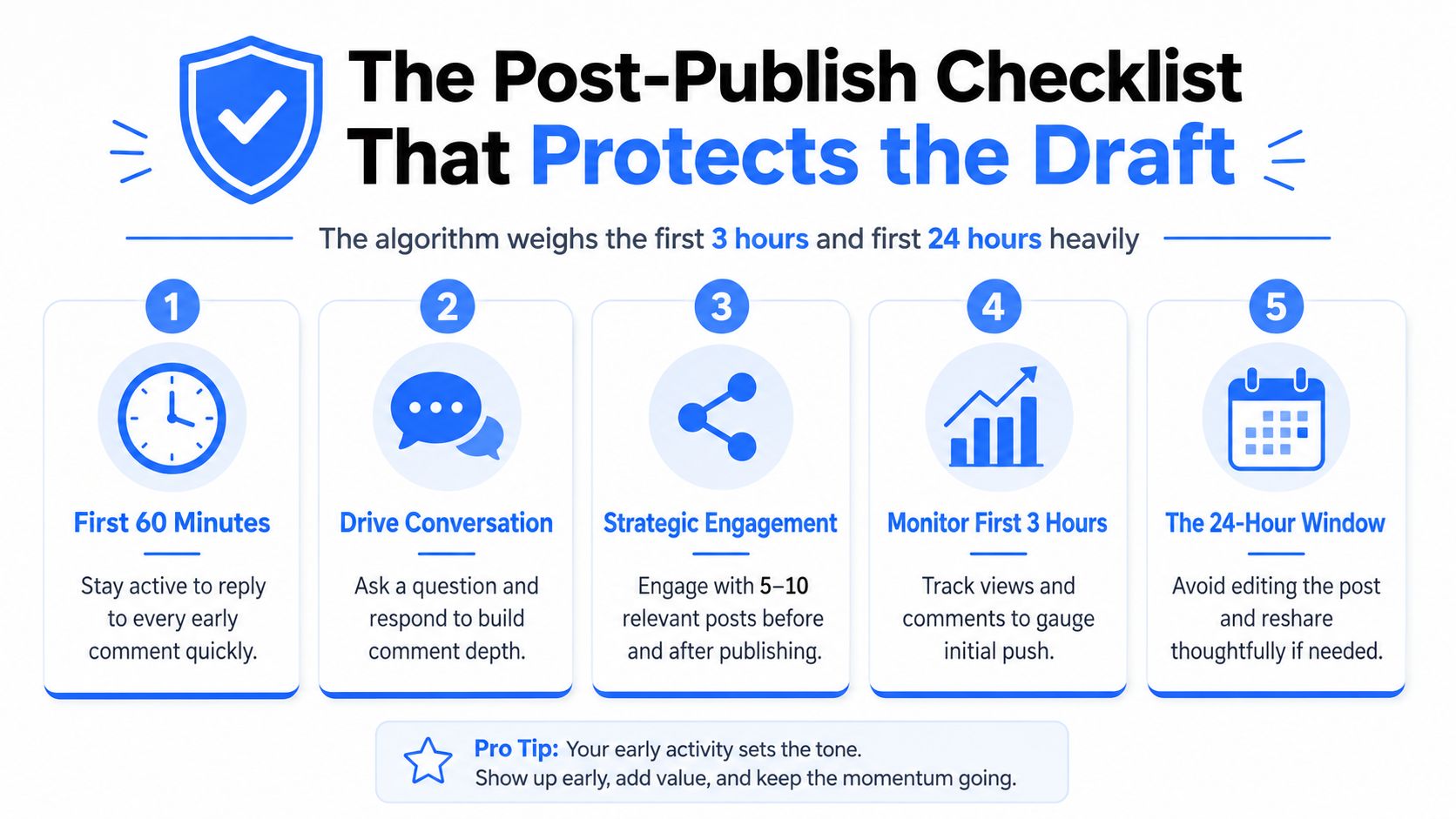
A post isn't finished when you press publish. The first hours matter because early reactions help determine whether the post receives broader distribution. One 2026 industry analysis reported that half of a post's impressions occur within the first 48 hours, as described in Socialinsider's LinkedIn benchmark report. Treat publication behavior as part of the draft plan.
LinkedIn guidance also warns against editing a post in the first 3 hours and recommends answering comments within 24 hours, according to this 2026 LinkedIn posting update. The point isn't to stare at analytics like a nervous day trader. It's to avoid damaging a post before it has had a fair chance to travel.
First 60 minutes
Stay available. Reply to early comments with substance. A reply that adds an example or asks a relevant follow up creates a better conversation than “Thanks for sharing.”
Avoid spammy tagging. Mention people only when the post involves their work or perspective. If the post is a flagship piece, pinning it to your profile can help visitors find it later.
First 24 hours
Answer comments within the day, with priority given to the earliest replies. Don't edit the post during the initial three hour window. Fix obvious mistakes later only when the correction matters more than the disruption.
After the first week
Review the comments for a useful follow up. A strong comment can become the seed for another draft. If the post underperforms, inspect the hook, format, audience fit, and distribution behavior before blaming the topic.
Publishing rule: The draft includes the opening, the body, the CTA, and the plan for what you'll do after publishing.
Use this screenshot friendly version:
- First 60 minutes: Stay active and answer early comments.
- Conversation: Add useful replies, not empty thanks.
- Strategic engagement: Engage with relevant posts before and after publishing without spamming.
- First 3 hours: Don't edit the post.
- First 24 hours: Reply to comments and review the early response.
ViralBrain helps turn proven LinkedIn patterns into drafts for your topic and voice. Its workspace supports hook refinement, format planning, repurposing, previews, saved drafts, and analytics, so you can improve the post before publishing rather than improvising inside the composer.
If your LinkedIn post drafts feel inconsistent, use ViralBrain to shape the hook, structure, format, and CTA before you publish. Build a repeatable drafting workflow, review the final post, then publish with a clear plan for the first day.
Grow your LinkedIn to the next level.
Use ViralBrain to analyze top creators and create posts that perform.
Try ViralBrain free