
LinkedIn Post Hook Generator: What It Is and How to Use It
Learn what a LinkedIn post hook generator is, why hooks decide reach, and how to use AI to write scroll stopping openers that match your voice and goals.
Grow your LinkedIn to the next level.
Use ViralBrain to analyze top creators and create posts that perform.
Try ViralBrain freeA LinkedIn post can have a useful idea, solid evidence, and a clean conclusion, then die because the first line arrived wearing beige office clothes.
That first line now sits inside a format sensitive feed. Socialinsider's 2026 benchmark, based on 1.3 million posts, found average LinkedIn engagement at 5.20%, up 8% year over year. Native documents led with 7.00%, while text posts averaged 4.50%. Engagement also rose across videos, images, and text posts, which means structure matters before anyone reaches the clever part of your post. Socialinsider's 2026 LinkedIn benchmark gives the useful correction to most hook advice: the opening isn't decoration. It helps decide whether the rest gets a fair chance.
A LinkedIn post hook generator can reduce the blank page problem. It can't replace judgment, proof, or a human voice. Used well, it gives you several sharp starting points. Used lazily, it produces the same warmed over “unpopular opinion” line that readers have already ignored twelve times today.
What a LinkedIn Post Hook Generator Actually Does
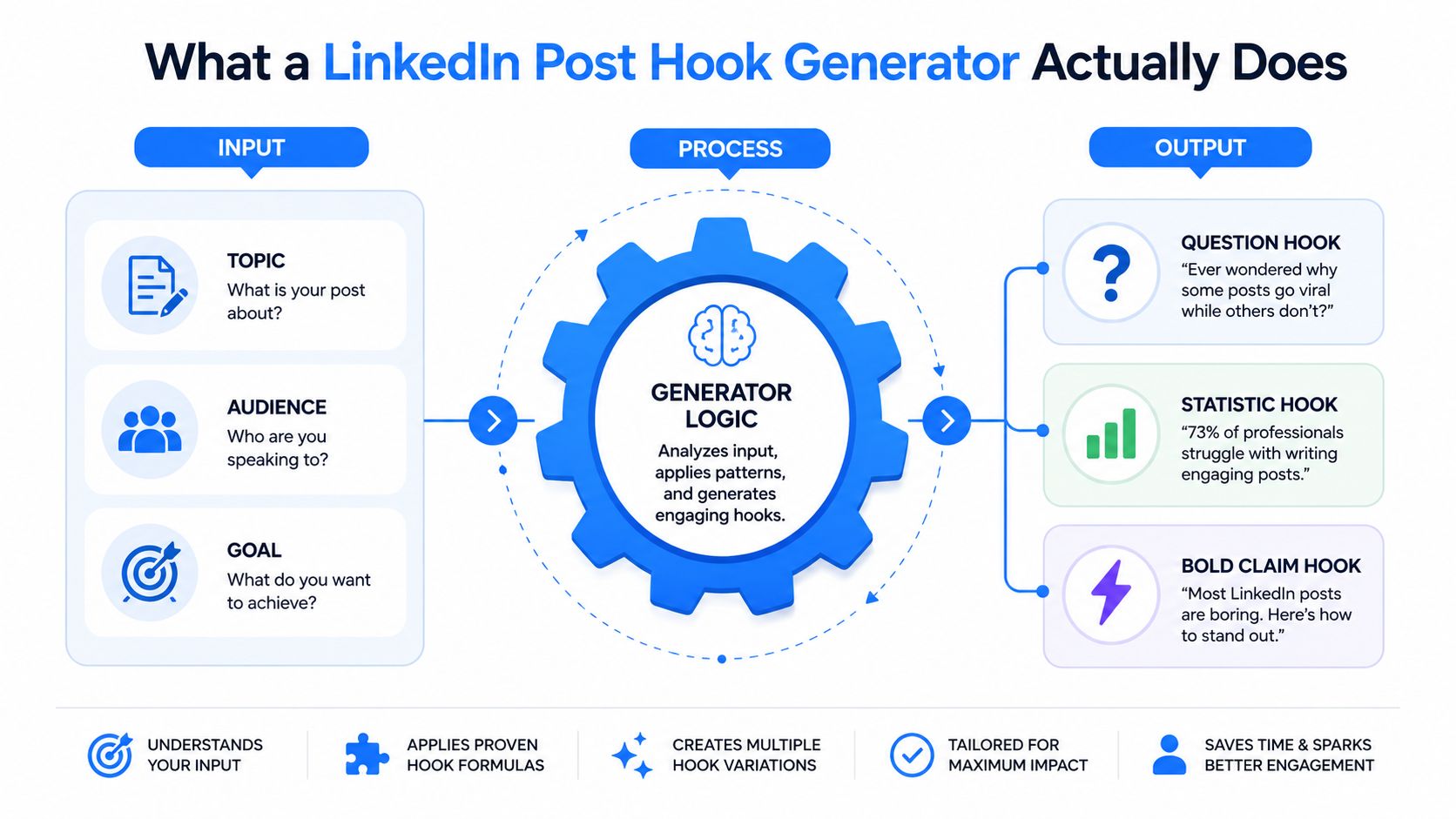
A hook generator is a feed survival tool. It takes your topic, audience, angle, and goal, then returns possible first lines that aim to fit the visible part of the post before truncation.
That changes the job. You aren't asking a machine to write your whole point. You're asking it to give you options for the sentence carrying the most pressure. You still decide whether the line is true, specific, useful, and connected to the post below it.
Start with better inputs
A vague input creates vague output. Feed the generator these details:
- Topic: State the subject in plain language, such as sales onboarding, founder hiring, or content repurposing.
- Reader: Name the person, not a broad crowd. A sales leader at a SaaS company gives the tool more to work with than “business owners.”
- Goal: Decide whether you want replies, saves, qualified conversations, or attention for a point of view.
- Angle: Choose story, question, contrarian, tactical, statistic, or admission.
- Limits: Add a character target, a word target, or a request to avoid emojis and familiar AI phrases.
The tool then matches your inputs against patterns found in existing openings. Some products use a library of labeled examples. Others generate new lines from learned language patterns. Neither approach knows whether your claim is accurate or whether you have earned the right to make it.
Try a focused tool such as the ViralBrain LinkedIn hook generator, then treat every result as a draft. Pick the line that best fits the evidence you have. Don't pick the one that sounds most dramatic.
The useful output is choice
A good generator compresses a blank page into a comparison. You might get a question, a story opening, a specific claim, and a blunt observation from one prompt. That lets you test the angle before spending time on the full post.
The value isn't “AI wrote my hook.” The value is “I can see four plausible openings, reject three, and improve the fourth.” That small shift keeps the writer in charge.
Why Hooks Decide Whether a LinkedIn Post Lives or Dies
A LinkedIn post can contain strong advice and still disappear before readers reach it. The visible first line determines whether someone recognizes a relevant problem, expands the post, or keeps scrolling. A hook earns that decision only when it creates interest without promising more than the body can prove.
Research recommends keeping the first line within 8 to 12 words. Lines longer than 15 words may be cut off on mobile, and click to expand can fall by up to 40%. Direct question hooks outperform declarative hooks by 34% on that measure, according to research on LinkedIn hook engagement and mobile truncation. Treat those findings as feed-survival guidance, not a formula. A short opening gives the reader enough context to understand the tension before truncation removes it.
The first-line cutoff changes the writing
A working hook passes three tests:
- The reader understands it without the next line.
- It creates a specific reason to continue.
- The body proves, explains, or develops its promise.
A story hook can begin with a mistake. A tactical hook can name an expensive process. A question hook can expose a problem the reader has felt but not clearly framed. The format matters less than the connection between the opening, the intended reader, and the post that follows.
Length also affects how much room the post has to earn attention. A six month analysis found hooks under 60 characters had a 0.422% engagement rate, compared with 0.191% for hooks over 250 characters. The same analysis associated stronger posts with 1,000 to 1,800 characters, line breaks, a direct question at the end, and no links in the body. Stan Store's LinkedIn engagement analysis supports a practical rule: keep the opener compact, then give the idea enough space to justify the initial click.
A generator is useful here because it can show several openings for the same post. It cannot decide whether the promise matches your evidence.
Stop-scrolling is not the same as value
A sharp hook may win the expand click and still lose the reader. If the opening sounds louder than the evidence, the post feels like a bait-and-switch. That experience lowers trust in the next post before it is even read.
A 2026 analysis of 309,614 posts found story hooks had the highest median engagement at 2.60%, while question hooks ranked last at 2.16%. The analysis of LinkedIn hook styles demonstrates why no style deserves automatic preference. Questions can work when they name a real tension. Generic questions become polite wallpaper.
The table below stays qualitative because the available evidence does not provide verified average reactions, comment rates, or save rates by hook type. Adding precise figures would turn an information gap into false strategy.
| Hook Type | Avg. First Hour Reactions | Comment Rate | Save Rate |
|---|---|---|---|
| Story | Not established in the verified data | Not established in the verified data | Not established in the verified data |
| Question | Not established in the verified data | Not established in the verified data | Not established in the verified data |
| Contrarian | Not established in the verified data | Not established in the verified data | Not established in the verified data |
| Specific claim | Not established in the verified data | Not established in the verified data | Not established in the verified data |
For a practical breakdown of first-line structure, read this guide to making a good LinkedIn hook. Use the generator to produce candidates, then choose the one your post can substantiate and readers can remember. A line that earns attention but gives no reason to save the post is only half the job.
How AI Turns Patterns Into Scroll Stopping Openers
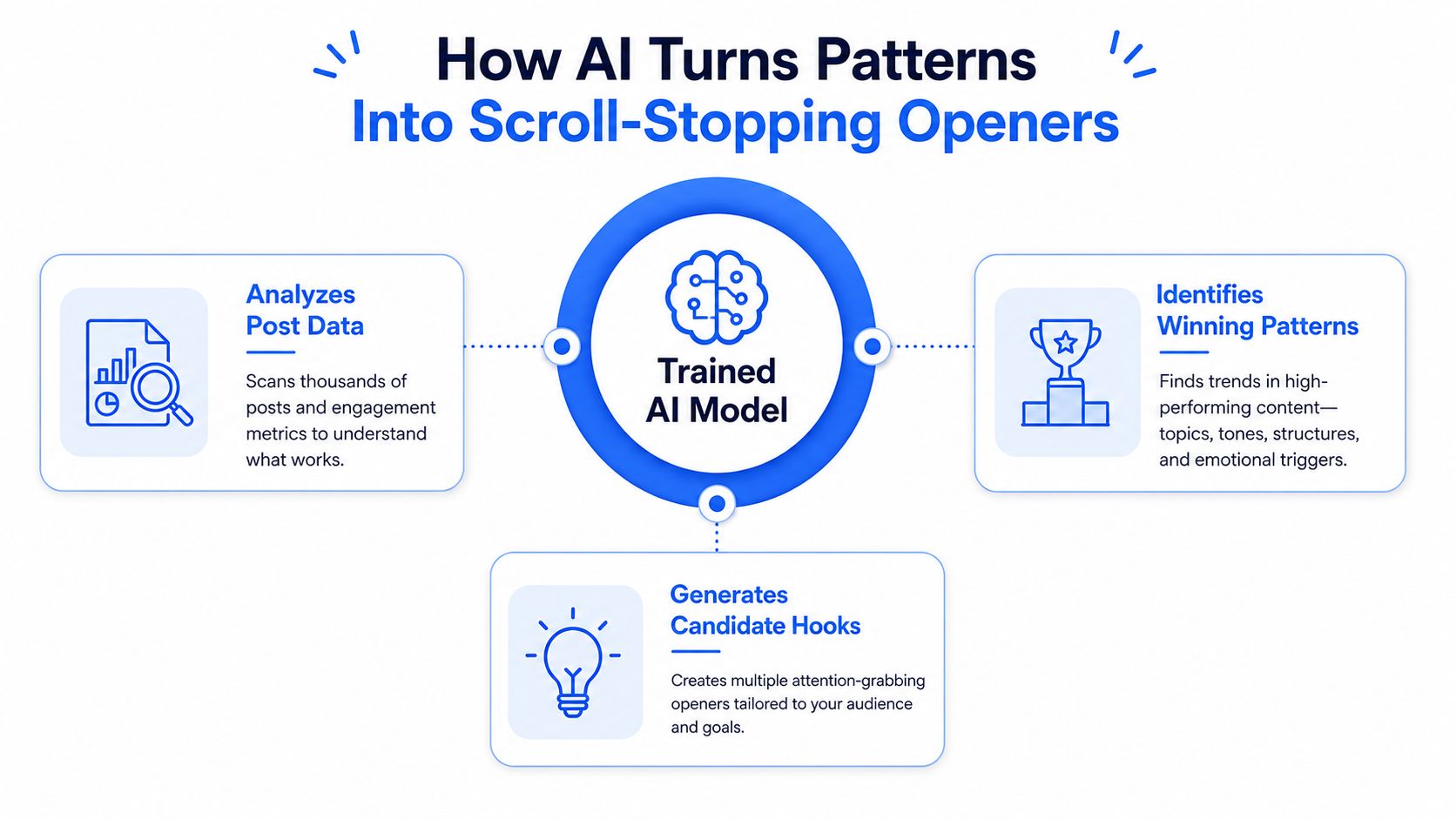
AI hook tools don't understand your audience in the human sense. They recognize patterns in language and use your prompt to select or produce a likely continuation.
You provide a topic, reader, tone, and sometimes the body of the post. The model compares those signals with patterns from its training data. It may notice that a story opening often begins with a concrete event, that a contrarian line uses a reversal, or that a tactical hook names a problem before offering a fix.
Two common tool types
Retrieval based tools pull from a labeled collection of examples. They can be consistent and fast. Their weakness is overfitting. Give them a familiar topic and you may receive a familiar template with a few nouns swapped.
Generative tools build a new line from learned patterns. They offer more variety, but they can wander. The sentence may sound fresh while making a claim you can't support. It may also drift away from your voice because the model is optimizing for plausible language, not personal history.
The difference matters when you review output. A retrieval tool needs close attention to repetition. A generative tool needs close attention to truth and specificity. Both need editing.
Watch the process in this short explanation before using a generator for larger batches.
The model doesn't know what you actually did
If the output says you changed a process, lost a customer, interviewed a candidate, or found a pattern in your data, check that you can defend the statement. A hook generator can produce a convincing first line without knowing whether the event happened.
Give it raw material. Include the mistake, the observed pattern, the buyer objection, or the result you can document. Then ask for variations. The more concrete the source material, the less room the tool has to fill gaps with empty confidence.
Practical rule: Use AI for angle generation. Use your own experience for proof.
The final hook should sound like something you would say before a meeting, not something assembled from the average of ten thousand posts. That distinction is where most tools stop helping.
Matching Hook Styles to Founders, Marketers, and Sellers
The right hook depends on what the post needs to do. A founder usually sells judgment. A marketer often earns attention for an idea. A seller needs the right buyer to recognize a problem quickly.
Founders need earned conviction
Founders can use hooks built around a decision, a reversal, or an honest mistake.
- “We built the feature customers kept avoiding.”
- “I hired for experience and got the wrong signal.”
- “Our best product decision looked bad in the planning meeting.”
Feed the generator the decision, the original belief, the evidence that changed it, and the reader you want to reach. Ask for story, contrarian, and admission angles. The failure mode is theatrical vulnerability. A confession with no lesson is still a performance.
Marketers need tension before the lesson
Marketers often have useful observations buried under campaign language. Give the generator the audience, the problem, the pattern you noticed, and the action you want readers to take.
Possible structures include:
- A surprising contrast between what teams measure and what buyers notice.
- A curiosity gap around a failed campaign decision.
- A tactical opening that names the part of the workflow many teams skip.
The mismatch appears when a brand awareness post opens like a sales pitch, or when a thought leadership post hides its point behind a generic question. “Want better marketing results?” tells nobody anything. Specificity does the work.
Sellers should name the buying situation
Sellers benefit from hooks that identify a role, trigger, or pain point. The reader should know quickly that the post concerns a problem they recognize.
- “Sales leaders, your new reps aren't losing on the demo.”
- “A missed renewal usually starts before the customer complains.”
- “If your buyer goes quiet after pricing, check this part of the call.”
Give the generator the job title, industry, trigger event, objection, and useful takeaway. Don't ask for “a viral sales hook.” Ask for a line aimed at a specific buyer facing a specific moment.
| Persona | Best Hook Patterns | Input to Feed Generator | Common Failure |
|---|---|---|---|
| Founder | Decision, reversal, admission | Real choice, belief, evidence, audience | Manufactured vulnerability |
| Marketer | Contrast, curiosity gap, tactical observation | Campaign context, audience, lesson, goal | Generic brand language |
| Seller | Role specific pain, trigger event, objection | Buyer role, industry, moment, response | Broad claims that fit nobody |
The hook should attract the person who can use the post. Broad reach is less useful when the wrong audience does all the clapping.
Choosing a Hook Generator Without Picking AI Slop
A polished interface proves very little. Many tools are a text box connected to a general model, wearing a small hat.
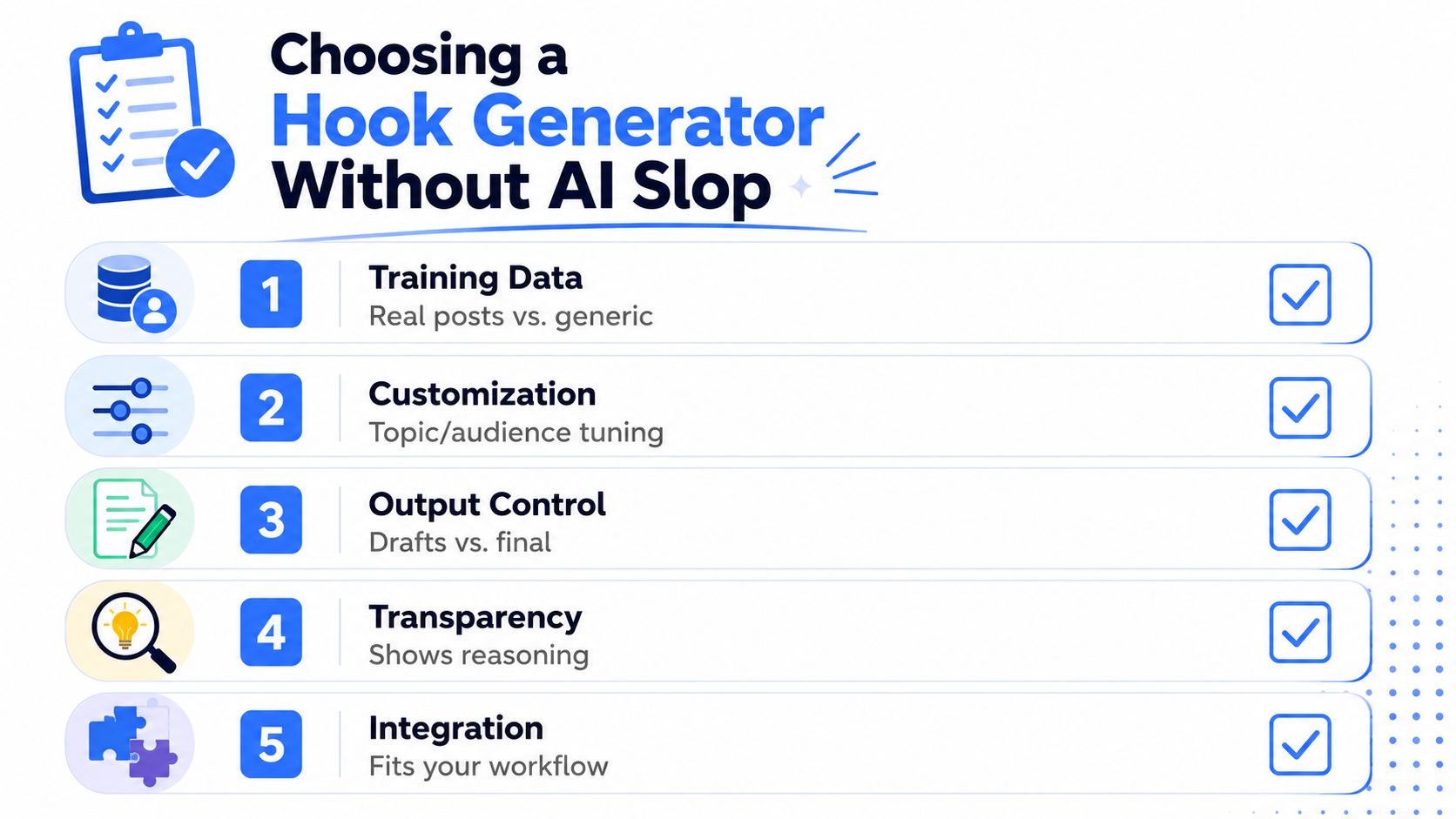
Use five checks before paying for anything. You can run them during a free trial or a short product demo.
Training data comes first
Look for a clear explanation of what the tool learns from. A product focused on LinkedIn should show how it uses relevant posts, patterns, or examples. A vague claim about “advanced AI” tells you nothing.
Ask for hooks about a narrow B2B topic. If the output sounds like a general business blog, the tool probably hasn't learned enough about your setting. The LinkedIn AI slop discussion is a useful reminder that fluency and usefulness aren't the same thing.
Controls should affect the result
A useful generator lets you specify the reader, angle, voice, outcome, and restrictions. Change one input and see whether the output changes in a meaningful way. If every result keeps the same structure, the controls are probably cosmetic.
Variety must mean different thinking
Ask for ten hooks. Don't count punctuation changes as variety. You want different routes into the same idea, such as a story, a specific observation, a question, and a direct claim.
Feedback beats a pile of text
A generator that remembers what you selected, compares patterns, or connects hooks to later results gives you a learning loop. A tool that only hands you sentences may still help, but it won't tell you why one option deserved attention.
Authenticity needs active editing
The product should help you remove familiar AI signals, including repeated balanced phrasing, inflated claims, and empty words such as “game changing.” Be wary of any tool that presents its first draft as ready to publish.
Before committing, run this short test:
- Same topic: Generate hooks for one real post.
- Changed audience: Switch from founders to sales leaders.
- Changed angle: Request story, then contrarian.
- Voice check: Add a sentence you wrote.
- Editing check: Ask the tool to remove filler and keep the claim precise.
For teams that need broader AI search visibility alongside content work, best ai visibility agency for saas is a separate resource worth evaluating. It solves a different problem, so don't confuse visibility work with hook writing.
A good tool makes your decisions faster. It doesn't make decisions disappear.
Customizing Generated Hooks Until They Sound Like You
The first output is usually too smooth. Smooth is where personality goes to take a nap.
Start by cutting the throat clearing. Remove phrases such as “in today's fast paced world,” “game changer,” and “I want to share.” They consume valuable space without adding information. Replace a vague claim with the detail your reader can picture, such as the meeting, process, objection, or deadline involved.
Use a five minute rewrite pass
Read the hook aloud. If you wouldn't say it to a colleague, change it. Then run this sequence:
- Cut the setup. Start at the moment where the decision or tension appears.
- Add the stake. Say what changed, failed, cost time, or exposed a mistake.
- Add a concrete detail. Use a name, timeframe, count, role, or observed result only when it's true.
- Trim the line. Keep the opening within the practical 8 to 12 word range recommended by LinkedIn hook engagement research.
- Read the body. Make sure the post earns the promise in the first line.
Use prompts that force useful constraints:
- “Rewrite this as if I said it aloud to a friend.”
- “Cut this to under 12 words and keep the tension.”
- “Give me three versions using my specific evidence, with no hype.”
Keep your fingerprints
Voice markers can be small. A short sentence. A blunt verb. A recurring point of view. A phrase you use naturally. Add one or two, not a costume.
Don't publish the first draft. Don't paste the same hook structure across every post. Don't let the generator choose the topic. It should shape the entrance, not decide what you believe.
The strongest edit often removes the clever part. If the line becomes clearer after you delete half of it, the tool did its job by giving you something to cut.
A Simple Operating Routine and Common Questions
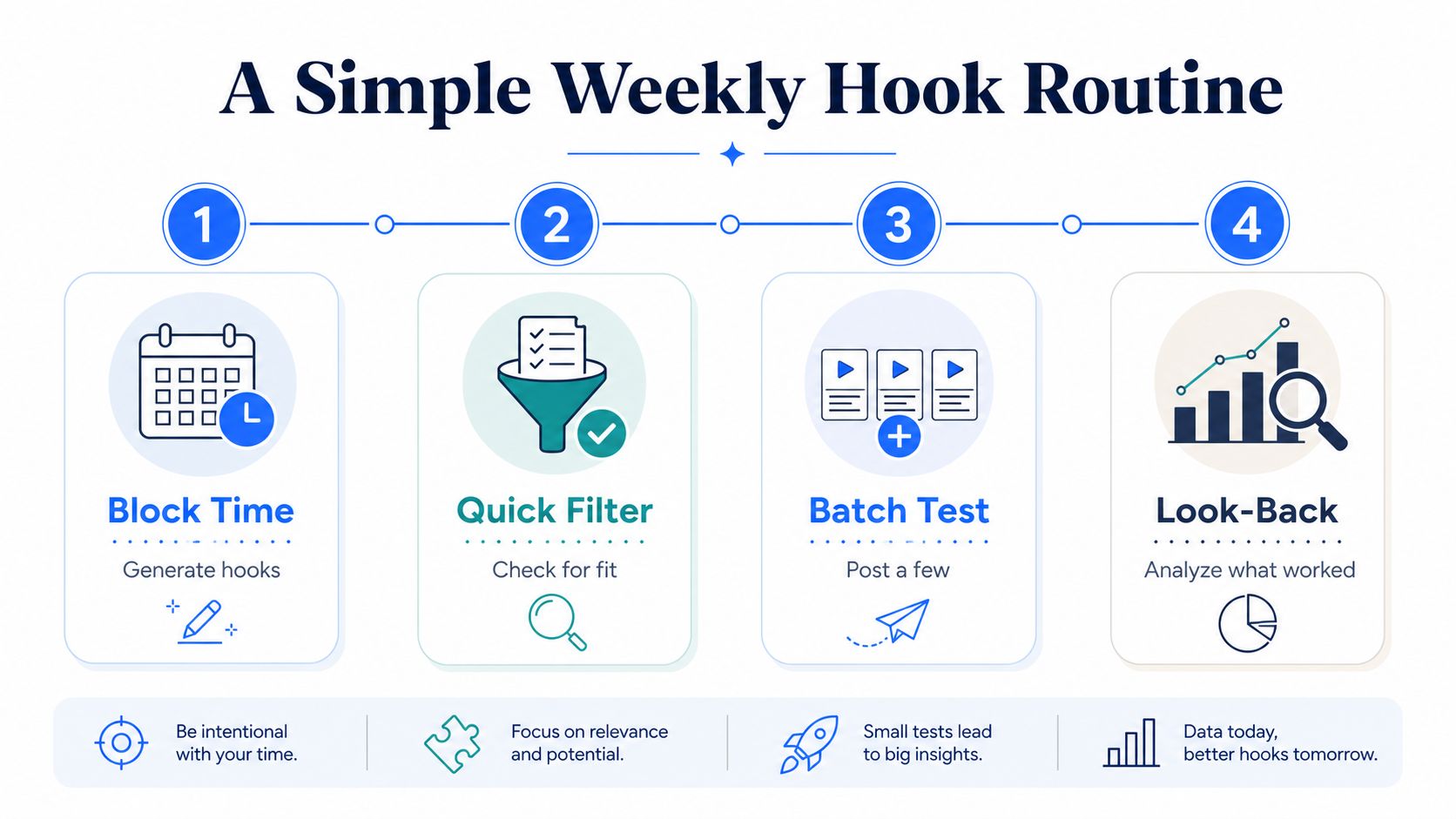
Reserve one weekly block of roughly 30 to 45 minutes for hook work. Start with posts you already plan to publish. Generate several opening angles, reject claims you cannot support, and test a small batch. At the end of the week, review which first lines earned replies, sustained reading, or saves. The goal is feed survival: make the opening clear before mobile truncation, then make the post useful enough to keep.
A 1,000 post analysis found that posts between 180 and 350 words earned the highest average engagement at 454 interactions. Posts under 30 words averaged 390 interactions, while posts between 30 and 80 words averaged 175 interactions. The LinkedIn post length analysis supports a practical boundary: the hook must pull readers into a real post, not replace it.
Questions most guides skip
Can AI hooks hurt reach? Generic phrasing can weaken reader response because repeated patterns reduce trust. The practical problem is thin content, not a magical penalty that a new adjective will fix.
How often should patterns change? Change them when your audience, offer, or evidence changes. A familiar structure can still work if it frames a useful idea clearly.
Do generic openers work in niche markets? They may attract broad attention, but niche readers usually respond better when the hook names their role, trigger, or problem.
What if every option sounds the same? Change the input, not only the instruction. Add a real event, contrary belief, buyer objection, or specific lesson. Request different structures rather than more versions.
Audit your own post history before changing the generator. One study of 359,000 LinkedIn posts found median engagement rose with length. Posts of 1,800 characters or more reached 25 likes and 28 average comments, compared with 12 likes and 14 comments for posts under 300 characters. The LinkedIn post length research reinforces the operating rule: use the first line to earn attention, then deliver substance worth saving.
A shorter benchmark reported 1.53% engagement for posts under 200 characters and 2.56% for posts over 2,000 characters, with engagement increasing as length increased. Taplio's LinkedIn engagement rate benchmark points to the same trade-off. Stop the scroll, then justify the pause.
ViralBrain turns LinkedIn patterns into draft hooks and posts, with tools for tone personalization, hook ideas, content analysis, and iteration. Visit ViralBrain to generate several openings, then edit the strongest one until it sounds like someone who has done the work.
Grow your LinkedIn to the next level.
Use ViralBrain to analyze top creators and create posts that perform.
Try ViralBrain free