
Problem Solution Format: The Writing Framework That Works
Learn the problem solution format with research-backed structure, real examples, ready templates, and tips to boost engagement on LinkedIn and beyond.
Grow your LinkedIn to the next level.
Use ViralBrain to analyze top creators and create posts that perform.
Try ViralBrain freeA 2026 LinkedIn benchmark reports 6.90% engagement for multi image posts, compared with 1.54% for text only posts in another benchmark cited by the same research set, Socialinsider's LinkedIn benchmarks show. The lesson is uncomfortable for writers who want words to do all the work: the problem solution format matters, but the container carrying it matters too.
A sharp problem can earn attention. A clear cause can earn trust. A specific remedy can earn saves, comments, or a profile visit. But the same idea may behave very differently as a text post, carousel, document, or short video. Good writing gets the logic right. Good content strategy gets the delivery right.
What the Problem Solution Format Is
A 1998 experiment compared persuasive ads that opened with problem information against ads that opened with company information. The problem-first ads attracted more attention, while company information was recalled better when it appeared earlier. Problem-solution ads also became less persuasive when the remedy or brand arrived too late. The study is documented by Utrecht University's research portal.
That trade-off remains visible in a LinkedIn feed. A sharp opening can stop the scroll, but attention does not ensure that readers remember the lesson or trust the recommendation. A dramatic pain point without a usable resolution is a complaint wearing a blazer.
The problem solution format follows a practical sequence:
- Name the problem. Show the reader a situation they recognize.
- Explain the cause. Identify what creates or worsens it.
- Present the solution. Offer a remedy with enough detail to use.
- Evaluate the result. Explain how to judge whether the fix worked.
A generic how-to post often skips the first two moves. It opens with “five ways to improve your sales process,” then delivers advice before showing that the reader has a sales process problem worth fixing. The format looks tidy, yet gives the audience little reason to care.
The working definition
Use this structure when the reader faces a visible symptom, a misunderstood cause, or a costly gap between the current state and the desired state. The writer builds a case instead of listing disconnected advice.
Practical rule: If the reader cannot recognize the problem in the opening, the solution must work harder.
The structure appears across rhetoric, journalism, business proposals, and technical communication. Its durability comes from the order of evaluation. Readers first identify what is wrong, then assess why it matters, and finally judge the proposed fix.
The setup does not need to be long. A LinkedIn text post can state the problem in one line, explain the cause in a paragraph, and deliver the remedy in the closing lines. A carousel can give each move its own slide, while a short video can show the symptom before demonstrating the fix. The logic stays intact. The delivery format changes how easily readers follow, save, and discuss it.
Why Problem First Then Solution Works
Successful groups in a broader communication study began by analyzing the problem before searching for a solution. Unsuccessful groups tended to jump straight into solution search. The finding, available through Human Communication Research, gives writers a useful warning: speed feels productive, but premature advice often solves the wrong problem.
The sequence works through three linked moves.
Problem recognition
Readers pay attention when your opening mirrors a situation they already feel. “Your sales team needs better enablement” is broad enough to mean nothing. “Your reps spend every demo explaining what the buyer thought the product did” gives the reader something concrete.
Use the reader's language, not your internal category. Pull phrases from sales calls, support tickets, customer interviews, or comments. A specific symptom creates recognition. Recognition creates attention.
Cause articulation
The problem alone creates tension, but the cause gives that tension shape. If you say a team has weak conversion, the reader still doesn't know whether the issue comes from targeting, positioning, qualification, product fit, or follow up.
Name the hidden constraint. Perhaps buyers arrive with a muddled understanding of the product because nurture content explains features without clarifying the buying decision. Now the reader has a reason, not just a complaint.
Remedy presentation
The remedy should feel like the logical next step, not a product pitch parachuted into the middle of the post. Connect each part of the solution to the cause you just named.
If confusion comes from generic nurture content, a better fix might involve a diagnostic worksheet, sharper pre call questions, or a different way to frame the buying problem. Don't list every possible tactic. Choose one mechanism and show how it addresses the constraint.
This order can support stronger recall, saves, comments, and decision confidence, but no structure guarantees those outcomes. Your wording, audience, topic, delivery format, and evidence still matter. The UMGC writing guide frames the sequence around the questions professional readers ask: why the issue matters, what options exist, and how the recommended fix works.
Use the following video as a visual explanation of the framework:
The Core Structure and Its Common Variants
The classic technical writing pattern is Situation, Problem, Solution, Evaluation, often shortened to SPSE. Research examining thousands of technical texts found this recurring four part discourse pattern. The evaluation stage matters because a proposed fix needs evidence, a test, or a clear success condition. A solution without evaluation is a nice idea waiting for adult supervision. The technical writing research explains why the final step closes the causal loop.
SPSE
Use SPSE for a long form article, case study, proposal, or technical recommendation. The situation supplies context. The problem identifies the deficiency. The solution explains the remedy. The evaluation shows what changed or how the reader should judge the result.
PAS
Problem, Agitate, Solution works well for sales pages, ads, and short promotional copy. It intensifies the emotional cost before presenting the remedy. That can create urgency, but it can also feel manipulative when the agitation is louder than the evidence.
PSB
Problem, Solution, Benefit suits landing pages and email copy. It moves quickly, then surfaces the value of the fix. Use it when the reader already understands the context and wants a clear reason to act.
LinkedIn hook, story, payoff
LinkedIn native posts need a mobile friendly version. Put the problem in the first line. Use the middle to reveal the cause through an observation, experience, or short story. Put the remedy and next action in the final lines.
| Variant | Best Use Case | Typical Length | Primary Metric |
|---|---|---|---|
| SPSE | Articles, case studies, proposals | Long form | Trust and comprehension |
| PAS | Sales pages, ads | Short form | Response or conversion |
| PSB | Landing pages, email copy | Short to medium | Click intent |
| Hook, story, payoff | LinkedIn text posts | Medium | Comments and profile interest |
Don't treat these as competing theories. They are trimmed versions of the same logic. For broader storytelling structures, ViralBrain's storytelling frameworks can help you choose a scaffold before drafting.
Keep headings, answer blocks, and paragraph structure easy to scan. These formatting tips for snippets are useful beyond search snippets because LinkedIn readers skim with the same impatience.
A Worked Example You Can Copy
Consider a SaaS company selling to RevOps leaders. Its demo to close rate is stuck at 12%, while reps spend most calls re explaining the same product context. That scenario contains a visible problem, but the visible problem isn't the full diagnosis.
Start with the symptoms:
“Your reps aren't losing demos because they lack enthusiasm. They're losing time rebuilding context the buyer should already have.”
That opening mirrors the sales team's frustration. It avoids the bland claim that “conversion is down.” The reader can see the wasted call time.
Then name the cause:
“Generic nurture content gives buyers a pile of features without a clear way to understand the operational decision. By the time they reach a demo, they know the vocabulary but not the problem they need to solve.”
The cause explains why reps keep repeating themselves. It also creates a direct path to the remedy.
Now prescribe the fix:
“Replace the first part of the demo with a shared diagnostic worksheet. Send it before the meeting. Ask the buyer to document the current process, the bottleneck, and the cost of leaving it unchanged. Use the completed worksheet as the agenda.”
The solution works because it addresses confusion before the call. It doesn't promise magic. It changes the information the buyer brings into the meeting.
The LinkedIn version
A post built from the same skeleton could read like this:
Your reps aren't losing demos because they lack enthusiasm.
They're losing time explaining the same product context on every call.
The buyer arrives with a vague idea of the category, a list of features, and no clear view of the problem they need to solve.
That confusion often starts in nurture content.
Feature education creates familiarity. It doesn't always create a buying diagnosis.
Try this instead.
Send a shared diagnostic worksheet before the demo. Ask the buyer to document the current process, the bottleneck, and the cost of leaving it unchanged.
Then use the worksheet as the meeting agenda.
The rep stops starting from zero. The buyer gets a clearer reason to care. The conversation has somewhere useful to go.
If your demos keep turning into product orientation sessions, inspect what buyers complete before they arrive.
The exact same logic survives the change from B2B email or article to LinkedIn post. The hook carries the symptom. The middle carries the cause. The ending carries the remedy plus a prompt for discussion.
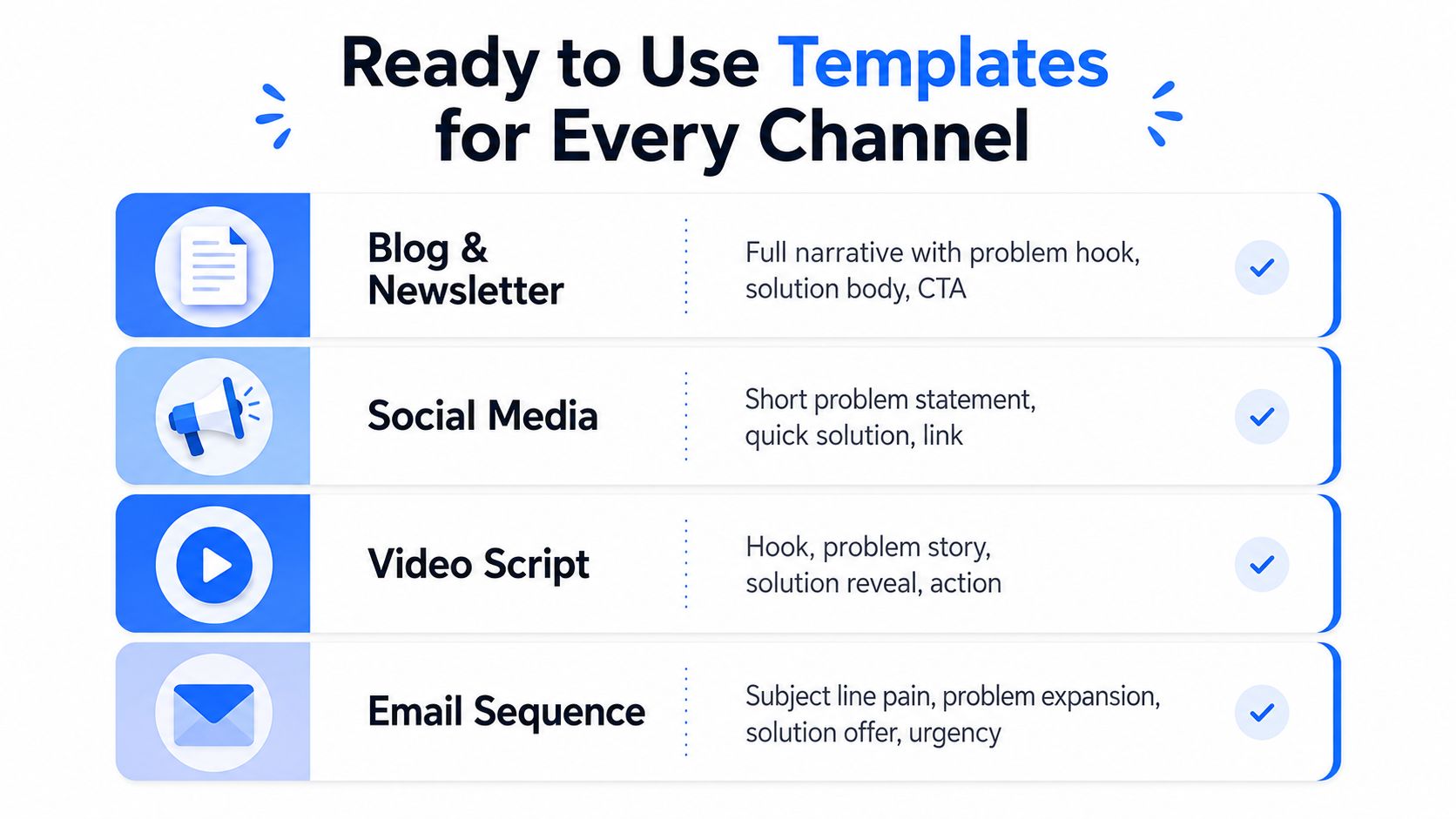
Ready to Use Templates for Every Channel
A template should shorten drafting time without flattening the idea. Keep the problem, cause, remedy, and evaluation sequence stable. Adjust the context and delivery to fit the channel.
Blog or newsletter
Hook: “Several teams try to fix [visible problem] by changing [common tactic].”
Situation: Identify who faces the issue and describe the current process.
Problem: Show the specific breakdown and its cost in time, clarity, risk, or effort.
Cause reveal: “The deeper issue is [underlying constraint].”
Solution: Explain one remedy, how it works, and the steps required to apply it.
Evaluation: Give readers a test. Define the evidence that would show the remedy is working.
Closing promise: State what the reader can do next.
Long-form content needs this extra room because readers may need context before they accept the diagnosis. The evaluation step also stops the article from ending with a tactic that sounds useful but cannot be assessed.
LinkedIn text post
Hook: “Your [team or audience] doesn't have a [surface problem]. It has a [specific cause].”
Problem: Use two short sentences to describe the symptom.
Cause reveal: Add one observation from customer calls, reporting, or your own work.
Remedy: Give one action and explain the mechanism behind it.
CTA: Ask readers to compare the pattern with their own process.
Keep the hook visible before the fold. Give each paragraph one job. Short writing works when it stays specific, not when it removes the reasoning.
Carousel or document
Use one beat per slide:
- Hook slide: State the problem in plain language.
- Problem slide: Show the symptom.
- Cause slide: Explain the hidden constraint.
- Solution slide: Introduce the fix.
- Proof slide: Add an example, test, or evaluation method.
- Recap slide: Restate the action and invite a response.
The cause reveal belongs on slide three because readers need a reason to continue. Put the remedy on slide four, then use the proof slide to support the claim. Without that evidence or test, the carousel becomes a sequence of confident statements rather than a useful reference.
Short video
Use the same sequence in spoken form. Open with the problem, spend the middle on the cause, and reveal the remedy near the end. Put the call to action in the caption as well as the final spoken line.
For broader planning, ViralBrain's content strategy templates can sit beside your editorial calendar. Use the template to protect the sequence, while letting each format carry the amount of context its audience will consume.
How Format Choice Changes Your Results on LinkedIn
Great wording isn't enough in the current LinkedIn data. Format changes how much room the idea gets, how long readers interact with it, and whether they can save it for later.
One benchmark reports 6.90% engagement for multi image posts in Q2 2026, up from 6.80% in the prior quarter. The same research set reports 2.94% median engagement for image posts compared with 1.54% for text only posts. These figures come from Socialinsider's LinkedIn benchmark report.
That doesn't mean every problem solution idea belongs in a carousel. A carousel needs a problem that can be separated into clean beats. A text post works better when the insight depends on voice, tension, or a personal observation. Short native video suits a problem that benefits from demonstration or spoken emphasis.
Match the container to the job
If the goal is saves, use a document or carousel when the solution can become a reference. If the goal is comments, use text when the problem invites disagreement or experience sharing. If the goal is authority, use a format that lets you show diagnosis, reasoning, and evaluation rather than only a punchline.
SocialInsider reports that native documents were posted about twice a month on average yet led engagement at 6.90%, while images were posted about seven times per month and reached 5.00% engagement. Those numbers suggest a practical gap between what brands publish often and what earns stronger interaction, as reported in its posting frequency analysis.
| Format | Avg Saves | Comment Rate | Dwell (s) |
|---|---|---|---|
| Text | Not provided | Not provided | Not provided |
| Multi image | Not provided | Not provided | Not provided |
| Native document | Not provided | Not provided | Not provided |
| Short video | Not provided | Not provided | Not provided |
The blank cells are deliberate. The available verified data doesn't provide those exact measures, so inventing them would turn strategy into fan fiction.
Posting frequency matters too. A dataset covering more than 2 million posts across more than 94,000 LinkedIn accounts found that posting 2 to 5 times per week improved reach and engagement, while higher frequency didn't keep improving results at the same rate, according to Buffer's LinkedIn posting analysis. Build a format experiment into that cadence. Test the same problem solution skeleton in different containers, then judge the result by the action you want, not by applause alone. This guide to LinkedIn post formats offers a practical starting point.
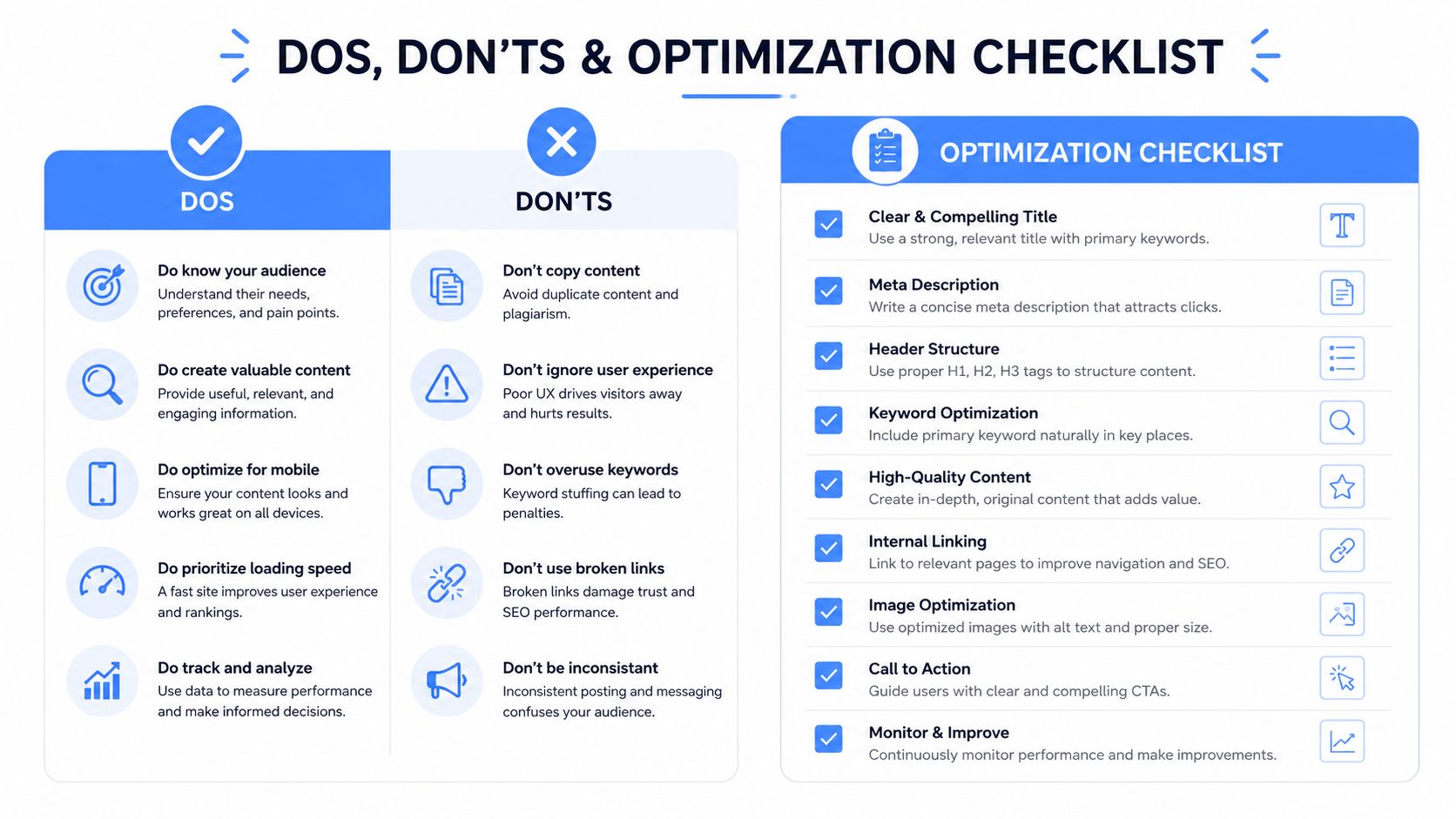
Dos Don'ts and the Optimization Checklist
Use this filter before publishing. It should take less time than repairing a vague post that readers cannot understand.
Hook construction
- Name the pain: Write “reps repeat the same explanation on every demo,” not “sales teams face challenges.”
- Use concrete language: Borrow wording from calls, comments, support tickets, or customer notes.
- Skip generic questions: “Are you struggling with growth?” sounds like a waiting room poster.
- Avoid fake tension: Do not exaggerate the problem just to make the hook dramatic.
Solution specificity
- Show the mechanism: Explain what changes, who owns it, and when it happens.
- Give a test: State what evidence would suggest the remedy works.
- Limit the promise: A defined process is more credible than a transformation claim.
- Place the solution in time: Earlier research found that leading with the problem can improve attention, while delaying the company or remedy too long can weaken persuasion and recall, as noted in the original Utrecht University research cited above.
Format discipline
- Choose one variant: Use SPSE for depth, PAS for pressure, PSB for quick value, or hook story payoff for a native LinkedIn post.
- Build around the medium: Give each carousel slide one job and each video beat one clear thought.
- Keep the framework consistent: A post that begins with PAS and ends like a technical report feels like two drafts competing for attention.
- Review the final lines: Confirm that the remedy appears early enough to be remembered and specific enough to save.
Optimization loop
Track four signals after publishing:
- Comment to impression ratio: Indicates whether the problem feels relevant enough to prompt a response.
- Saves per impression: Indicates whether the solution is useful enough to keep.
- Profile visits per post: Indicates whether the post creates interest in the author.
- Follower conversion within 48 hours: Indicates whether the content attracts the intended audience.
Do not set universal pass thresholds. Your baseline depends on the audience, account history, topic, and format. Compare each version with recent posts covering a similar topic and reaching a similar audience. On LinkedIn, test the same problem solution skeleton in text, document, image, and video formats. Judge each format by the action you want, such as saves for utility, comments for discussion, or profile visits for authority.
If you want to test this framework against your own performance data, ViralBrain offers a unified studio for pattern analysis, LinkedIn drafting, and analytics. Use the results to compare the problem, cause, remedy, and delivery format rather than relying on engagement totals alone.
Grow your LinkedIn to the next level.
Use ViralBrain to analyze top creators and create posts that perform.
Try ViralBrain free