
7 Tools That Find Trending Topics to Write About in 2026
Find trending topics to write about with seven research tools. Practical tips, sourcing steps, and honest tradeoffs for each one.
Grow your LinkedIn to the next level.
Use ViralBrain to analyze top creators and create posts that perform.
Try ViralBrain freeMost trend lists show you what already blew up last week. That's fine for news, but late for almost everything else. The better question is not which topic is popular. It's which signal gives you enough time, context, and audience relevance to write something useful.
This roundup covers seven tools that help you find trending topics to write about, sorted by signal type. Some show live search activity. Some surface early signals. Some show what already performs on social platforms. Each entry explains what the tool does well, what it misses, and the first post it can help you write that day. Social and video platforms now play a central role in discovery and discussion, which makes timely commentary useful when it adds context rather than repeating a headline. Reuters Institute's 2025 Digital News Report documents that shift across 48 markets.
If you're checking whether a viral claim is safe to repeat, see these AI Video Detector use cases.
1. ViralBrain
Best for social performance patterns and fast LinkedIn drafts
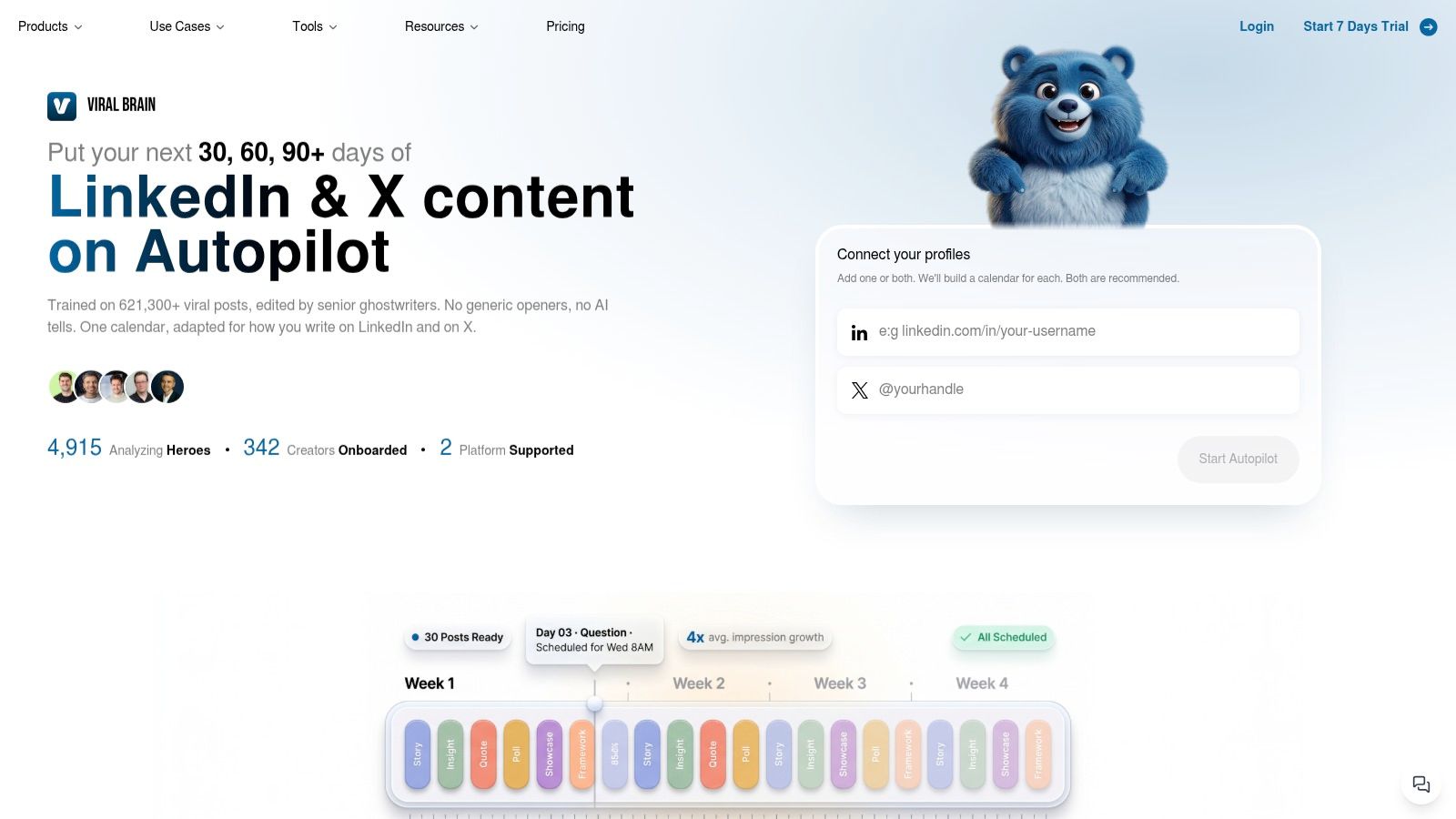
ViralBrain is useful after you have a topic and need a workable angle. It studies hooks, post structures, and calls to action that perform in your niche, then uses those patterns to help draft content in your voice.
The platform analyzes high-performing posts and top creators, called “heroes.” That lets you examine why a post worked rather than copy its wording. It supports LinkedIn and X workflows, along with trending topic discovery, hook generation, profile optimization, carousel creation, image generation, content repurposing, previews, drafts, analytics, and a shared content calendar.
ViralBrain reports 4,900 plus creators tracked, 12.6 million plus impressions generated, and 200,000 plus posts created on its official website. It also reports an average 4x impression uplift for users. These figures are product claims, not a promise for your account. Results still depend on your source material, audience, topic, and editing. AI can produce a polished post about nothing, and it does so with worrying confidence.
Practical rule: Choose the topic first. Use pattern data to decide how to frame it, not to decide what you believe.
What it gives you and what it misses
The main signal is social performance structure. You can import relevant heroes, identify recurring formats, and apply those patterns to a subject your audience cares about. You can also turn YouTube videos, Reddit threads, and articles into LinkedIn drafts instead of starting with a blank document.
Curation determines the quality of the result. Choose heroes who have no connection to your market and the output may sound generic or inherit habits that do not fit your audience. You still need to set the tone, edit the draft, and add evidence from your own work.
The free tier includes three hero profiles, three posts per month, and more than 100 free tools. Pro costs €39 per month for 20 posts per month. Premium costs €69 per month for 90 posts per month, LinkedIn auto posting, and a 30 day calendar, according to ViralBrain pricing information. A 7 day trial costs €1, requires a card, and excludes auto posting. Pricing can change.
The first post to write
Use ViralBrain when a fresh development needs a useful opinion quickly. Import three creators who write for your buyer group. Find a pattern built around a strong claim, an example, and a practical takeaway. Then write about how the development changes one decision for founders, marketers, sales teams, or creators.
The first draft should explain an implication, not repeat the announcement. That is the tool's practical advantage: it connects a live topic with a publishable LinkedIn format. Its limitation remains judgment. You must supply the point of view and check every claim.
2. Google Trends
Best for live search interest
Google Trends gives you a first party view of search activity on Google. It's free, refreshes frequently, and works well when you need to check whether a topic is gaining attention before you spend time writing about it.
Trending Now shows clusters of surging queries with news context and activity status. Explore lets you compare topics, inspect regions, choose categories, and separate web interest from YouTube interest. The regional filters can narrow a topic to US states or metro areas, which helps when your audience lives in a specific market.
Google Trends shows relative interest, not a clean count of searches. A rising line tells you that attention changed. It doesn't tell you whether the audience is large, qualified, or ready to buy. It also won't give you a finished angle. That part remains your job. A graph is not a point of view, despite its best efforts.
Write first: A short post that compares two rising terms, explains why one matters to your audience, and gives readers one action to take.
Use this guide to finding trending topics when you need a simple process for moving from a trend graph to a post idea.
Google Trends works best at the validation stage. Start with a real customer problem or current event. Check whether search interest supports it. Then inspect related queries for the language people use. Don't publish a post because a line moved upward. Publish because the movement helps explain a decision your reader already faces.
3. BuzzSumo
Best for proven articles, headlines, and engagement signals
BuzzSumo is useful when you need more than a topic name. Its Trending Feeds, Content Analyzer, Topic Explorer, and Question Analyzer connect live interest to actual articles, headlines, questions, and engagement data.
That makes it a strong tool for turning a broad trend into a concrete angle. Search a subject, inspect the articles receiving attention, then look for gaps. Perhaps every article explains what changed but none explains what a sales team should do. Perhaps the headlines focus on executives while your audience needs an operator's view. Those gaps are more useful than another list of popular links.
The platform mines questions from sources such as Reddit, Amazon, and Quora. It also covers broad web and social data. That depth comes with a cost. Solo writers may find it expensive if they only need occasional ideas. Its filters, alerts, and reporting options take time to learn.
What it cannot tell you
BuzzSumo can show that an article earned attention. It can't prove that the audience matched your buyer group, that the engagement was thoughtful, or that the topic influenced revenue. Social response is evidence of interest, not evidence of commercial value.
Use the competitor content analysis guide to turn competitor examples into a gap analysis rather than a copying exercise.
Write first: A reaction post built around one article that performs well, one missing explanation, and your practical answer to that missing point.
BuzzSumo is strongest when the topic already has examples worth examining. It's weaker when you need the earliest possible warning. Pair it with an early signal tool if you're planning a longer content series.
4. Exploding Topics
Best for early signals and planned content arcs
Exploding Topics is built for writers who'd rather spot a subject before every competitor turns it into a carousel. It surfaces emerging topics, products, and themes that may be moving toward broader attention. The tool is part of Semrush.
Its Meta Trends and Trending Products views help with broad scanning. Channel Breakdown shows where attention is appearing, such as LinkedIn, TikTok, or Reddit. Trend lists, monitoring, forecasting, algorithmic detection, and human curation make it useful for planning content beyond today's headline.
The signal is direction and timing. The tool can help you decide whether a subject deserves a short post, a series, or a place in your editorial calendar. It doesn't give you the same depth of concrete article examples or engagement context as BuzzSumo. You'll need another source to study the language, objections, and formats that already attract readers.
Where it earns its place
Exploding Topics works well for a US focused B2B team planning several weeks of content around AI, SaaS, marketing, or another active category. A rising topic can become a sequence of posts. Start with the basic change. Follow with an operational problem. End with a decision framework or field lesson.
That approach is more useful than publishing one vague prediction and moving on. The guide to trend forecasting offers useful context for thinking about early signals without treating every upward line as destiny.
Write first: A forward looking post that explains why an emerging topic matters to one job role before the topic becomes common knowledge.
The main trade off is access. Higher limits and advanced exports may require a more expensive plan. If you only publish occasionally, the subscription may be hard to justify. If you plan campaigns, briefs, or topic clusters, the early warning can save you from joining the conversation after it has become wallpaper.
5. Semrush Topic Research
Best for turning one subject into an SEO and social series
Semrush Topic Research is less of a pure trend alert system. It's a planning tool for expanding a seed topic into subtopics, questions, headlines, related articles, and content clusters.
That makes it useful when one LinkedIn post needs to become a series. A seed topic such as AI implementation can produce posts about workflow redesign, data governance, model evaluation, employee adoption, and system integration. Those angles are more useful than repeating that AI is changing business. McKinsey's 2025 survey found that 88% of organizations regularly use AI in at least one business function, while only 39% reported enterprise level EBIT impact. The survey details support a sharper editorial angle, widespread use does not equal captured value.
Semrush connects topic research with keyword research, content templates, analytics, and AI visibility features. That helps teams link social ideas to longer form content and search work. The downside is scope. New users may face too many panels, settings, and related tools when they only need five good post ideas.
The first post to write
Write a contrarian post from the gap between adoption and results. Explain why a company can use AI widely while still failing to produce measurable business value. Add one implementation bottleneck your audience can recognize. End with a small test, such as comparing task time, accuracy, cost per interaction, or conversion before and after a workflow change.
Use Semrush when the topic needs structure. Don't use it to avoid having an opinion.
6. AlsoAsked
Best for audience questions and objection led posts
AlsoAsked maps Google's People Also Ask results into visual question trees. Enter a seed topic and it reveals related what, why, and how questions by language and region. It supports US targeting, exports, bulk searches, deep search, and API access.
The signal here is question language. That matters because people rarely describe a business problem using the same words found in a product page. They ask whether a process is worth changing, what a new rule affects, why a result dropped, or how to compare options. Those questions make better openings than broad claims about innovation.
AlsoAsked does not measure social virality. It shows search questions, not whether a post will spread on LinkedIn. Lower tiers also have credit limits. Pair it with a social performance tool when you need both audience language and evidence of engagement.
A practical use for LinkedIn
Take one branch from the question tree and answer it for a defined job role. If the tree asks why content performance fell, write for a B2B marketing manager with limited reporting data. If it asks how to choose an AI tool, write for a founder who needs a workflow test rather than another tool list.
Write first: A question and answer post that handles one buyer objection in plain language, with an example from your work.
The tool is lightweight, affordable, and fast. It won't tell you whether a topic deserves a full article. It will tell you what people are trying to understand. That's often enough to stop writing for an imaginary audience.
7. Treendly
Best for low cost, cross platform discovery
Treendly combines signals from Google Trends, Amazon, YouTube, Pinterest, TikTok, and other sources. Its Treendly Index gives you a combined view, while monitoring, alerts, a trend library, a simple API, and a Chrome sidebar help you keep track of rising subjects without opening six tabs.
The broad source mix is its main advantage. A topic may appear first in a consumer channel, then become relevant to marketers, creators, or product teams. Treendly can expose ideas you wouldn't think to search for directly. Its free plan and low cost Pro plan make it easier to use as a regular scanning tool.
The compromise is depth. Treendly puts less emphasis on example posts and engagement details than BuzzSumo. It also comes from a smaller ecosystem, with occasional user reports of stability problems. Treat the score as a lead, not a verdict.
The first post to write
Use Treendly for a cross platform comparison. Find a rising subject that appears in more than one source. Then explain why the difference matters to your audience. A creator might compare what people search for with what they watch. A marketer might explain why consumer interest has not yet become a B2B buying priority.
The result should contain your interpretation. A trend score alone is not content. It's a nudge to investigate.
Top 7 Trending Topic Tools Comparison
| Tool | Implementation complexity | Resource requirements | Expected outcomes | Ideal use cases | Key advantages |
|---|---|---|---|---|---|
| ViralBrain | Medium, setup heroes and voice tuning | Paid tiers (free tier + trial); time to curate profiles | Repeatable, personalized viral-ready post drafts; higher impressions (reported uplift) | Founders, B2B marketers, creators & agencies scaling LinkedIn/X content | Pattern-driven templates, persona personalization, integrated creation + scheduling |
| Google Trends | Low, plug-and-play | Free; requires interpretation time | Real-time search interest signals and topic validation | Real-time trend spotting, regional topic validation, timely content hooks | Free authoritative Google data, real-time and regional filters |
| BuzzSumo | Medium, learning filters and alerts | Paid subscription; time to analyze articles | Actionable content ideas with engagement metrics and concrete examples | Mining high-performing headlines/articles, competitive content analysis | Wide coverage, engagement stats paired with article examples |
| Exploding Topics | Low–Medium, simple onboarding | Paid (part of Semrush for some features); monitoring time | Early identification of durable, rising topics before mainstream adoption | Long-term trend planning, multi-week content arcs, “what's next” scouting | Early signals, blended algorithmic + human curation |
| Semrush Topic Research | Medium–High, integrated suite complexity | Enterprise-grade subscription; ties to Semrush tools | SEO-aligned topic clusters, headlines, and AI visibility insights | End-to-end SEO + content strategy for teams and publishers | Deep data, integrated workflow, collaboration and optimization tools |
| AlsoAsked | Low, minimal onboarding | Affordable; credit limits on lower tiers; export/API optional | Precise People‑Also‑Ask question maps and topical clusters | Generating audience-voiced prompts, objection handling, US-targeted content | Visual PAA trees, rapid conversion of seed topics into prompts |
| Treendly | Low, easy setup and alerts | Free and low-cost plans; simple API/widget | Multi-source trend discovery and alerts across platforms | Cost-effective early discovery and monitoring for consumer/pro niches | Multi-source scoring, affordable monitoring, Chrome sidebar widget |
Pick One Signal Source and Write This Week
The right tool depends on the signal you need. Use ViralBrain when you need a social post shaped by proven patterns and adapted to your voice. Use Google Trends for live search movement. Choose BuzzSumo when you need real articles and engagement context. Pick Exploding Topics for earlier signals and longer planning windows.
Use Semrush Topic Research when one idea needs to become a structured content series. Choose AlsoAsked when you need audience voiced questions. Use Treendly when you want a cheap way to scan several platforms for ideas that may not appear in your normal search routine.
The tool won't decide whether a trend matters to your buyers. You still need to identify the trigger, the affected role, the decision being reconsidered, the evidence of risk or budget, and the next useful action. That is the difference between a popular topic and a commercially relevant one.
B2B audiences already spend time with thought leadership. Edelman and LinkedIn found that 52 percent of decision makers and 54 percent of C suite executives spend at least one hour each week reading it, based on their survey of 3,484 business executives. The 2024 Edelman LinkedIn report also found that 75 percent had researched a product or service they hadn't previously considered after seeing strong thought leadership. A useful post can create demand before a buyer starts a formal search.
Pick one signal source this week. Check it for three topics that fit your audience. Draft one post from each. Keep the topics that get questions or replies. Drop the rest. Check every trend claim against the original source before you cite a number.
ViralBrain helps founders, marketers, sales teams, and creators find relevant LinkedIn topics, study proven post patterns, and draft content in their own voice. Visit ViralBrain to turn fresh signals into posts without starting from a blank page.
Grow your LinkedIn to the next level.
Use ViralBrain to analyze top creators and create posts that perform.
Try ViralBrain free