
LinkedIn Learning Content Strategy for 2026
Plan a LinkedIn learning content strategy with formats, weekly cadence, buyer stage metrics, and honest tests for 2026.
Grow your LinkedIn to the next level.
Use ViralBrain to analyze top creators and create posts that perform.
Try ViralBrain freePost more often. Improve the hook. Turn the lesson into a carousel. That's the usual advice, and it starts in the wrong place.
A useful LinkedIn learning content strategy starts with the skill someone needs and the decision they're trying to make. Founders and marketers already have enough publishing tasks. They need posts that help people do better work, judge expertise, and decide whether to trust the person teaching.
Build around those jobs. Then choose the format. Otherwise, you're running a busy little printing press.
Audience and Buyer Stage Posts
Learning content earns trust when it helps a buyer make a decision. It also needs to address skills that can lose relevance as tools and work change. Build posts around a real task, not a tour of your content library.
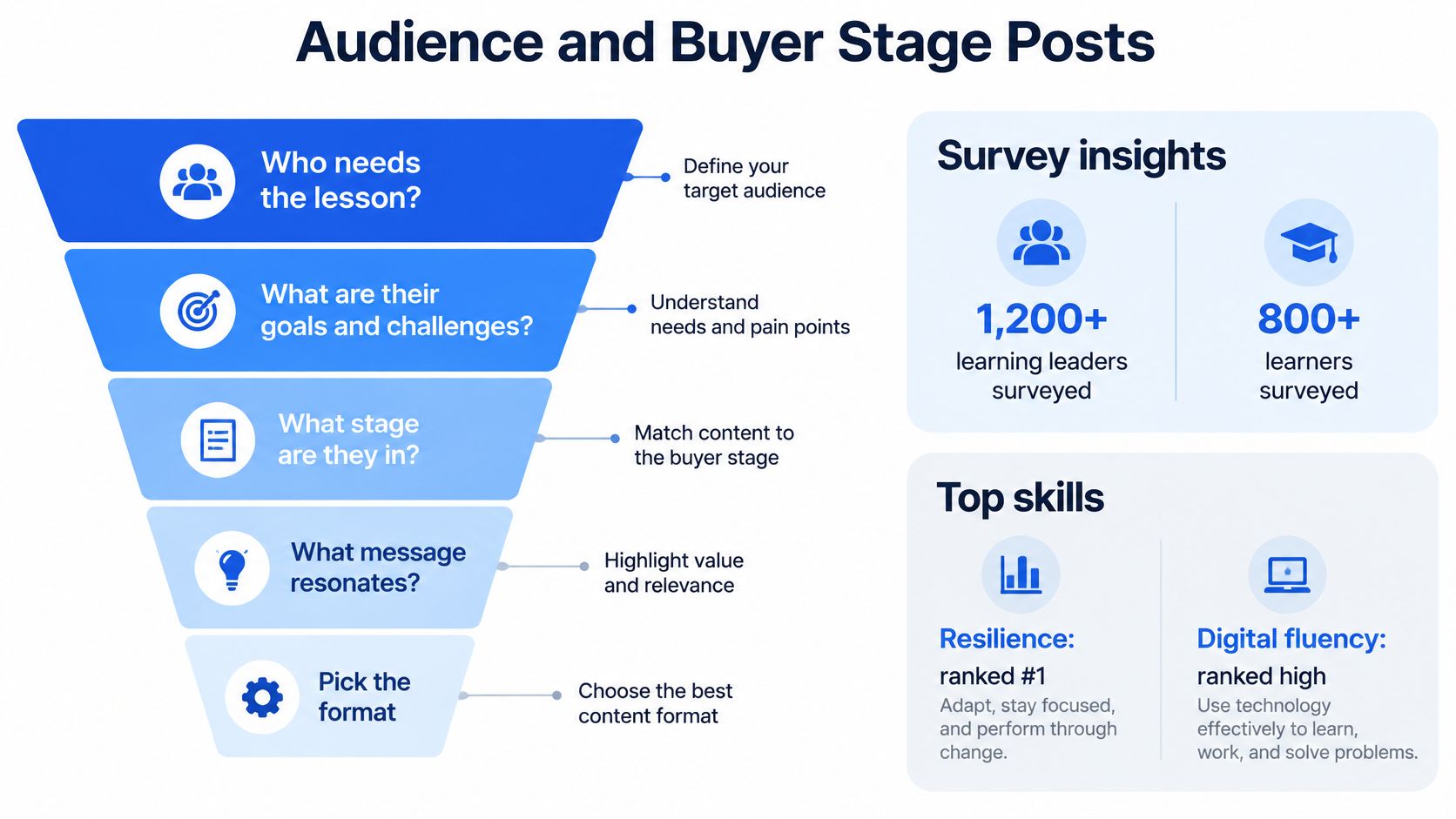
The LinkedIn Learning global study of more than 1,200 learning and development professionals and over 800 learners offers a dated snapshot of workplace learning priorities. Use resilience and digital fluency as practical themes, not as current rankings. Show how someone can handle a difficult handoff, learn unfamiliar software, or make a sound decision under pressure.
The commercial case is also specific. LinkedIn's B2B marketing findings report that 56% of B2B buyers who use creators rely on creator input during the final stage of purchasing. The same findings say 81% of B2B CMOs believe video accelerates sales cycles and 79% say it accelerates lead conversion.
These figures do not prove that your next video will close a deal. They support making useful material for people evaluating a purchase, rather than giving every production slot to broad opinions. A lesson that clarifies a buyer's risk has a job. A post that only collects reactions does not.
Give each post a buyer job
Learning posts by buyer stage
| Stage | Post job | Trust signal | Metric |
|---|---|---|---|
| Awareness | Name the problem in the reader's words | Visits from the right job titles | Qualified profile visits |
| Consideration | Show the method and a worked example | Saves and comments that add a case | Saves and meaningful comments |
| Evaluation | Show risk, proof, and what failed | A buyer asks a specific question | Direct inquiries |
| Decision | Share a customer result without a hard pitch | The post appears in a late-stage buying conversation | Influenced pipeline and cycle time |
Choose the reader before choosing the production method. Keep the order visible with this funnel.
Founders can build evaluation-stage trust by explaining what broke, what they changed, and what remains difficult. Marketers can turn a messy process into a usable consideration-stage method. Creators can introduce a problem and offer a free sample without turning every lesson into a checkout page.
Find the language buyers actually use
Start with sales calls, support tickets, onboarding questions, and comments from people doing the work. Organize those inputs with a practical approach to audience research for better content. Then use LinkedIn audience insights to check whether your readers match the roles you intend to reach.
For project management software, an awareness post might name the pain of unclear approvals. An evaluation post should show what happens when the approval owner is absent, including the limits of the process. That detail helps a buyer assess implementation risk. It may draw fewer reactions, but it gives the right reader a reason to care.
Ask sales to record when a prospect mentions a post during a buying conversation. Keep the wording in the CRM. Treat the mention as useful context, not proof that the post caused the sale.
The Weekly Learning Post Mix
Use this as a publishing menu, not a requirement to maintain every format. The doses are editorial starting points. Your available evidence and production time set the actual schedule.
Weekly learning formats, dose, and the metric that counts
| Format | Job | Metric that counts |
|---|---|---|
| Text micro lesson | Teach one skill with one example and one action, use as the regular weekly base | Saves and comments that show use |
| Carousel | Walk a procedure people can keep, add when the steps benefit from separation | Saves |
| Native video | Show the move on screen or in person, reserve a weekly slot when demonstration helps | Watch time and profile visits |
| Long form post | Give a framework a colleague can reuse, publish when the argument needs room | Reposts |
| Newsletter or document | Hold the deeper lesson and the outbound link, prepare periodically rather than daily | Clicks to the lesson |
| Poll | Ask a narrow professional choice, use sparingly | Comments, not proof of learning |
Start with a week you can finish
For a solo founder, try text on Monday, a carousel on Wednesday, and a video or longer post on Friday. That's a proposed work plan, not an algorithm rule. If you can't make the demonstration useful, publish the written explanation instead.
A marketer running a company page can add an employee lesson. Ask the employee for a practical mistake, the correction, and an artifact they can share. Edit the explanation without sanding off the judgment that made it worth publishing.
A creator selling teaching should give readers a sample they can use. A teaser that withholds the method teaches people to expect a teaser.
A smaller publishing schedule with usable lessons beats a full calendar of introductions to lessons.
Give formats different jobs
Use text when the reader needs an explanation. Put the task near the top, show an example, and finish with something they can try at work.
Use a carousel when order matters. Give each slide a distinct step, keep screenshots legible, and end with a recap. Don't spend the final slide congratulating yourself for having a company.
Use native video when movement, timing, or screen behavior supplies the proof. Add captions and visible labels so the demonstration remains understandable without sound. A face talking over stock footage rarely explains a software procedure.
Keep the deeper lesson's main outbound link in the newsletter or document rather than scattering competing destinations through every post. Treat that as a reader choice, not a claim about reach penalties.
Review the mix after a sustained trial. If saves stay flat and readers don't finish a format, remove it temporarily and spend the time improving the format they use. Adding another production task won't repair an unclear explanation.
Why Skill Lessons Go Stale
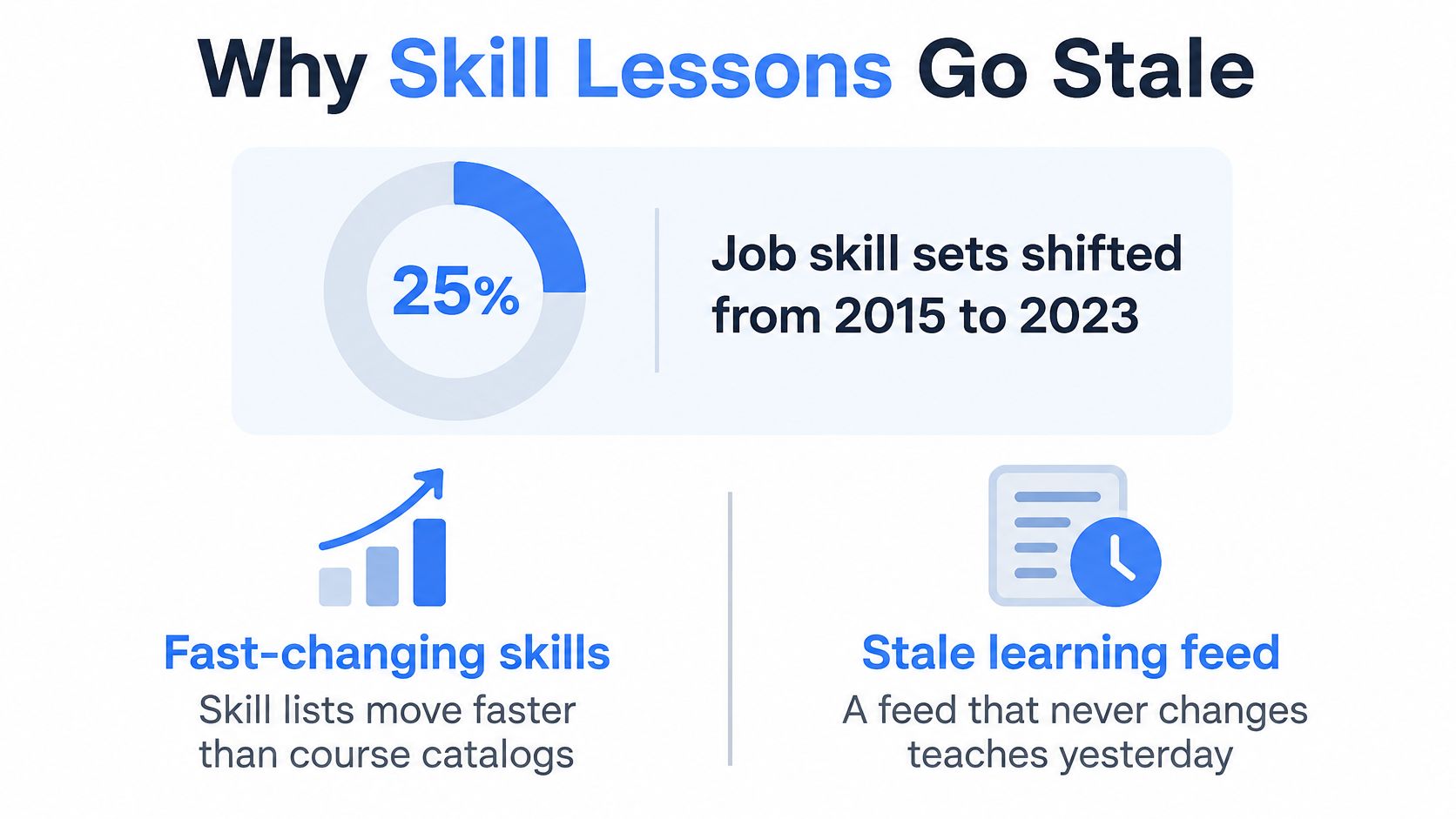
Job skill sets changed by approximately 25% between 2015 and 2023, according to LinkedIn's 2023 Workplace Learning Report, whose discussion includes an earlier projection of approximately 40% change by 2025. The report also discussed an earlier projection of approximately 40% change by 2025. That was a forecast, not a measured result.
Treat this shift as a maintenance problem. A static catalog can quickly lose relevance, even when its lessons remain clear. Review whether each lesson still helps with the work readers need to do now.
The visual highlights why skill lessons need refreshing.
Refresh the work, not the wrapper
Build modules around current tasks. A lesson on AI fluency can show how to check a generated answer against its source document. Stakeholder writing can teach readers to turn a vague request into a decision note. Pipeline judgment can help distinguish a polite reply from evidence of buying intent.
Review your topic list quarterly. Use trend forecasting to spot changes worth investigating, then compare those signals with questions people raise at work. A trend is a prompt to check relevance, not a reason to publish a lesson without a practical use.
Update the example, interface, assumptions, and recommended action. Replacing a headline while leaving an outdated workflow intact is cosmetic maintenance.
A lesson with views but no evidence of use needs inspection. Check whether the topic matters, the explanation is clear, and the task matches the reader's needs. A skill can remain valuable even when the lesson needs a rewrite.
For another perspective on learning and content planning, use the video alongside your review.
Keep a refresh log
Use a shared spreadsheet to track each lesson's owner, review date, and decision. Clear ownership stops updates from becoming everybody's job and nobody's task.
| Topic | Last updated | Keep or cut |
|---|---|---|
| AI answer checking | March 2026 | Keep after checking the source comparison |
| Stakeholder decision note | March 2026 | Keep if readers can apply the template |
| Retired software workflow | March 2026 | Cut or replace when the steps no longer work |
Add a short reason beside each decision. A popular post is not automatically worth keeping, and a note helps explain why a lesson stayed, changed, or disappeared.
Expertise Posts and Human Posts
A feed full of tidy instruction can feel like compulsory training. A feed full of personal stories can produce conversation without leaving readers anything useful to carry back to work.
A SAGE Open study of 1,001 LinkedIn users' posts found that Business content was most frequent, Interpersonal and Observance themes generated comparatively more comments and reactions, and Business and Expertise themes were reposted more often. Use those differences to plan a portfolio, not to diagnose your personality.
Theme, response, and where it belongs
| Theme | What to publish | Tends to earn | Where it belongs |
|---|---|---|---|
| Expertise | Walkthrough, checklist, benchmark, or framework | Reposts | The reusable middle of the post |
| Interpersonal | Career lesson, conflict, mentorship, or a collaboration miss | Comments and reactions | The opening problem |
| Observance | A specific thing noticed in a meeting or a number | Comments and reactions | A hook that leads into the mechanism |
| Business | Market or process point tied to a skill | Reposts | A lesson, never a naked pitch |
The study supports different response patterns across themes. It doesn't establish that a Business post will earn more reposts than comments, or that every personal story will start a useful discussion.
Join the human problem to the expert method
Say a marketer needs to explain why campaign approvals keep slipping. Start with the workplace friction. The designer thought approval meant permission to publish. The founder thought it meant permission to keep editing.
Then explain the mechanism. The team used the same word for different decisions.
Give readers a compact repair. Define approval states, name the decision owner, and record what changes after approval. Finish by inviting a comparable case from someone who has dealt with a similar handoff.
That sequence gives the reader a reason to care before asking them to learn. It leaves them with a tool rather than a moral about teamwork.
Personal detail earns its place when it helps the reader understand the work.
Allocate effort before drafting
Score each idea for reusable value and discussion potential. A diagnostic checklist may deserve production time even if nobody shares a personal story underneath it. A candid account of a failed handoff may deserve space because readers can compare how their teams handle it.
Prioritize ideas that do both. Cut ideas that offer neither an applicable method nor a meaningful professional tension.
Keep the boundaries honest. Don't turn an ordinary disagreement into a dramatic leadership confession. Don't dress a product announcement as a lesson unless the reader can learn something without buying.
Give expertise and human context room in the same week. Otherwise, your feed becomes either a lecture hall or meeting notes with applause.
How to Build One Learning Post
Build the draft around the task, not around a clever opening. Readers should be able to identify the skill before they decide whether you're an interesting writer.
Keep the working material beside the draft. Use a real document, a screen recording, or an example you can verify. If you don't have evidence from actual work, label the example as a scenario.
Use a repeatable spine
-
Name the person, task, and cost. Use the opening lines to identify who needs help and what the old approach makes harder. Skip the suspense.
-
Explain the mechanism. State the reason the problem happens in a plain idea. If the explanation requires a separate lesson, split the draft.
-
Show the work. Present an actual example you have permission to use, or a clearly hypothetical before and after. Remove private details without inventing a customer.
-
Give copyable moves. Tell the reader what to change, where to change it, and what to check afterward. Keep each move short enough to perform.
-
Invite a comparable case. Ask where the method failed in the reader's team or what constraint would prevent its use. Don't ask for applause.
-
Check topic and timing. Remove unrelated points, explain internal terms, and publish while the advice still applies.
The planning sketch is a useful reminder to separate preparation from production.
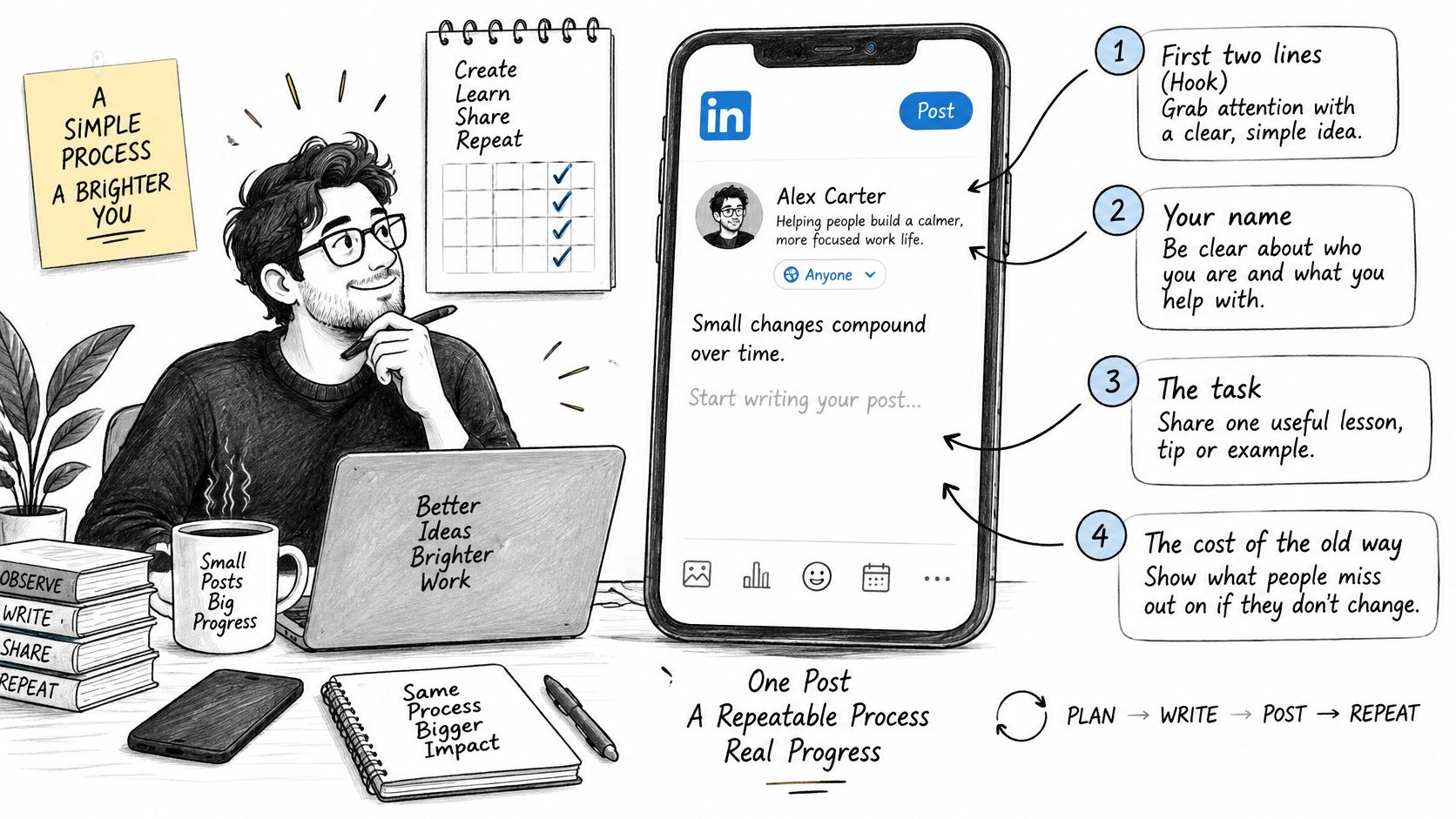
For an explanation check, use the learning strategies from Voice Control Pro. Explain the lesson aloud without leaning on your team's shorthand. Wherever you stumble, revise the reasoning before polishing the wording.
Keep the spine when the format changes
For text, put the worked example before the actions. For a carousel, place the cost on the opening slide, separate the actions, and close with the recap. For video, say the cost immediately and show the relevant words on screen.
Consider a hypothetical lesson about writing an approval request. The weak version says the team needs feedback soon. The stronger version names the decision, identifies the approver, and explains what will happen after approval.
The reader can compare the versions and copy the structure. No invented revenue increase is needed.
Match the topic to your professional context
LinkedIn's explanation of feed relevance describes identity, content, and activity signals, including professional background, the post's subject and usefulness, and member interactions.
Keep your profile accurate and your lesson specific. If stakeholder communication is part of your work, name that skill in your profile and demonstrate it in the post. Don't add skills you can't teach merely to make the wording match.
Before publishing, delete sentences that neither explain the problem nor help someone perform the task. A short lesson can still contain a surprising amount of furniture.
Metrics That Show Real Learning
Test distribution separately from the educational idea. Otherwise, you can't tell whether readers responded to the lesson or merely encountered it under different conditions.
A 2025 study published in Business and Professional Communication Quarterly, using negative binomial regression on a random sample of 991 LinkedIn posts, found that hashtags and user tags significantly increased expected reactions, while tags substantially increased comments. That's a reason to test relevant tags, not permission to summon every executive you know.
Keep a control
Publish an untagged version, then test a closely matched version with a relevant expert or company tag. Keep the topic, format, and observation window consistent. Organic posts won't provide perfectly controlled conditions, so treat the outcome as directional rather than proof of causation.
Use a small spreadsheet matrix. Put awareness, skill acquisition, and implementation in the rows. Use no tag, expert tag, company tag, and a narrow hashtag as the treatments.
Tag someone because their work belongs in the lesson. Random tagging makes an instructional post look like a request for attention.
Separate the results
LinkedIn Page analytics defines click through rate as clicks divided by impressions and engagement rate as interactions divided by impressions, with interactions including clicks, reactions, comments, and shares.
Separate numbers for a learning post
| Metric | How it is counted | Decision it supports |
|---|---|---|
| Reactions | Reaction count | Not proof of learning |
| Comments | Comment count | Whether people want to talk |
| Reposts | Repost count | Whether the lesson looks reusable |
| Impressions | Times the post was shown | Seen, not acted on |
| Click through rate | Clicks divided by impressions | Movement to the next step |
| Engagement rate | Clicks, reactions, comments, and shares divided by impressions | Interaction level, inspect comments for quality |
| Profile visits | Visits attributed to the post where available | Whether awareness prompts further investigation |
| Lesson clicks | Clicks to the newsletter or document | Demand for the deeper lesson |
An engagement rate can't tell you whether the conversation was thoughtful. Read the comments. A pile of congratulations and a detailed implementation question deserve different interpretations.
A save suggests intent. A reader describing how they applied the method gives you stronger evidence of learning.
Compare equal date ranges before copying a successful format. LinkedIn creator analytics supports comparisons of impressions and engagements across periods and notes that daily engagement can become negative when removed engagements exceed new ones.
Use a LinkedIn post analytics workflow to maintain that comparison. Track unique viewers, profile visits, and downstream lesson clicks where available, but choose the winning version by its intended buyer stage.
Don't average everything into a single victory number. That makes reporting easier and decisions worse.
Your First Month of Posts
Run the month as a set of publishing decisions. You don't need another planning system. You need enough consistency to see which lessons deserve more work.
Make a decision each week
-
Week one. Publish the manageable mix and write the buyer stage beside each draft before it goes live. Record the intended reader, not just the topic.
-
Week two. Test distribution on closely matched lesson material. Change the tagging treatment without rewriting the entire argument.
-
Week three. Give the strongest reusable format another production slot. Pause a format that produced reactions without useful follow through.
-
Week four. Replace an old example in the refresh log and ask a reader whether they used the method. Record the answer, including the part they couldn't apply.
Keep an editorial desk in Notion or Google Sheets. ViralBrain is another option for examining patterns from creators you follow and preparing drafts, with human preview before manual posting. Use it as a pattern desk, not as the owner of your claims.
Keep a human responsible
95% of B2B marketers use AI at least weekly and 65% use it daily, according to LinkedIn's 2025 B2B benchmark. Producing drafts faster is already common.
Use AI to group recurring questions, suggest variants, edit repetition, and repurpose material you own. Keep the original source beside the draft. You remain responsible for every number, anecdote, and claim.
If you have annotated screenshots, LunaBloom AI offers a way to create videos from images. Check that the sequence explains the procedure accurately. Movement alone doesn't make a useful demonstration.
Compare assisted and unassisted posts on qualified conversations, saves, repeat readers, and pipeline notes. Don't declare a production win because you generated more drafts.
Reject fabricated anecdotes, generic contrarian openings, and personal stories nobody experienced. When a subject matter expert can't defend the explanation, keep it out of the publishing queue.
ViralBrain helps you examine creator patterns and turn them into drafts for your topics and voice. Visit ViralBrain to prepare your next learning post, then check the evidence, buyer stage, and practical lesson before you publish.
Grow your LinkedIn to the next level.
Use ViralBrain to analyze top creators and create posts that perform.
Try ViralBrain free