
LinkedIn Post Ideas for Companies: 10 Proven Formats
Find practical LinkedIn post ideas for companies, with templates, hooks, CTAs, formatting tips, examples, and data checks for every format.
Grow your LinkedIn to the next level.
Use ViralBrain to analyze top creators and create posts that perform.
Try ViralBrain freeMost company pages still run on the same tired schedule: product update, hiring notice, polished win, repeat. That routine may keep the page alive, but it rarely gives buyers a reason to stop scrolling. Strong company posts show evidence, explain a decision, reveal a useful process, or take a clear position that can survive scrutiny.
That matters on a crowded publishing channel. One 2026 industry roundup reports that more than 69 million businesses maintain company pages, while LinkedIn's ecosystem sees members engage with 1.5 million pieces of content every minute. A company account needs more than activity. It needs a point.
The format data is useful too. Socialinsider's 2026 LinkedIn benchmark, based on 1.3 million posts across 16,645 business pages, puts average engagement at 5.20%. Native document posts lead at 7.00%, followed by multi image posts at 6.45% and video at 6.00%. Simple links sit at 3.25%. The lesson is not that every company should turn its feed into a PDF factory. It's that the idea and its packaging need to match.
This list gives you ten company account formats, each with a usable template, hook, CTA, formatting plan, and grounded example. Use it beside an actionable social media plan, then adapt the format to the evidence you have. ViralBrain can help teams study high performing patterns, adapt hooks to their voice, and review drafts with analytics. It still can't manufacture a real insight from an empty announcement.
1. The Brutally Honest Metrics Post
A metric post earns attention when the result creates tension. Acquisition cost may fall while qualified pipeline shrinks. A target may look sensible until customers respond. A polished win signals competence. An explained surprise shows how the company makes decisions.
Choose one result tied to a customer, campaign, product, or operating choice. State the direction or number, then provide enough context to make it interpretable. Revenue, churn, acquisition cost, conversion rate, and several cheerful arrows in one graphic do not create transparency. They create a spreadsheet wearing lipstick.

A usable structure
Hook: “Our acquisition cost fell, but qualified pipeline fell with it.”
Template:
- Metric: State the number or direction.
- Context: Define the period, audience, or campaign.
- Cause: Identify what produced the result.
- Response: Explain what changed.
- Lesson: Set the rule for the next decision.
Use one lead number, short lines, and a simple before-and-after block. Put the lesson in a blockquote, where readers can find it without excavating the post.
Practical rule: A metric without context can mislead. A metric with a decision attached can teach.
Ask readers which metric they monitor most closely, or which result changed their plan. A founder could share a monthly recurring revenue drop and the product decision behind it. A marketing team could compare ad spend with qualified opportunities if it can document both. A support team could show unresolved tickets rising, then explain the workflow change that followed.
Apply this guide to measuring content performance to judge whether the post created useful attention or merely collected agreeable reactions. Likes are a weak ending when the post does not lead to a better decision.
2. The Decision Reversal Post
A company earns trust when it shows that evidence can beat pride. The decision reversal post starts with a choice that once made sense, then explains why the team changed it. That could involve pricing, hiring, product scope, sales channels, or campaign strategy.
Don't present the original decision as foolish. Explain why the team chose it. Then name the signal that made the old plan harder to defend. That signal might be customer feedback, a stalled workflow, a product constraint, or a metric the team had ignored.
The before and after
Hook: “We moved from outbound sales to inbound. The reason wasn't lower effort.”
Use a two column visual:
Before
- Original decision
- Reasoning at the time
- What the team expected
After
- Trigger for the change
- New approach
- Rule the team uses now
Keep the post in short paragraphs. Add one blockquote for the turning point.
“We didn't change because the first approach looked embarrassing. We changed because the evidence stopped supporting it.”
That line should only appear if it reflects what happened. Do not dress up a random shift as a strategic reversal. The post needs a clear sequence: original reasoning, trigger, switch, observed result, next rule.
A software company could explain why it stopped building a custom product version after customer feedback showed a narrower need. A services firm might explain why it outsourced a specialist function instead of hiring internally. A sales team could show why it changed its pricing model after repeated objections.
The CTA can ask readers to share a decision they reversed. Keep the question tied to judgment, not confession theatre. “What signal made you change course?” is more useful than “What's your biggest failure?”
The new approach doesn't need to be called a win unless the company has evidence to support that word. “We now use this rule” is often stronger. It promises a lesson, not a miracle.
3. The Niche Warning Post
A warning earns attention only when it identifies a mistake that looks reasonable and shows what to check next. “Businesses should avoid bad strategy” says nothing. “Sales teams should stop treating unqualified leads as pipeline” points to a definition that can distort the forecast.
Aim the warning at a customer problem or operating habit, not a rival. The post should leave readers with a safer action, not a vague impression that competitors are villains.
Build the warning around the cost of confusion
Hook: “Your marketing qualified lead count may be hiding a sales problem.”
Use five short blocks:
- Warning: Name the behaviour.
- Why it seems reasonable: Explain why capable teams adopt it.
- Cost: Show the operational consequence or a supported figure.
- Safer alternative: Give a practical replacement.
- First step: Tell readers what to inspect today.
If the company has evidence, include a figure. Without it, describe the consequence precisely. A high MQL count can still produce weak sales conversations when the leads do not match the buying problem.
Follow the proof points with a simple do and don't block.
Do
- Review whether the lead matches the buying problem.
- Track the handoff between marketing and sales.
- Tie the metric to a defined action.
Don't
- Treat a contact form as buying intent.
- Celebrate volume without qualification.
- Blame sales for a definition marketing controls.
A sales leader could warn against focusing on annual contract value while ignoring the growth rate of the underlying account. A founder could explain why hiring too early creates management work before the business has a stable need. A marketer could challenge the assumption that social media automatically functions as a sales channel.
The CTA should ask which warning belongs on the reader's own list. “Which metric gets celebrated in your team before anyone checks its quality?” invites a specific answer. “Agree?” produces little beyond a nod in an empty meeting room.
Close with the alternative, not a dramatic prediction.
Safer move: Track the signal that changes a decision, not the number that makes the dashboard look busy.
4. The Uncomfortable Truth Post
A company account earns credibility when it names the business problem behind a popular LinkedIn habit. The useful tension comes from evidence, customer questions, internal experience, or a clearly defined limitation. An opinion can work, provided the post labels it as an opinion. Certainty remains a poor substitute for proof.
A compact format
Hook: “More LinkedIn activity can leave the buying problem untouched.”
Build the post around one claim per line:
- Popular belief: More posting solves weak visibility.
- Counterpoint: Unclear positioning still leaves buyers unsure.
- Evidence: Show what customers asked, ignored, or misunderstood.
- Limit: Explain when publishing more still helps.
- Response: Give the next practical action.
A company that sells analytics could show how teams review engagement while missing whether content helps a buyer define the problem. A recruitment firm might question the assumption that job movement signals disloyalty, while acknowledging that some roles require continuity and lengthy handovers.
The post needs a boundary around its claim. State the belief, show the evidence, then identify the situation where the advice applies. That makes disagreement useful because readers can test the argument against their own context.
The useful question is whether attention helps someone make a better choice.
Use a short text update when the argument fits a few lines. Use a native document when the evidence has several steps, with one claim per page. Socialinsider's benchmark places text posts below several native visual formats, but that finding does not make text ineffective. It suggests a stronger argument may need a more deliberate format when readers must follow a sequence.
The CTA should ask readers to challenge the claim with a relevant example. “Which LinkedIn habit looks productive in your team but leaves buyers unclear?” requests context and invites a specific answer. “Agree?” usually produces little more than a nod. A company account that can handle disagreement appears more credible than one that treats every comment as applause.
5. The Pattern Recognition Post
A pattern post earns attention by showing repeated signals, not by turning one anecdote into a rule. Build it from observations across customers, campaigns, support conversations, or product decisions. Label them as observations, protect customer privacy, and describe examples only with permission and enough evidence.
Start with the evidence:
Hook: “We kept seeing teams track revenue while missing the health of the pipeline.”
Then place three situations side by side:
- One team reported strong closed revenue but had no view of stalled opportunities.
- Another tracked lead volume while ignoring fit.
- A third reviewed results only after the quarter ended.
The cases should differ in setting while pointing to the same operating problem. Here, the shared cause might be dashboards designed for upward reporting rather than early action.
A compact map makes the logic visible:
Visible result
↓
Missing operating signal
↓
Late reaction
Use a repeated phrase to give the post a spine: “The issue appeared after the decision window had closed.” Follow it with a specific correction, such as a weekly review of stalled stages, ownership gaps, or customer fit. “Be more disciplined” offers no operating change, so leave it out.
Repeated observations deserve testing. They don't deserve promotion to universal truth without a method.
The claim also needs a boundary. State where the pattern appeared, what evidence supports it, and where it may not apply. A company account becomes more credible when it shows the limits of its inference instead of presenting every recurring signal as a law.
Choose the format according to the evidence. A short text update suits one clear pattern and a few examples. A native document suits a sequence, with one observation or inference per page. The format should help readers inspect the reasoning, not decorate a weak claim.
End with a question that invites comparable evidence: “Where does this pattern show up in your process?” That gives readers room to add detail and turns accumulated company experience into public learning. It is more useful than another photo of colleagues holding coffee near a whiteboard.
6. The Skill Stack Post
A skill stack post explains how two ordinary capabilities work together on one specific customer problem. The point isn't that every combination creates a magical advantage. The point is that a company can become more useful when separate teams stop treating their skills as separate departments.
Choose a pairing that readers can understand quickly. Sales plus technical knowledge can help a team handle complex buying conversations. Analytics plus storytelling can turn a report into a decision. Writing plus customer research can produce clearer product education.
Make the bridge visible
Use two labeled columns:
Capability one
- What the team can do
- Where it's useful
- What it misses alone
Capability two
- What the team can do
- Where it's useful
- What it misses alone
Then add the bridge:
Shared problem: A buyer needs to understand a technical choice and justify it internally.
A company selling technical software could show how its sales team uses product knowledge to answer implementation questions, while its content team turns those questions into plain language. The example needs to be concrete. Name the decision the buyer must make, not just the department names involved.
Hook: “Technical knowledge gets the meeting. Clear writing helps the buyer survive the meeting after you leave.”
The CTA can ask readers which two skills they'd combine for a specific problem. Keep the company honest about its limits. If the team lacks implementation experience, say so. A skill stack is more credible when it includes the missing pieces.
Format the post as a native document with one capability per page, followed by the shared problem and the practical example. Native documents led engagement at 7.00% in Socialinsider's 2026 benchmark, while the overall average was 5.20% across the dataset. Socialinsider's benchmark report supports the format choice, not the claim that every skill post will perform well.
The final page should state where the combination applies and where it doesn't. Specificity beats a grand declaration about becoming unbeatable.
7. The Assumption Audit Post
Strategy rests on assumptions. Teams often hide them inside phrases such as “customers want,” “the market needs,” or “our audience prefers.” An assumption audit pulls those beliefs into daylight, tests them, and records what changed.
Open with the belief that failed. That creates a clean reason to read the rest.
Hook: “We assumed buyers cared most about price. Our conversations kept pointing somewhere else.”
Use five compact blocks
Assumption: State the belief before the test.
Test: Explain what the team checked, such as interviews, support records, usage behaviour, or sales objections.
Evidence: Show the actual signal. Don't replace missing evidence with a confident guess.
Verdict: Mark the assumption as supported, weakened, or rejected.
Change: Say what the team did differently.
You can format this as a compact audit visual:
Assumption → Test → Evidence → Verdict → Decision
Add one checkmark for what held up and one correction for what didn't. A product team might assume a feature is the main buying trigger, then find that customers care more about setup speed. A hiring team might assume office culture is the key attraction, then inspect candidate feedback and revise the role description.
The CTA should ask readers which assumption they should test next. It's better to ask for the belief behind a decision than to ask for general strategy advice. General strategy advice is where evidence goes to take a nap.
Use a native document if the audit needs several stages. Use a text post if one assumption and one correction tell the whole story. Either way, state the limits. A handful of customer conversations can change a hypothesis. It can't prove that every buyer thinks the same way.
The strongest ending is operational: “We now ask this question before approving the next feature.” That shows the audit changed behaviour rather than merely producing content.
8. The Workflow or Process Post
A process post earns attention by making work visible. It doesn't describe an ideal workflow assembled from fashionable nouns. It shows what the team does, where judgment enters, and which shortcut caused trouble before.
Choose one useful process tied to content, sales, recruiting, support, or product work. A company that publishes on LinkedIn could show how it turns a customer question into a draft, then decides whether the idea belongs in a text post, document, video, or employee led version.
Write the process so someone can follow it
- Set the goal: Define the reader, problem, and decision the post should support.
- Collect the evidence: Pull from customer calls, support questions, internal results, or verified research.
- Choose the angle: Pick one claim, reversal, warning, pattern, or process.
- Package the idea: Match the content to a native format and write the CTA.
- Review the draft: Check the facts, tone, permissions, and next action.
- Measure the response: Record what happened, then use it to improve the next draft.
Here's the part teams skip: the decision point. If the idea needs several pages to explain a framework, use a document. If it depends on a personal account, consider an employee or executive post. If the idea has no evidence, send it back for research instead of publishing a confident fog bank.
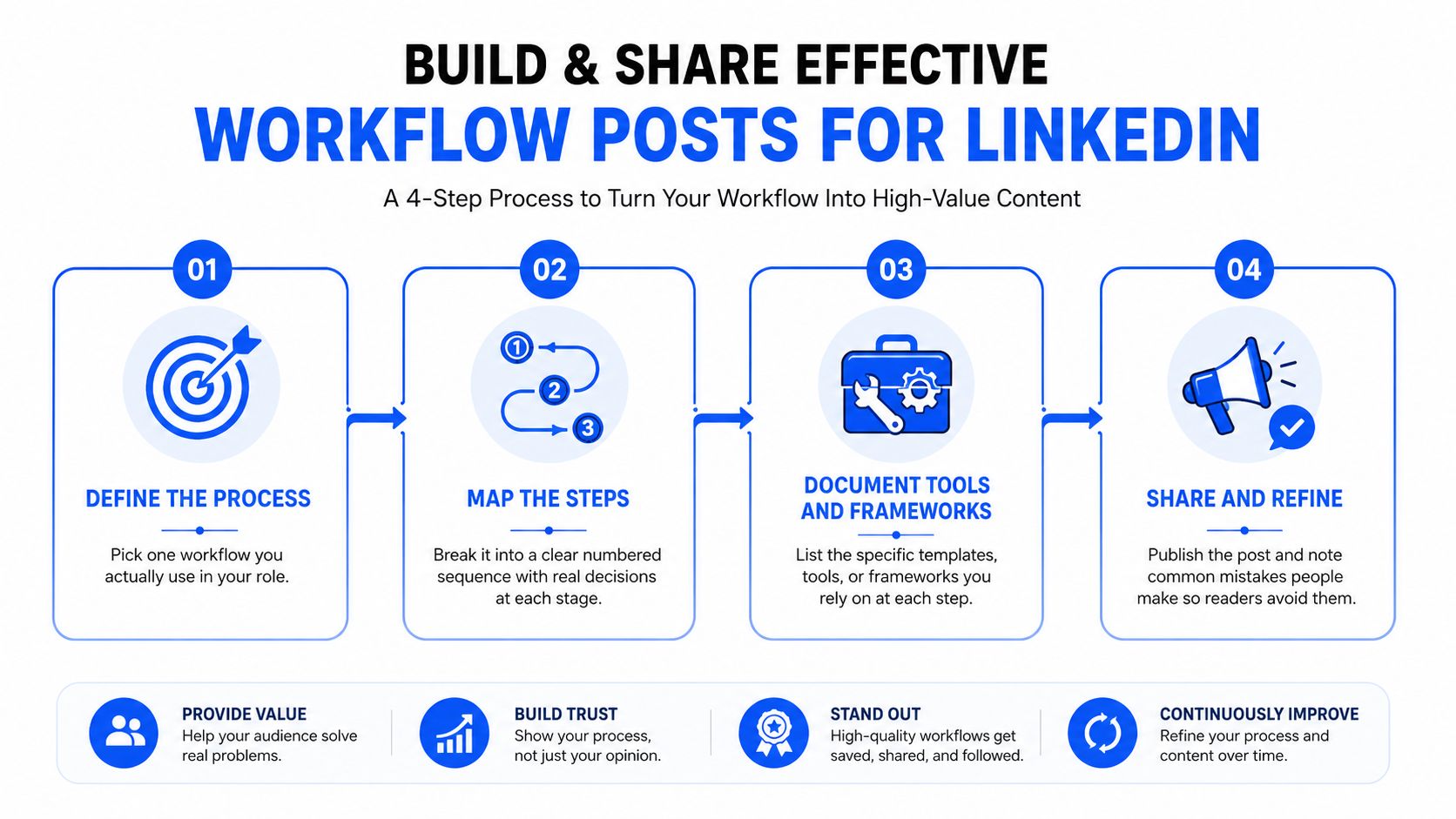
The content creation workflow can help teams formalize the handoffs without turning every draft into a committee meeting. Keep ownership clear. A process with five reviewers and no final editor is just a queue with branding.
A workflow should make the next decision easier, not make the team feel busy.
Use numbered blocks, short lines, and a process flow. The video below can support the visual explanation, but it shouldn't replace the written steps. Readers need something they can copy into their own process.
End by asking which step readers would change. The answer can reveal where the audience has a different constraint. That makes the post a working conversation, not a public performance of operational perfection.
9. The Contrarian Data Post
A contrarian data post earns attention by exposing its method first. Name the sample, source, or internal dataset, then state the finding, its caveat, and the decision it supports. The hook should report what the evidence showed, rather than instructing readers what to believe.
For a company account, use verified internal data, a clearly identified survey, or an inspectable source. A dramatic number without a traceable method is decoration, not evidence. The post format should match the question: a chart for comparison, a document for a referenceable explanation, and a direct link when the click itself matters.
Build the post around a finding
Hook: “Link posts produced less engagement than our native explainers, so we changed how we shared research.”
Use that line only when the company has measured the result. For a source-based version, Socialinsider reports native documents at 7.00%, multi image posts at 6.45%, video at 6.00%, image posts at 5.30%, text posts at 4.50%, polls at 4.20%, and link posts at 3.25% in its 2026 LinkedIn benchmark. The LinkedIn benchmark dataset covers 1.3 million posts across 16,645 business pages.
Present the comparison in one chart and print the source on the visual. Keep the caption focused on the publishing decision:
Caveat
- The benchmark averages business pages.
- Your audience may behave differently.
- A format cannot repair a weak idea.
Then give readers a usable template:
- Finding: state the observed difference.
- Evidence: show the chart and source.
- Limit: name what the data cannot establish.
- Action: explain which format the team will test and why.
- CTA: ask readers to compare the result with their own data.
The practical implication is conditional. Turn an explanation, checklist, or framework into a native document when readers need to save it. Use a link post when the click supports the business objective, and measure that outcome rather than treating engagement as the whole result.
The benchmark can guide the package. It can't write the insight.
A company account can challenge a common publishing habit without presenting one dataset as a universal rule. The evidence earns the contrarian angle. The caveat keeps it credible.

10. The Framework or Mental Model Post
A framework earns attention only when it improves a real decision. Give readers the choice, the criteria, one worked example, and the point where the model stops applying. A memorable acronym is optional. Clear reasoning is not.
Start with a recurring customer or team decision. A product company might ask whether a requested feature belongs on the roadmap. A services company could help buyers choose between hiring internally, outsourcing, or using a temporary contractor.
Build the post around the decision
Decision: Is this feature worth building?
Use four tests:
- Customer pressure: Are real customers asking for it?
- Problem severity: Does the problem block a meaningful outcome?
- Strategic fit: Does the feature support the product's intended use?
- Delivery cost: Can the team build and support it responsibly?
Apply the tests to one situation from the company's work. A feature request with strong customer interest may still describe an edge case, which makes discovery more appropriate than a roadmap commitment. A severe, recurring problem at the product's centre deserves a stronger case, provided the team can support the result after launch.
A compact visual can turn the reasoning into a usable decision tree:
Repeated problem?
No, keep researching.
Yes, continue.
Core customer need?
No, consider a separate solution.
Yes, assess delivery cost.
Supportable after launch?
No, redesign or delay.
Yes, define the next test.
Format the post as a document or carousel. Put the decision on the opening slide, place one criterion on each following slide, then show the worked example before the final checklist. The caption should explain the company's choice, not repeat every box in the visual. A problem solution format guide can help connect the framework to a real user problem instead of turning it into a feature announcement.
Build the thing that solves a costly, repeated problem you can support after launch.
Ask readers to save the framework and test it on one live decision. Invite them to comment with the criterion that changed their view. State the boundary plainly: these tests may not fit regulated work, urgent incidents, or products with unusual constraints. The framework becomes more credible when the company identifies where it should not be used.
10 LinkedIn Post Ideas Comparison
| Post Type | Implementation complexity | Resource requirements | Expected outcomes | Ideal use cases | Key advantages |
|---|---|---|---|---|---|
| The Brutally Honest Metrics Post | Medium, needs accurate figures and clear context | Internal metrics, analytics verification, legal/privacy check | High credibility and shares; engagement from data-focused readers | Sharing revenue, churn, CAC, campaign performance | Builds trust quickly; concrete proof beats platitudes |
| The Decision Reversal Post | Low–Medium, narrative with before/after evidence | Case timeline, comparative metrics, time to validate new approach | Strong comments and lessons learned; demonstrates adaptability | Explaining product/pricing/hiring or channel pivots | Shows judgment and data-driven change; relatable |
| The Niche Warning Post | Low, clear contrarian framing required | Domain expertise, concrete alternatives, credibility signals | High attention and follow-up conversations; possible pushback | Warning niche audiences about common costly mistakes | Positions as experienced advisor; drives engagement |
| The Uncomfortable Truth Post | Medium, careful framing and supporting evidence | Case studies or evidence, measured tone, readiness for debate | Significant engagement via disagreement; thought leadership | Challenging industry assumptions backed by evidence | Memorable positioning as independent thinker |
| The Pattern Recognition Post | Medium–High, requires multiple corroborating examples | Several anonymized examples, synthesis, permission where needed | Perceived authority; validation for common problems; shares | Highlighting recurring failures or trends across clients | Feels evidence-based; offers structural fixes |
| The Skill Stack Post | Low, clear pairing and example needed | Personal or team examples showing combined skills | Practical engagement, saves, prompts replication | Showing unique advantage from combining capabilities | Actionable and replicable; explains non-obvious advantages |
| The Assumption Audit Post | High, needs tests and documented results | Experiments, customer research, quantitative or qualitative data | Demonstrates rigor; trusted insights; encourages testing | Auditing product, messaging, pricing, or target assumptions | Shows disciplined thinking and correctable changes |
| The Workflow or Process Post | Medium, map and document actual steps | Process documentation, tools/templates, optional video | High utility; bookmarks and immediate adoption | Sharing operational workflows for content, sales, hiring | Highly actionable; easy for audiences to implement |
| The Contrarian Data Post | High, requires robust data and methodology | Clean dataset, transparent methodology, statistical care | Strong attention and debate; potential virality if credible | Contradicting common beliefs with verified internal or survey data | Surprising insights; establishes data literacy |
| The Framework or Mental Model Post | Medium, distillable, repeatable criteria needed | Example application, concise criteria, visual aid | Saved and reused content; positions as helpful authority | Decision-making aids for hiring, features, or strategy | Durable, shareable tool that improves decisions |
Turn Ten Formats Into a Working System
Ten formats are only useful if the team can choose between them. Otherwise, the list becomes another document people save, admire, and never open again. The cleanest system groups formats by the evidence available and the decision the post needs to support.
Use metrics and audits when the company has evidence. A metric post shows what happened and what changed. An assumption audit shows which belief survived testing. Both formats punish vague language, which is healthy. If the team can't explain the source, context, or decision attached to a claim, the draft isn't ready.
Use reversals and warnings when the company has a lesson. A reversal shows that the team changed course after new information. A warning shows where a reasonable habit creates a real problem. These formats work best when the company explains the original logic instead of pretending it was born wise.
Use patterns and frameworks when the company has repeatable insight. A pattern post turns repeated observations into a testable idea. A framework turns that idea into a decision tool. The distinction matters. A pattern describes what keeps appearing. A framework tells the reader what to do with it.
Use skills and workflows when the company can show how work gets done. Skill stacks explain how capabilities combine around a customer problem. Workflow posts expose the steps, handoffs, and decision points behind a useful result. They're strong formats for teams that want to show competence without posting another vague claim about excellence.
Use uncomfortable and contrarian posts when the claim is supported. A sharp opinion without evidence is just noise with better posture. A contrarian data post needs a source, method, and caveat. An uncomfortable truth needs a defined problem and a practical response. The company doesn't need to offend people. It needs to say something precise enough to be tested.
Format selection should follow the job:
- Need saves: Use a native document for a framework, checklist, or visual process.
- Need discussion: Use a clear claim with a CTA that invites informed disagreement.
- Need trust: Show the metric, decision, or limitation behind the conclusion.
- Need distribution: Adapt the same idea for founders, executives, sales staff, or subject experts when their experience adds useful context.
- Need conversion: Connect the post to a buyer problem, then make the next action clear.
The distribution point deserves attention. One recent analysis reports that company page reach declined 60 to 66% from 2024 to early 2026, while employee and shared content generated more engagement, with employee advocacy adding roughly 3x lift on top of company posting. Treat that as a strategic signal, not a license to repeat the figure without checking the underlying source and context. The practical lesson is sound: one strong company idea can become several posts in different voices, provided each person adds a real perspective.
LinkedIn's broader B2B role supports that approach. 97% of B2B marketers use LinkedIn for content distribution, and LinkedIn attributes nearly 1 in 5 closed deals to a company page view, as reported by Leadfeeder's LinkedIn statistics overview. That doesn't mean every post should sell. It means awareness and conversion shouldn't live in separate universes.
A working publishing cycle can stay simple:
- Choose one objective: Awareness, trust, discussion, education, or conversion.
- Choose one format: Match the evidence and the reader's decision.
- Write one specific post: Use one hook, one core claim, and one CTA.
- Package it natively: Select text, document, image, video, or an employee led version for a reason.
- Track the response: Review meaningful actions, not just flattering numbers.
- Improve the next draft: Keep the lesson, change the weak part.
Consistency still matters. LinkedIn's own ecosystem is crowded, but the 2026 industry roundup reports that company pages posting at least once per week grow followers 7x faster than pages posting less often, while weekly posting can drive 2x more engagement per post. Those figures support a regular cadence. They don't excuse publishing empty updates every week. Frequency compounds useful content, not corporate wallpaper.
ViralBrain can support pattern research, hook testing, tone personalization, draft review, repurposing, and analytics. Its faceless LinkedIn video tutorial may help teams think through another native format. The company still has to supply the facts, the point, and the permission to share the story. Software can help you study what works. It can't turn a product announcement into a lesson by force.
Save this roundup. Pick one objective and one format this week. Publish the post, review the response, then fix one specific weakness before you publish again.
ViralBrain helps teams generate LinkedIn angles, study high performing patterns, personalize tone, review drafts, repurpose content, and use analytics to improve company posts. Visit ViralBrain to turn one real business insight into a repeatable publishing workflow.
Grow your LinkedIn to the next level.
Use ViralBrain to analyze top creators and create posts that perform.
Try ViralBrain free