
How to Increase LinkedIn Profile Views (2026 Playbook)
Learn how to increase LinkedIn profile views in 2026 with a step by step playbook covering headlines, content, and analytics.
Grow your LinkedIn to the next level.
Use ViralBrain to analyze top creators and create posts that perform.
Try ViralBrain freePosting more often is the most popular advice for increasing LinkedIn profile views. It's also where many teams waste their time. A busy feed can create attention, but attention from the wrong people produces a full dashboard and an empty pipeline.
The better question is which people are viewing your profile, why they found you, and what they do next. Search appearances, profile conversion, public discoverability, and audience fit sit upstream of the view count. Fix those mechanics first, then use content and networking to bring the right people in.
Why Most LinkedIn Profile View Tactics Miss the Point
Profile views measure interest, not growth. LinkedIn defines them as visits that reflect interest in your background, skills, and experience, according to its profile views guidance. Use the metric, but inspect the visitor and the path that brought them there.
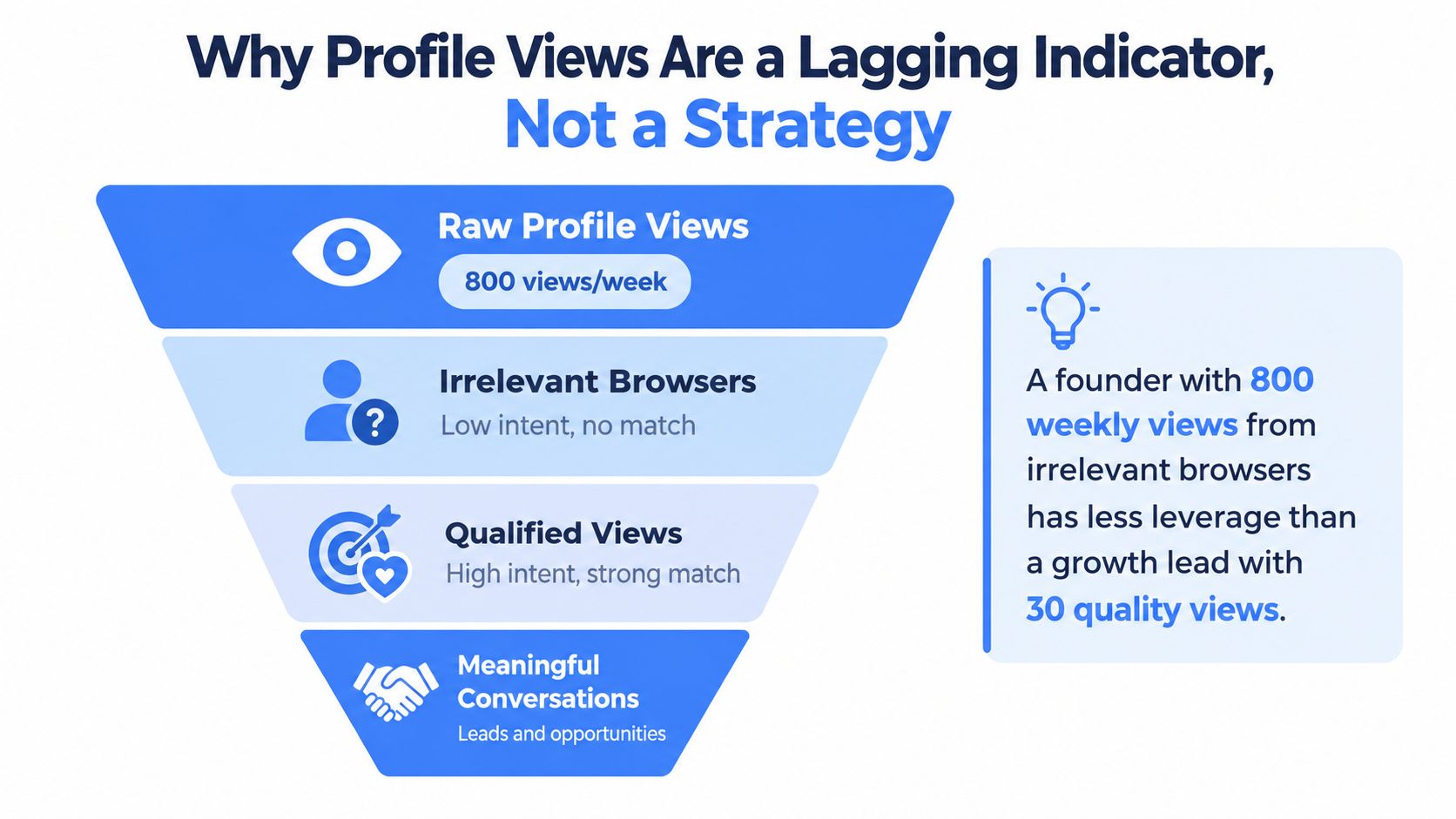
A founder can receive a large weekly view count from students, unrelated creators, and job seekers, yet create less business value than a growth lead attracting fewer visits from target buyers, hiring managers, and relevant partners. Raw views are tempting because they look like progress. They do not show whether your positioning reached the right market or produced a useful next step.
Three signals that matter
Raw profile views confirm that people reached your profile. They cannot confirm that your message worked.
Search appearances reveal whether LinkedIn shows your profile for relevant queries. The platform's Search Appearances area reports how often your profile appeared in search and which terms were linked to those appearances, as described in the Search Appearances help page.
Qualified viewer intent indicates whether the visitor has a reason to care. Review their role, company, market, and timing. A buyer who visits after reading a relevant post is more valuable than a casual browser drawn by a clever phrase.
Practical rule: Treat profile views as a downstream report card. Improve the search visibility, audience fit, and profile conversion mechanics that create useful visits.
Clickbait hooks, engagement pods, and vague headlines attract curiosity without building demand. They fill your activity data with people who will not buy, hire, refer, or reply. The result is a weaker audience signal and less precise future content.
Set the target clearly: a qualified visitor understands your work, a relevant visitor connects with you, and a high-intent visitor starts a conversation. Judge every profile edit and post against those outcomes, not the view count alone.
Profile Foundation That Drives Profile Views
Raw profile views are a weak target. A profile earns useful visits only when its message matches the right searcher and gives that person a reason to continue. Build the page around what you do, who you help, and why your experience matters, then judge views by viewer quality and ICP fit.
LinkedIn's own completeness guidance treats a finished profile as the base layer. Its profile meter rises as you add suggested sections, while the All Star standard centers on fields such as your photo, location, industry, education, current position, skills, and About section. Review the LinkedIn profile completeness guidance before polishing the copy.
Fix the top of the profile first
Use a current professional photo. Historical optimization guidance reports that profiles with a professional photo can receive up to 21 times more profile views than profiles without one, based on the benchmark in Salesloft's LinkedIn profile statistics guide. The practical requirement is simple: look credible and recognizable today, not like a witness from an old conference badge.
Write the headline for search and fast scanning. LinkedIn allows up to 220 characters, so put the main keyword near the front, then state your role and value. Do not spend the space on corporate fog.
Use this pattern:
Role or expertise, target audience, specific value
“B2B Growth Lead, SaaS Demand Generation, Building Qualified Pipeline” gives a buyer more context than “Founder at Startup Name.” Keep the company name in your current position. The headline has one job: earn the click from a relevant viewer.
Open the About section with one plain sentence that positions you. Follow it with proof, your working area, and a low-friction next step. Remove passionate about, thought leader, results driven, and strategic visionary. Those phrases take space without showing what you have done.
Complete the supporting surfaces
Use Featured as evidence. Add a useful article, product explanation, customer lesson, talk, or strong post. Keep the banner aligned with the headline's promise, so the visitor sees one coherent point of view across the profile.
Experience entries should explain the work in plain language and include outcomes when you can state them. Skills should reinforce your role, not become a junk drawer. Recommendations should come from people who can describe the work you want more of. Request endorsements for skills that match your target searches. These elements will not rescue vague positioning, but they connect your stated expertise to proof a visitor can inspect.
| Profile Element Optimization Checklist | Default Mistake | Fix | Expected Impact |
|---|---|---|---|
| Photo | Old, casual, or missing | Use a current, credible headshot | Better first impression and conversion |
| Headline | Only a job title | Add role, keywords, audience, and value | Clearer search relevance |
| About | Dense biography | Open with positioning and add proof | Faster visitor understanding |
| Featured | Empty or random links | Show work that supports your offer | More confidence after the click |
| Banner | Generic stock image | Reinforce your topic or audience | Stronger profile context |
| Experience | Duties copied from a résumé | Explain work and outcomes | More useful proof |
| Skills | Long, unrelated list | Keep skills aligned with your role | Cleaner relevance signal |
Historical guidance also frames the top profile stack as a practical sequence. It assigns roughly 15 minutes to the photo, 30 minutes to the headline, and 90 minutes to the About section, as outlined in Gradguide's profile optimization guide. Use those estimates to schedule the work, not to promise a result. A complete profile improves the chance of a qualified click, but search appearances, audience fit, and the visitor's intent decide whether that click becomes a conversation.
Search Appearances and Discoverability Mechanics
Profile views begin before someone visits your page. LinkedIn has to find your profile, decide that it matches a search or social context, then give the person a reason to click. That makes discoverability the first operating problem.
Open your profile's public visibility settings. LinkedIn lets you control which sections appear outside the platform and lets you hide the full public profile from people who aren't logged in, according to its public profile visibility settings. If you want more views, don't hide the asset you're trying to distribute.
Search relevance needs a tight signal
Use the same audience language in your headline, current role, About section, experience entries, and skills. A growth leader targeting B2B SaaS buyers should use the terms those buyers and hiring teams recognize. Avoid stuffing every possible skill into the profile. A long list of unrelated terms makes the page harder to understand.
LinkedIn's Search Appearances panel shows how often your profile appears in search and which terms are connected to those appearances. Check it before changing your copy, then check it again after the rewrite. A rising appearance count means LinkedIn is showing you more often. It doesn't guarantee qualified views, but it gives you an upstream signal that a profile view strategy can improve.
For a deeper practical guide to keyword placement, use LinkedIn profile keywords. If your work involves hiring, viewer quality matters even more. Teams that assess public professional information can benefit from a process for structured screening for hiring teams, especially when they need consistent review rather than casual browsing.
Check who can find you
LinkedIn separates public profile visibility from how you appear when viewing other profiles. In profile viewing options, you can show your name and headline, show limited private characteristics, or use private mode, as explained in LinkedIn's profile viewing options. Use a visible identity when you want visits to lead to recognition and connections. Use private mode for research, knowing that anonymity removes a useful context signal.
Email and phone discoverability can be controlled separately. LinkedIn offers settings that may include connections, broader network groups, anyone, everyone, or nobody, depending on the account setting, as described in discoverability by email and phone. Set a baseline for search appearances, profile views, viewer roles, viewer companies, and viewer geography before you publish new content. Otherwise, you'll confuse activity with improvement.
Content Engine for Steady Inbound Profile Views
Content creates the entry points. Your profile converts them. Posting more without a clear point only creates more evidence that you have a calendar.
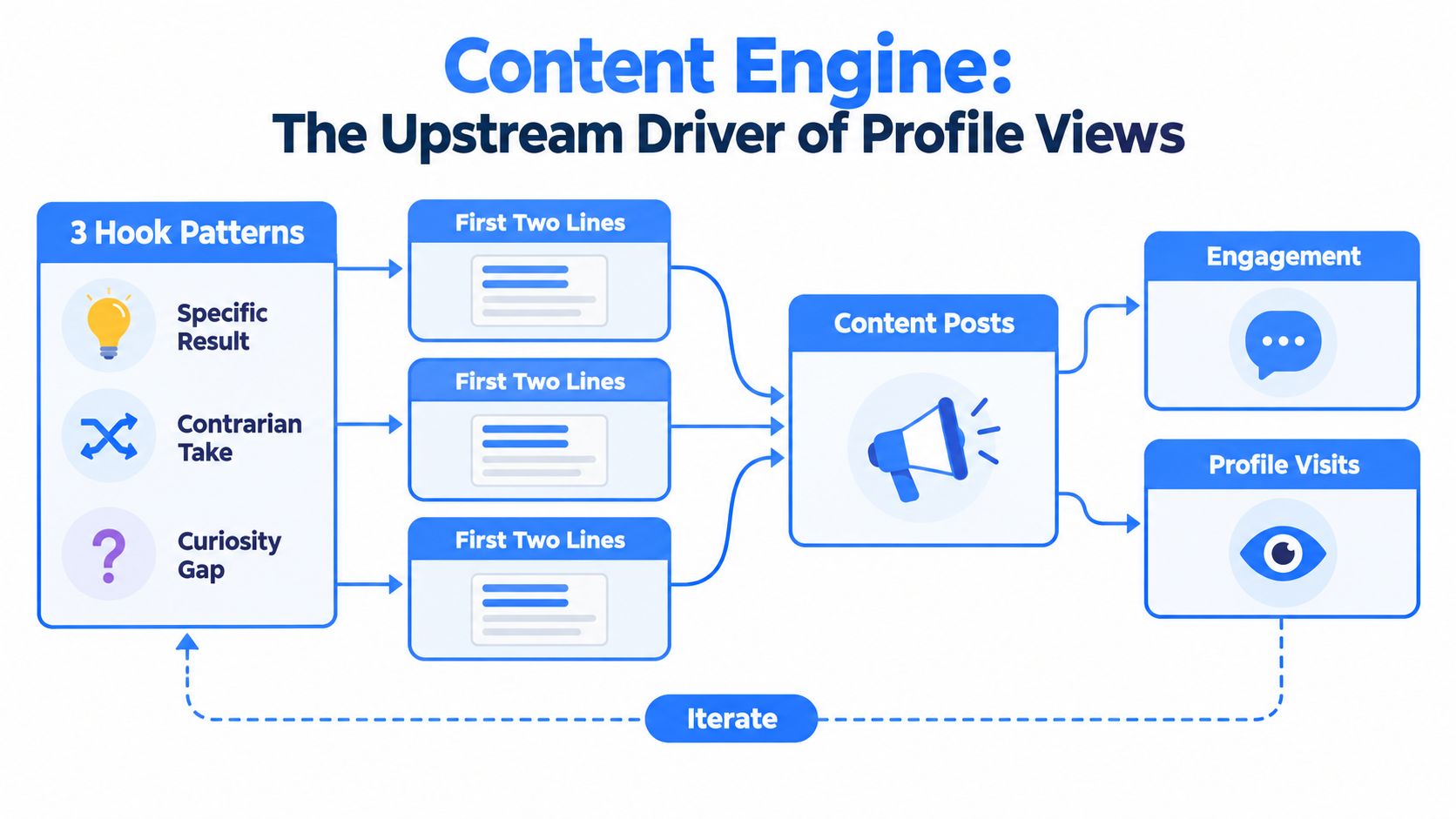
Start with the first two lines. Use one of three hook patterns:
- Specific result: State what changed, for whom, and under what condition.
- Contrarian take: Challenge a tactic your audience uses every day, then explain the tradeoff.
- Workflow tension: Name the contradiction, such as a team wanting qualified leads while optimizing for cheap engagement.
A founder can write about a customer decision, a build log, a mistake, or a lesson from a failed launch. A growth team can publish a teardown, a swipe file, or a metric movement post with the context behind the change. Keep the claim honest. Readers can smell invented certainty through a screen.
Use a repeatable publishing rhythm
Use one substantial pillar post each week to build a durable point of view. Add several short posts to stay present in the feed. Use a document carousel when the idea benefits from structure, examples, or saves. Text is usually the fastest format to produce. Native video can create a reach burst when the speaker has something useful to say. Polls should stay occasional because broad participation can bring impressions without bringing the right visitors.
End each post with one low friction next step. Invite the right reader to view the profile, read a specific resource, or send a message about the problem. Don't beg for comments from everyone. Comments from people outside your target audience can raise the view count while doing nothing for pipeline quality.
Founders can study the operating details in this Sift AI enterprise playbook. For a broader personal brand system, see LinkedIn content strategy for personal branding. The point isn't to imitate someone else's voice. Extract the structure, then use your own experience.
Review which posts produce profile visits from the right roles. A post that attracts fewer reactions but brings relevant buyers is doing more work than a popular post that fills your viewer panel with spectators.
Networking and Engagement Tactics That Convert Visitors
A profile visit gives you context, not permission to pitch. If someone visits after reading your post, send a short note within 24 hours that refers to their work and asks one specific question. For example, “Saw you're working on demand generation at a SaaS company. Which channel is getting the most scrutiny from your team right now?” That opens a conversation without pretending you've discovered their life's mission.
Set a focused daily engagement window. Spend 20 minutes on accounts your ideal customers follow. Leave a useful observation, a counterpoint, or a practical example. An emoji is not a market insight. Comment on relevant conversations, not only on the posts published by people you already know.
Build a smaller, cleaner network
Use LinkedIn search to identify repeat viewers. Send three to five connection requests per week to people who match your audience and have shown repeated interest. Personalize the note around their role or a visible business trigger. Don't mention that you're tracking them in a way that sounds like a security camera with a sales quota.
A monthly audio room or live session can give your profile a clear reason to exist beyond individual posts. Pick a narrow topic, publish a registration post, and feature that post on your profile. The page should show what you know, not that you attended a webinar.
Track viewer title, company, and trigger in a simple CRM sheet. A trigger might be a post visit, a shared connection, an event registration, or a repeated search appearance. Patterns beat memory. A practical GTM LinkedIn outreach framework can help teams structure that process without turning every interaction into a sequence of robotic messages.
Audience filter: Don't send a connection request to every viewer. Protect the quality of your network and your own attention.
Blasting requests pollutes your audience signal and can lower the quality of future engagement. Your job is not to collect strangers. Your job is to make the right people feel that a conversation with you would be useful.
Tracking, A/B Testing, and Weekly Experiments
Raw profile views are a weak success metric on their own. Track whether the right people can find you, choose to visit, and take a useful next step. Use a weekly sheet with four fields: profile views, search appearances, post impressions, and qualified connection requests from viewers. LinkedIn separates profile views from search appearances, and fuller analytics become available after a member reaches three unique viewers in seven days. That threshold makes weekly review more useful than a vague long-term average.
Run one change at a time. Test headline wording, banner message, hook style, or publishing time. Keep each test running through a sensible cycle, rather than rewriting the profile after one noisy post. Compare the result with your recent baseline and record the audience, change, and outcome.
Use targets without fooling yourself
Reference guidance places 30 to 50 profile views per week in the healthy visibility range for active professionals and 100 or more per week in the range associated with strong thought leadership presence, based on a last 90 day window. Use those figures as context, not a universal scorecard. Viewer title, company, and ICP fit matter more than a larger total.
| LinkedIn Profile Metrics Benchmarks and Test Targets | Baseline Expectation | 30 Day Target |
|---|---|---|
| Profile views | Establish your current weekly level | Hold a stable qualified baseline |
| Search appearances | Record current appearances and terms | Rise after relevant copy changes |
| Post impressions | Track by format and audience fit | Identify repeatable hooks |
| Qualified connection requests | Count requests from relevant viewers | Improve quality, not raw volume |
Use A/B testing basics to keep the method clean. Do not compare a viral post with an ordinary week and call it a strategy. Look for repeated movement from the same audience segment.
Review the pattern each week. If search appearances rise but qualified visits do not, your keywords may be broad or your headline may promise the wrong outcome. If visits rise while qualified connection requests stay flat, fix profile conversion. If both stay flat, stop polishing the banner and change the upstream topic, positioning, or audience. The goal is fewer low-fit views and more visits that can become conversations.
A 30 Day Action Plan and Common Traps
Week one is for the profile foundation. Update the photo, headline, About section, banner, Featured area, experience entries, and skills. Produce five headline variants before choosing the clearest one.
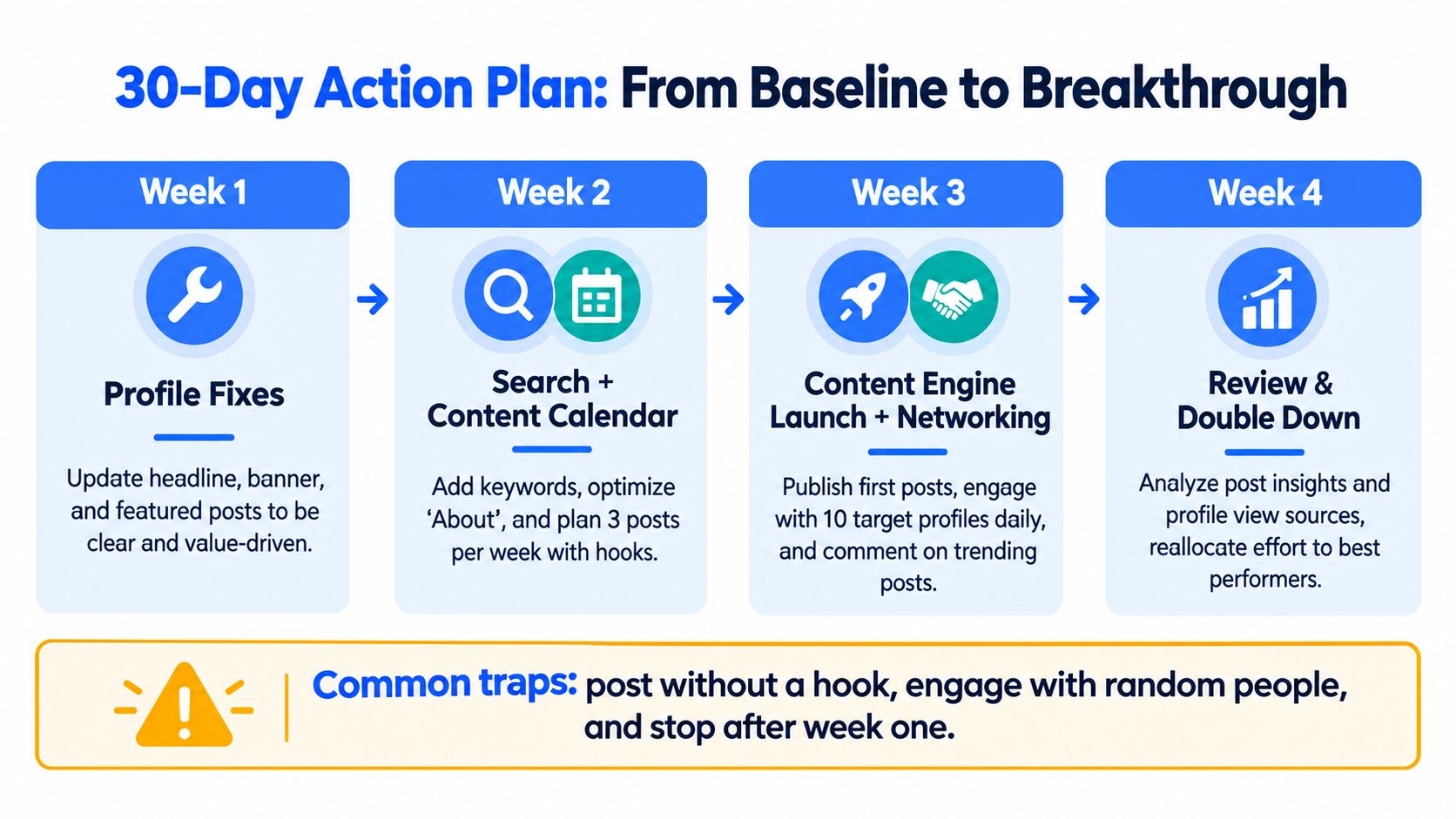
Week two is for search and planning. Check public visibility, email and phone discoverability, viewing mode, search appearances, and the terms linked to your profile. Build a content calendar with ten scheduled post ideas, each tied to a problem your ideal audience recognizes.
Week three is for execution. Publish the first posts, run the hook patterns, spend the daily engagement window on relevant accounts, and make selective connection requests. Keep notes on which posts create visits from the right people.
Week four is for review. Compare search appearances, profile views, post impressions, and qualified connection requests with your baseline. Test one variable, keep the useful result, and remove the theater.
The recurring traps are simple. Chasing views from non ICP audiences wastes attention. Posting without a hook produces activity without curiosity. Private profile settings block discovery. Reading one noisy week as a trend leads to bad decisions.
Watch three numbers: search appearances, qualified profile views, and qualified connection requests. If growth stalls, kill the habit of publishing for broad applause. Write for the person who can buy, hire, refer, or start a serious conversation.
ViralBrain helps founders and growth teams analyze high performing LinkedIn patterns, improve profile elements such as the photo and headline, draft posts in a chosen voice, and review performance signals. Visit ViralBrain to turn this playbook into a repeatable content and profile workflow.
Grow your LinkedIn to the next level.
Use ViralBrain to analyze top creators and create posts that perform.
Try ViralBrain free